
Construction Financial Management Software: Costing Jobs Without the Chaos
Construction financial management software ties cost tracking, job costing, WIP, retentions and cash flow to each job. Here is what it does, the leak it fixes, and why the right-sized owned system beats a monster ERP when you are outgrowing spreadsheets but not looking to bend to a full platform.
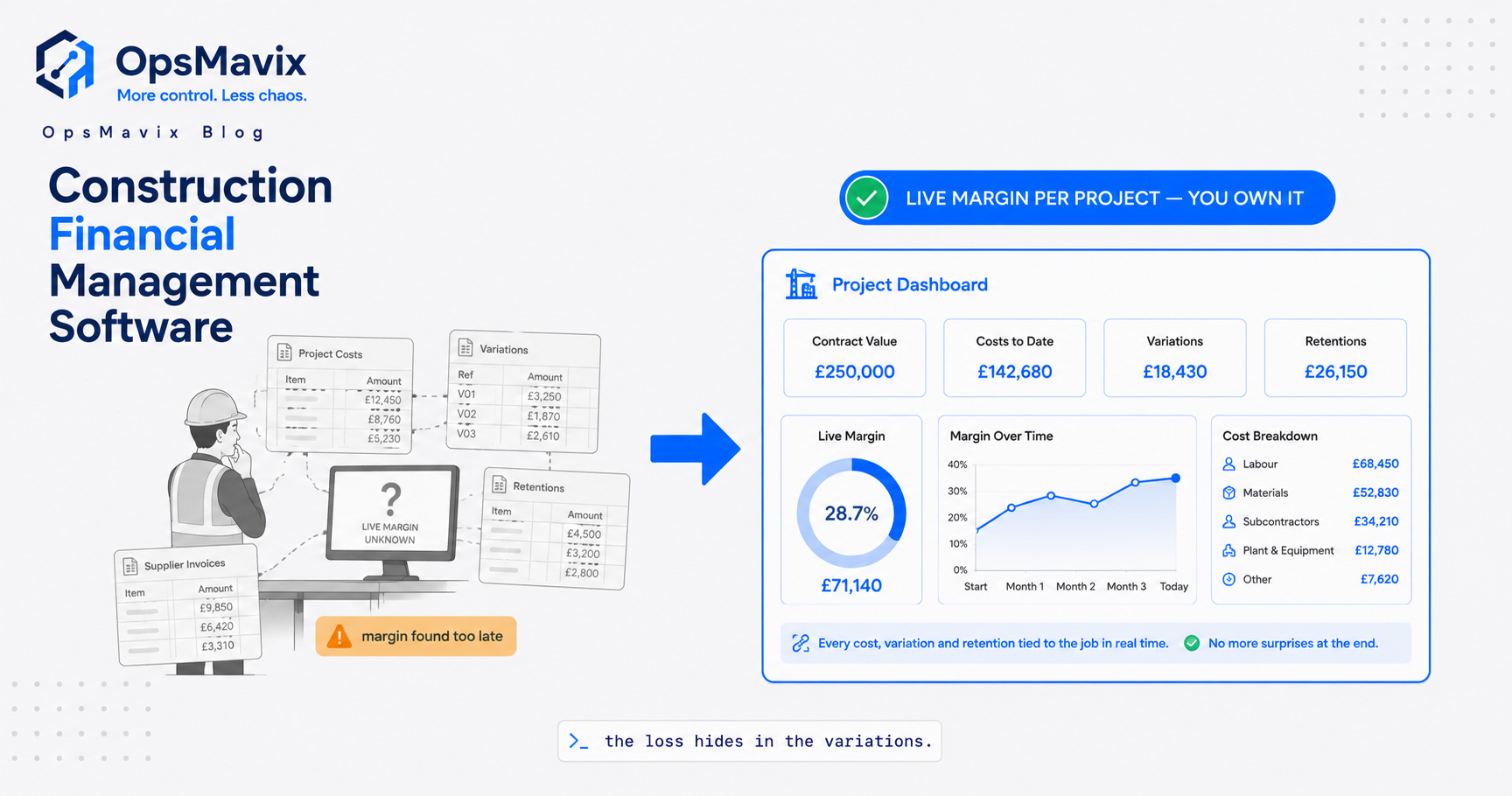
Construction financial management software is the system that ties money to jobs: what each contract has committed, what it has actually spent, what it will still cost to finish, and what all of that is doing to your cash. It covers cost tracking, job costing, work in progress (WIP), retentions and cash flow, shaped around the way contracting actually works, where the unit of profit is the job and revenue arrives in messy instalments over months.
The pain it exists to fix is specific and expensive. A job looks fine on the running sheet, valuations go out, invoices trickle in, and then final accounts land and the margin you thought you had has quietly evaporated. Committed cost was never visible in real time, plant kept billing after it should have gone back, and retentions you booked as profit are still sitting unpaid two years later. The software is not there to teach you that costs matter. It is there to stop the number surprising you when it is too late to do anything about it.
What construction financial management software does
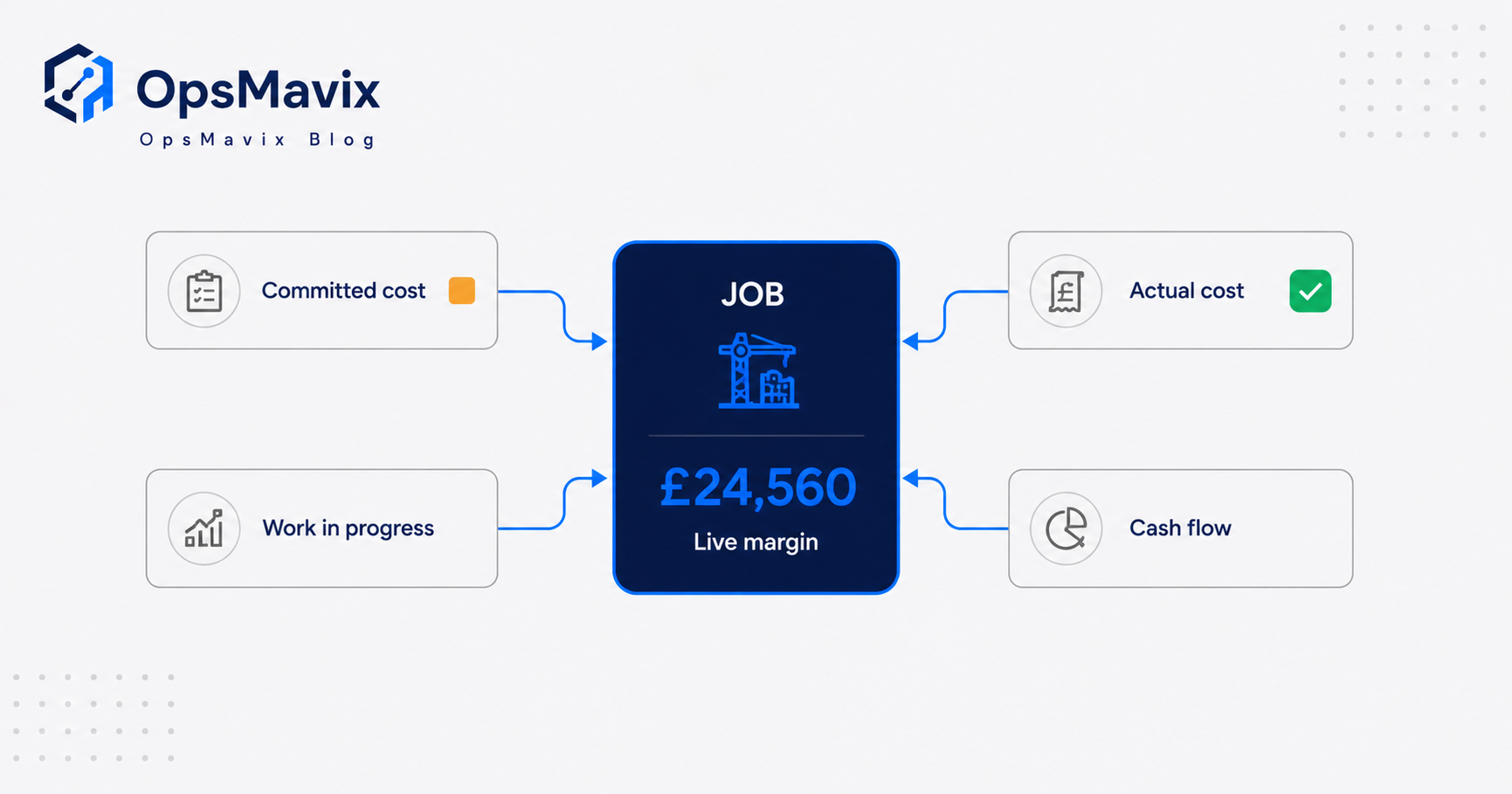
Strip away the marketing and the job of construction financial management software is to answer four questions per contract, at any moment, without anyone re-keying a spreadsheet:
What have we committed? Every purchase order, subcontract order and plant hire raised against a job and a cost code, counted the day it is committed, not the day the invoice arrives. This is the number generic accounting packages miss, because they only see cost once a supplier invoice is posted.
What have we actually spent? Posted supplier invoices, labour, materials and plant, matched back to the commitment and the cost code so you can see where the estimate is drifting.
What is it worth? The valuation or application for payment against the client, the certified amount, and the retention held back on each certificate.
What is it doing to cash? The gap between money committed and money you have actually been paid, projected across the weeks ahead so a good month on paper does not hide an empty account.
Get those four right and the rest (VAT position, CIS on subcontractor payments, WIP for the year-end accounts) mostly falls out of the same data. The Construction Industry Scheme still has to be handled, since contractors must verify subcontractors and deduct money from most payments to pass to HMRC (HMRC), but that is a byproduct of clean cost data, not the hard part. If job costing itself is where you feel the pain, start with our guide to job costing software.
The real leak: profitable until final accounts
Here is the pattern that costs contractors the most money, and it has nothing to do with pricing work badly.
A job is priced with a fair margin. It runs for four or five months. Throughout, the office tracks cost by looking at invoices received, because that is what the accounts system shows. Committed cost, the orders already placed but not yet invoiced, lives in people’s heads or in a subcontract file nobody reconciles weekly. Plant is booked by whoever needs it and comes off hire when someone remembers.
So the running position looks healthy right up until the tail of the job, when the outstanding orders finally convert to invoices all at once. Suddenly the cost line jumps, the margin collapses, and by the time final accounts are reconciled the work is done and the money is spent. The job was never as profitable as the sheet said. You were looking at a lagging indicator and calling it a live one.
This is why “profitable until final accounts” is the single most common leak in a contracting business. The fix is not a bigger system. It is committed cost visible against each job the day it is committed, with forecast cost to complete updated as orders are placed, so the final number is something you steered towards instead of something that ambushed you.
Committed cost, WIP and retentions, explained
Three concepts do most of the damage when they are handled loosely. Worth being precise.
Committed cost. The value of orders you have placed but not yet been invoiced for. If you have issued a subcontract order for £60k of groundworks, you have committed £60k even though not a penny has been invoiced. A system that ignores commitments will always understate your true cost position, sometimes for weeks.
Work in progress (WIP). The cost and revenue tied up in unfinished contracts at any accounting date. Because construction jobs straddle month and year ends, you have to recognise the cost incurred and the revenue earned on work that is only part done. Get WIP wrong and your management accounts are fiction: a job can look like it is making money simply because you have billed ahead of cost, or look like a loss because cost has run ahead of a valuation you have not yet raised.
Retentions. A percentage of each certified payment (commonly around 3 to 5 per cent) that the client withholds as security against defects. Half is typically released at practical completion and the balance at the end of the defects period, sometimes two or three years later. Retentions are booked as revenue you have earned but not been paid, and they are routinely paid late, in part, or not at all when someone up the chain becomes insolvent. The government’s 2026 response on payment practices went as far as proposing to ban the deduction and withholding of retentions under construction contracts, noting that withheld money is “often subject to unjustified late, partial, and non-payment” and reduces the working capital available to smaller firms (GOV.UK). Whatever happens to the rules, a system that does not track retention held and retention due per job is losing sight of real money.
Why construction firms die solvent on paper
Construction is the highest-volume sector for company insolvencies in England and Wales. In the 12 months to August 2025 there were 3,934 construction insolvencies, 17 per cent of all cases where an industry was recorded (Insolvency Service). Plenty of those firms had full order books. They ran out of cash, not work.
The mechanism is timing. You commit to subcontractors and suppliers on their terms, you pay operatives weekly, plant bills monthly, and your own money arrives after a valuation is submitted, certified, and settled, minus retention. That lag is structural. The law gives you tools to manage it: under the Housing Grants, Construction and Regeneration Act 1996 (the “Construction Act”), a party to a construction contract is entitled to payment by instalments or stage payments for any work lasting 45 days or more, with defined payment notices and final dates (legislation.gov.uk). But you can only use those rights if you know your true committed cost and cash position per valuation cycle. Financial management software that projects cash from committed cost, not just from invoices posted, is what turns a statutory right into something you actually act on before the account runs dry.
Generic tool vs full ERP vs right-sized owned system
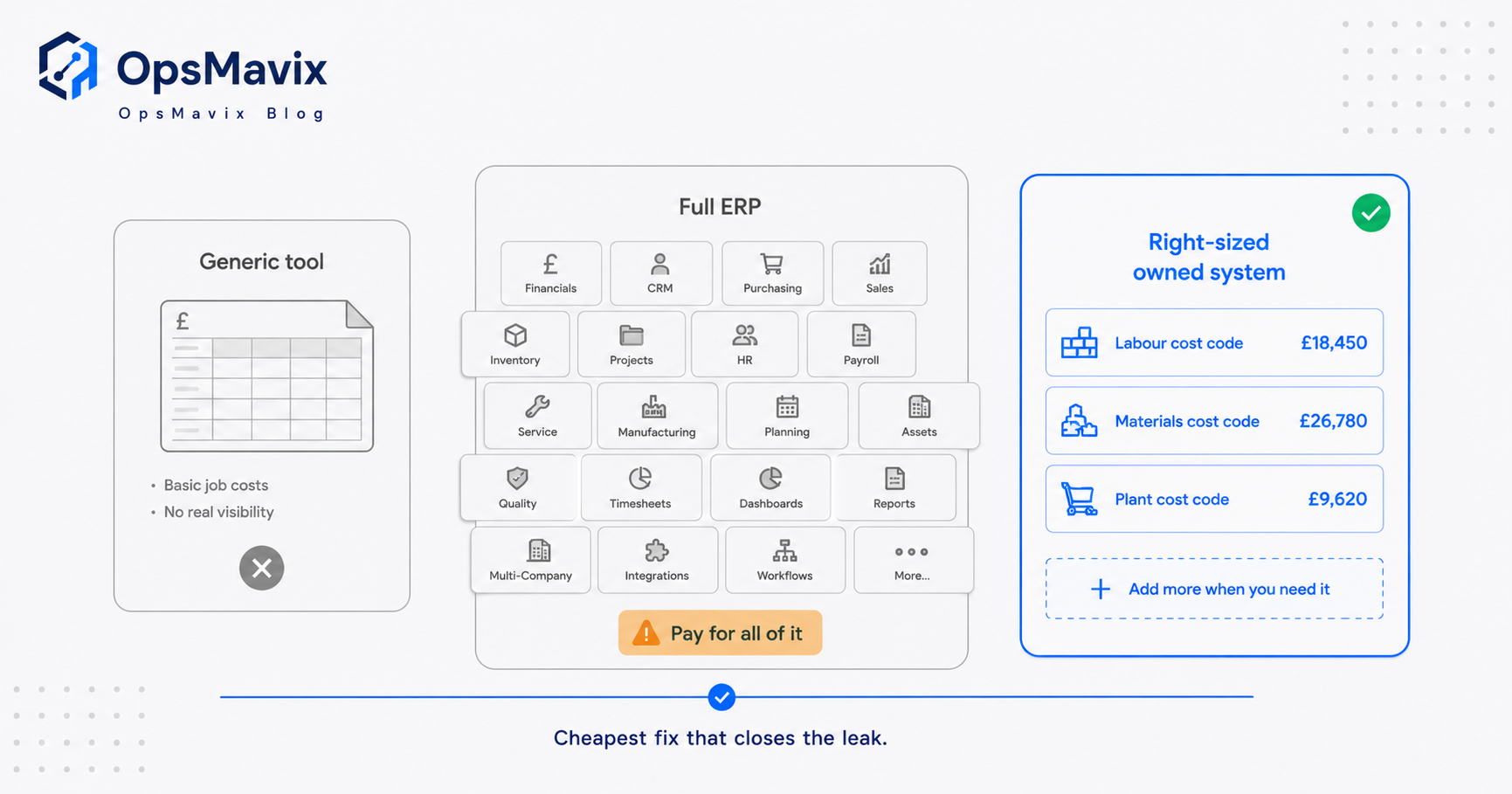
There are three honest ways to solve this, and the right answer is the cheapest one that closes your real leak.
| Dimension | Generic / cheap tool (Xero, QuickBooks + spreadsheets) | Full construction ERP | Right-sized owned system |
|---|---|---|---|
| Committed cost in real time | No, sees invoices only | Yes, if fully embedded | Yes, built around your cost codes |
| WIP and retentions per job | Manual, lagging | Strong | Strong, scoped to your process |
| Cash flow from committed cost | Manual guesswork | Strong | Strong, projected per valuation cycle |
| Modules you will never use | N/A | Paid for anyway | Not built, not paid for |
| Time to value | Immediate but fragile | Months of implementation | Weeks |
| Cost shape | Low cash, high hidden labour and risk | High licence plus implementation, per seat forever | One build cost, you own the asset |
| Who controls change | You, but it breaks | The vendor or a consultant | You own the code and the data |
| Fails when | Job volume or staff turnover rises | The team never fully adopts it | Requirements far outgrow the scoped design |
A generic tool is genuinely fine until you outgrow it, and many small firms do not outgrow it. A full ERP does everything, which is exactly the problem: you pay for forty modules to fix three, wait months to embed it, pay per seat forever, and bend your process to fit the software. The right-sized owned system is deliberately narrow. It does the two or three things that move your margin and cash, you own it outright, and it expands later if you genuinely need CIS payroll, plant management or document control. The market it fits is large: there were 370,770 registered construction firms in Great Britain in 2024 (ONS), most of them running a handful of concurrent jobs where a full platform is more system than the business can carry. If you are weighing a full platform, our pieces on construction ERP software and construction ERP cost lay out the real numbers.
A worked example: the profit that was never real
The following is illustrative, not a claim about a specific client.
A fit-out contractor near Birmingham runs seven concurrent jobs. On a £280,000 office refurbishment, the estimate carried a 12 per cent margin, roughly £34,000. Cost was tracked the usual way, off supplier invoices posted to the job in the accounts package.
At month three the running sheet showed £150,000 of cost against £190,000 invoiced to the client, so the job read as comfortably on target. What it did not show: £46,000 of subcontract orders already placed and not yet invoiced, plant that had stayed on hire three weeks past the off-hire date at roughly £1,900, and two variations done on trust that were never priced into a valuation. Committed cost was really £205,000, not £150,000.
By final accounts the numbers reconciled to what they always were. Actual cost landed at £262,000. Add the unrecovered variations and the retention of about £8,400 still held for the defects period, and the £34,000 margin had shrunk to roughly £6,000 of cash the firm could actually count, most of it a year away. Nothing was stolen and nobody priced the job badly. The business simply could not see committed cost, so it steered by a number that was always going to move.
A right-sized system would have flagged the £46,000 of commitments in week one, the overdue plant hire the day it passed off-hire, and the unpriced variations at the next valuation. Same job, same team, a margin defended while it was still defensible.
Integrations and why ownership matters
Financial management software does not replace your accounts package, and it should not try to. You keep Xero, QuickBooks or Sage for the statutory ledgers, VAT and payroll, and the job-costing layer sits on top, pulling supplier invoices and pushing cost codes back so you are not entering anything twice. It should also connect to how orders are actually raised, whether that is a purchase-order form on a phone or a subcontract log, so committed cost is captured at source rather than reconstructed later.
The reason ownership matters is that construction processes change constantly. New forms of contract, a different retention arrangement, a client who wants applications in their own format, a move into a second entity. With a rented platform, every one of those changes is a support ticket, a consultant, or a feature you wait a year for and never get. With an owned system, the code and the data are yours, so it changes when your process changes because it was built around your process in the first place. No per-seat rent, no vendor gatekeeping, and nothing you pay for and never switch on. You can see the shape of that kind of build on our project operations dashboard page.
FAQ
What is the difference between construction financial management software and normal accounting software?
Accounting software (Xero, QuickBooks, Sage) is organised around your business as a whole: ledgers, VAT, payroll. Construction financial management software is organised around the job: committed cost, actual cost, WIP, retentions and cash flow against each contract. You can bolt job costing onto standard accounts software, but it usually ends up in spreadsheets, which is exactly where the committed-cost blind spot lives.
Does it handle WIP and retentions, or just costs?
A proper system handles all three. Cost tracking is the base, WIP recognises cost and revenue on unfinished jobs so your management accounts are honest at month and year end, and retentions track what is held and when it is due back. Handling costs but ignoring WIP and retentions leaves two of the most common profit and cash leaks unmanaged.
Do I need a full ERP to get this, or is there a lighter option?
You do not need a full ERP. A generic tool plus disciplined spreadsheets works until job volume grows, and a right-sized owned system solves committed cost, WIP, retentions and cash flow without the licence rent, the long implementation or the modules you will never use. A full ERP is the right buy only when you run many concurrent contracts or multiple entities and will genuinely use most of the modules.
How does it help cash flow specifically?
By projecting cash from committed cost rather than from invoices already posted. That shows the gap between money you are on the hook for and money you have been paid, weeks ahead, so a good month on paper does not mask an account that is about to run dry. It also keeps retention due dates visible so you actually chase the money you are owed.
Will it replace my accounts package?
No, and it should not. It sits alongside Xero, QuickBooks or Sage and feeds the job-costing layer from the same data, so you keep your statutory accounting where it belongs and gain the live job view on top without double entry.
How OpsMavix can help
OpsMavix builds right-sized, owned operations systems for construction firms that are outgrowing spreadsheets but not looking to bend to a full ERP. We start with where money and margin are actually leaking across your jobs, then build the smallest system that ends it: committed cost visible the day it is committed, WIP and retentions tracked per contract, and cash flow projected from what you have committed rather than what has already been invoiced. It sits on top of your existing accounts package, you own it outright, and it expands to a full ERP later only if and when you genuinely need it. We sell the outcome, not code, our guarantee is on delivery, and we will tell you honestly if a generic tool or a full platform is the better fit. Book a Free Operations Leak Audit
Sources
- HMRC / GOV.UK, Construction Industry Scheme overview (contractors verify subcontractors and deduct money from most payments): https://www.gov.uk/what-is-the-construction-industry-scheme
- GOV.UK, Late payment consultation government response (proposal to ban withholding of retention payments; impact on cash flow and working capital): https://www.gov.uk/government/consultations/late-payments-tackling-poor-payment-practices/outcome/late-payment-consultation-time-to-pay-up-government-response-web-version
- Insolvency Service / GOV.UK, Company Insolvency Statistics commentary (construction the highest-volume sector, 3,934 in the year to August 2025, 17% of cases): https://www.gov.uk/government/statistics/company-insolvencies-september-2025/commentary-company-insolvency-statistics-september-2025
- legislation.gov.uk, Housing Grants, Construction and Regeneration Act 1996, Part II (entitlement to stage payments and payment notices): https://www.legislation.gov.uk/ukpga/1996/53/part/II/crossheading/payment
- Office for National Statistics, Construction statistics, Great Britain: 2024 (370,770 registered construction firms in GB): https://www.ons.gov.uk/businessindustryandtrade/constructionindustry/articles/constructionstatistics/2024
Keep reading
Getting value from OpsMavix? Add us as a preferred source on Google — you'll see more of our operations content in your AI Overviews, AI Mode and Search.