
Accounts Receivable Software for Small Business: Get Paid Faster
Accounts receivable software for small business chases overdue invoices, runs credit control and shows your real cash position. This guide compares a cheap AR add-on, a full ERP and a right-sized owned receivables view for a business outgrowing spreadsheets but not looking to bend to a full ERP.
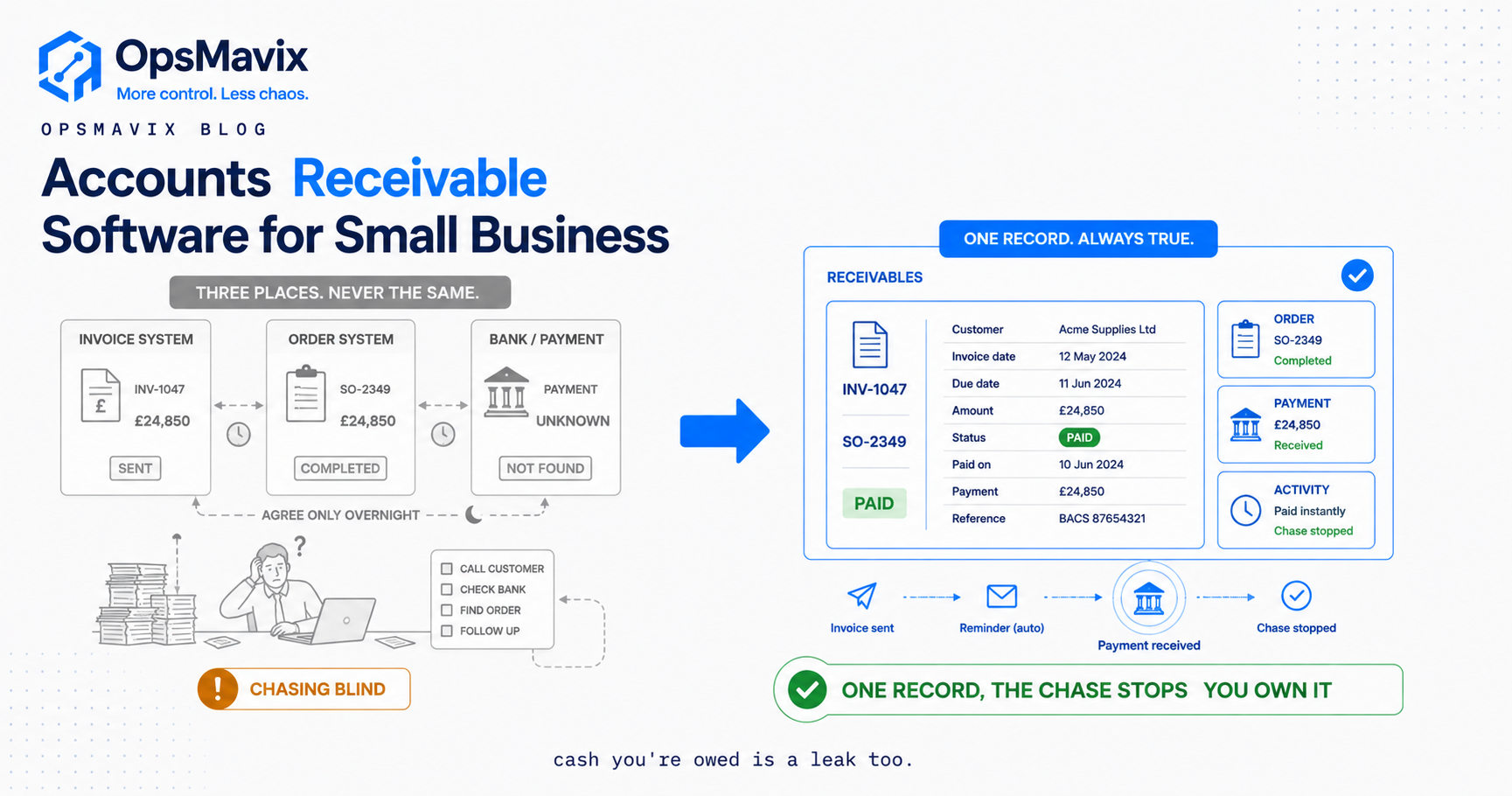
Accounts receivable software for small business is the tool that keeps track of who owes you money, chases them when they’re late, and tells you at a glance what you’re actually going to get paid this month. In practice it does three jobs: it records every invoice and its due date, it runs a chasing sequence (reminders, escalation, credit control) without you having to remember, and it shows you the money sitting out there as overdue debt before that gap becomes a payroll problem.
Most small firms don’t lose money because they under-price or over-spend. They lose it because work gets done, an invoice goes out, and then nobody chases it. It sits at 30 days, then 45, then 60, while the owner is busy running the actual business. The cash exists. It’s just parked in someone else’s bank account, and the longer it sits, the harder it is to get. That is the real leak, and it’s the leak this category of software exists to close.
What Accounts Receivable Software Actually Does
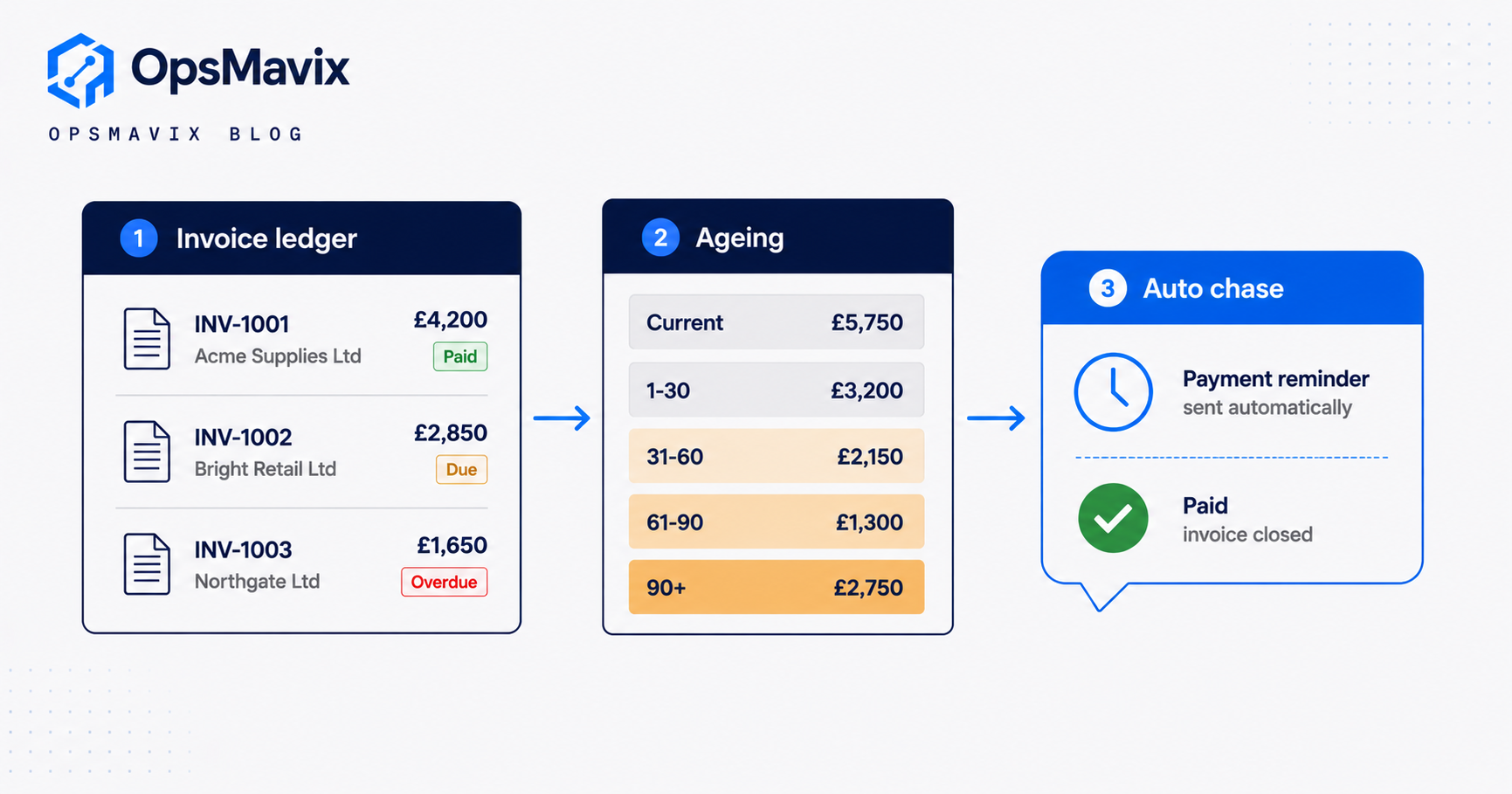
Strip away the marketing and accounts receivable (AR) software does four specific things, and it has to do all four to earn its place:
- Holds a live ledger of what’s owed. Every invoice, its amount, its issue date, its due date, and its status (sent, viewed, part-paid, paid, disputed, overdue). Not a spreadsheet someone updates when they remember, but a record that changes the moment a payment lands. Businesses also need a simple way to create those invoices in the first place. A free invoice generator can help small businesses create professional invoices with the required details and download them as PDFs before tracking their payment status.
- Ages the debt automatically. It sorts outstanding invoices into buckets: current, 1 to 30 days overdue, 31 to 60, 61 to 90, 90-plus. This aged debtors view is the single most useful screen in credit control, because it tells you where to point your attention first.
- Runs the chasing for you. This is dunning: a pre-set sequence of reminders that fire on their own. A polite nudge before the due date, a firmer note the day after, an escalation at 14 days, a final notice before collections. You approve the tone once and the software keeps the rhythm.
- Records every interaction. When a chase went out, whether the customer opened it, what they said back, what they promised. So when you pick up the phone, you’re not guessing.
Everything else (payment links, statements, credit limits, reporting) sits on top of those four. A tool that does the reporting beautifully but leaves the chasing to you hasn’t solved the problem you actually have.
The Leak: Overdue Invoices Nobody Is Chasing
Here is the uncomfortable shape of the problem. The UK Government’s own research, cited by the Office of the Small Business Commissioner, puts the cost of late payments to the economy at around £11 billion a year, and links late payment to roughly 4,000 small business closures annually. Late payment doesn’t just squeeze cash flow. For thousands of firms a year, it’s terminal.
The leak has a very particular anatomy in a small business, and it’s rarely about bad customers. It’s about nobody owning the chase.
- The invoice goes out with the job, then attention moves to the next job. There’s no diary entry for “check this got paid.”
- The owner is the credit controller, the salesperson and the delivery driver. Chasing feels awkward, so it slides to next week, every week.
- When someone does look, the information is scattered: the invoice is in the accounting tool, the delivery note is in a folder, the customer’s excuse is in a WhatsApp message. Reconstructing the story takes twenty minutes per customer, so it doesn’t get done.
- Worst of all, the fear of chasing the wrong invoice. Nobody wants to send a stern reminder to a customer who paid last Tuesday, so when the records are shaky, people chase nobody rather than risk chasing someone in error.
That last point is the quiet killer. When invoice data and payment data live in different places that don’t agree, the safe move is to stop chasing entirely. The software’s real job is to make the chase safe: to be certain the invoice is genuinely open before a reminder goes out.
Dunning and Credit Control: A Chasing Rhythm That Gets You Paid
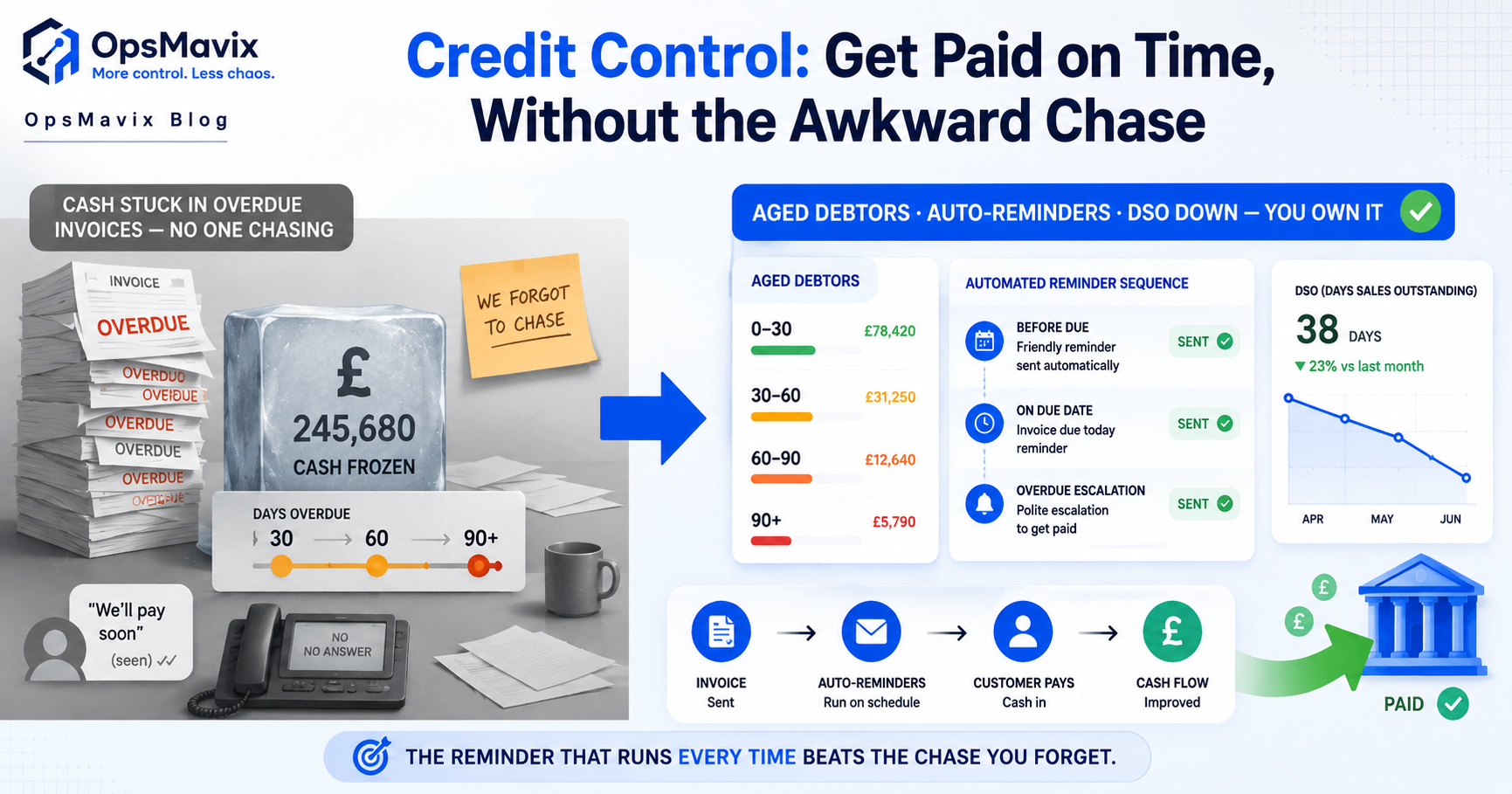
Dunning is the industry word for the reminder sequence: the ladder of messages that escalates from friendly to firm until an invoice is paid. Done by hand it’s exhausting and inconsistent. Done by software it becomes a rhythm the business keeps without thinking about it.
The AR tool Chaser’s guide to dunning lays out the standard ladder: an initial soft reminder around the due date, a firmer second reminder, a final pre-collection notice, then escalation. Two findings from that guide are worth holding onto. First, consistency matters more than tone: their data notes that 31% of businesses do not follow up on all overdue invoices each month, and those gaps are exactly where debt goes stale. Second, channel matters: they report that combining SMS with email gets invoices paid within two weeks 73% of the time, compared with 49% for email alone.
A sane UK credit control rhythm for a small firm looks like this:
- Before due date: a short “your invoice is due on Friday” note. This pre-dunning catches genuine oversights before they become overdue at all.
- Day 1 overdue: a polite reminder with a payment link and the invoice attached again.
- Day 7: a firmer note, referencing the terms they agreed.
- Day 14 to 21: a phone call, backed by a written escalation. Most disputes surface here, so it needs a human.
- Day 30-plus: a final notice referencing your right to statutory interest and recovery costs (more on that in the FAQ), then a decision on collections.
Software fires the first three steps automatically, logs everything, and hands you a clean call sheet for the phone call. Credit control stops being a dreaded Friday-afternoon job and becomes a background process. Our deeper credit control guide covers the policy side (terms, limits, deposits) that this chasing rhythm sits on top of.
Cash-Flow Visibility: Seeing the Money Before It Bites
Chasing is half the value. The other half is knowing where you stand. A small business owner with an aged debtors view can answer, in five seconds, questions that otherwise cause sleepless nights: how much am I owed right now, how much of it is more than 60 days late, and if my three biggest debtors all paid this week, could I cover payroll and the VAT bill?
Without that view, cash-flow planning is a guess. With it, you can see the wall coming. You can spot the customer whose balance keeps creeping up and tighten their terms before they become a bad debt, or see that £8,000 of your £21,000 outstanding is stuck with one slow payer and deal with that single relationship rather than worrying about the whole book.
This is also where AR connects to the rest of the business. Money owed to you (receivables) and money you owe (payables) are two halves of the same cash picture, which is why receivables sensibly lives near your expense management software and the wider accounting os rather than as a stranded island. The number that matters is net: what’s genuinely coming in, minus what’s genuinely going out, over the next few weeks.
Three Ways to Buy It
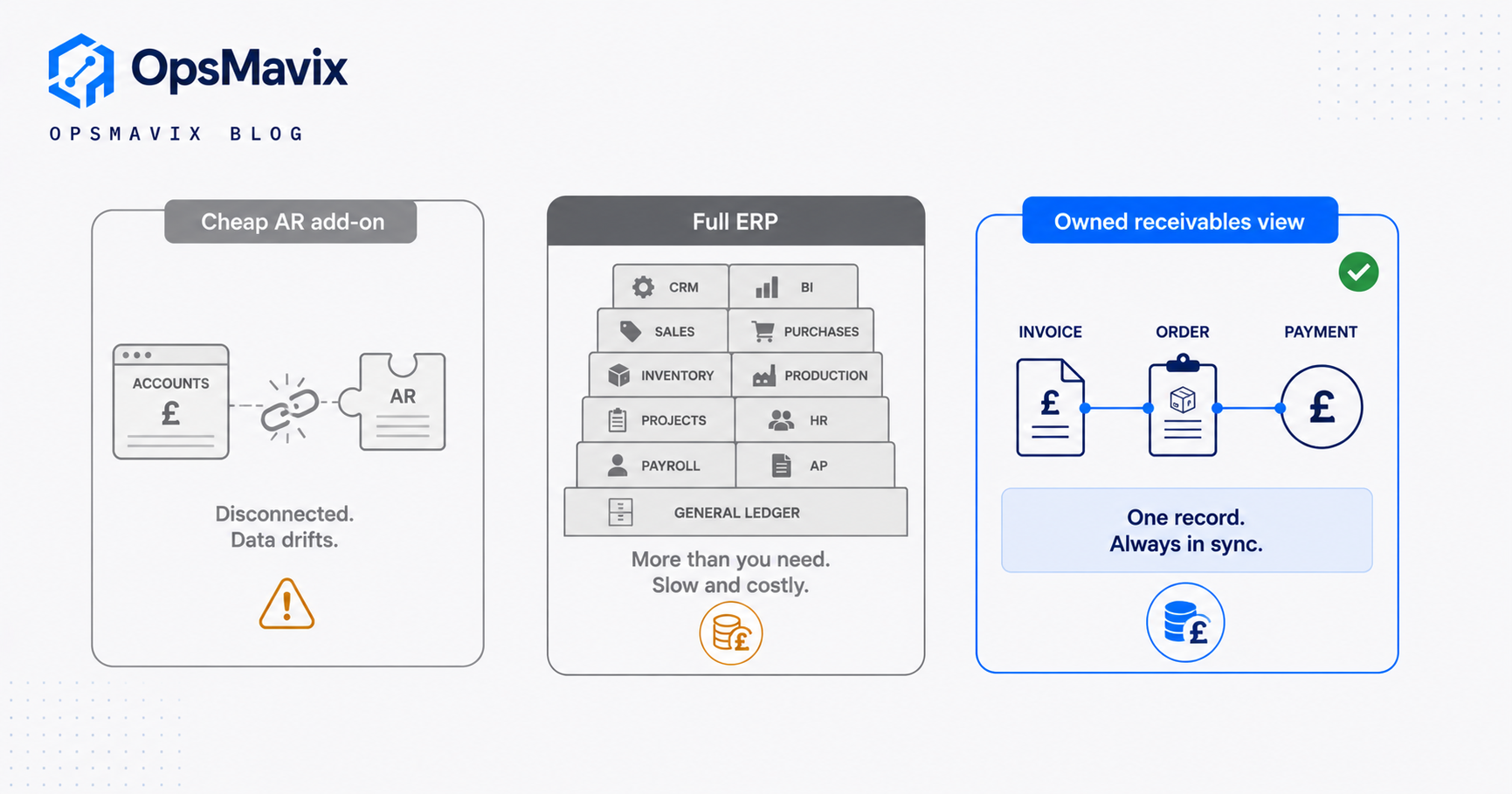
There isn’t one right answer here. There are three honest options, and the correct one depends entirely on how tangled your receivables actually are. The rule of thumb: buy the cheapest thing that closes your real leak, and no more.
| Cheap AR add-on or app | Full ERP (with AR module) | Right-sized owned system | |
|---|---|---|---|
| What it is | A dunning tool (Chaser, a Xero add-on, GoCardless) that chases invoices | A large suite (finance, stock, orders, AR) you configure and adopt | A receivables view built around your own orders and terms, expandable later |
| Best for | A simple book of invoices that just needs chasing | A larger firm ready to run everything through one platform | A firm whose receivables are tangled up with orders, jobs or stock |
| Cost shape | Low monthly fee per user | High upfront plus per-seat licences forever | A build cost, then it’s yours; add scope when you need it |
| Setup time | Days | Months, sometimes longer | Weeks |
| Who bends | Fine until your process outgrows it | You bend your process to fit the software | The software fits how you already work |
| The catch | Another disconnected app; can chase invoices it doesn’t fully know the status of | Powerful but heavy, slow and expensive for a small firm | Needs the right partner to build it well |
Most small firms with a clean, simple invoice book should start with a cheap AR add-on. It’s the right tool and it’s honest value. You outgrow it at the point where the chasing tool and the thing that creates your invoices (your orders, your jobs, your stock) don’t agree with each other, and reconciling them by hand eats the time the tool was meant to save. That’s the signal to move up, and for most firms an ERP is more than they need.
Integrations and Why Ownership Matters
The whole game in AR is trust in the status of an invoice. A reminder must never go out against one that’s already paid, part-paid, credited or in dispute. Send one of those and you damage the relationship you were trying to collect from. So the value of AR software is only as good as its connection to two things: the system that creates the invoice (your order or job records) and the system that receives the money (your bank or payment provider).
This is where a standalone AR app shows its seams. It syncs with your accounting tool on a schedule, and between syncs it works from a slightly stale picture. It knows the invoice exists, but it may not know the customer rang this morning to dispute the delivery, because that fact lives in a tool nobody connected. The chase fires anyway.
An owned receivables view closes that gap because the invoice, the order it came from, and its payment status are the same record, not three records trying to agree overnight. When a payment lands, the chase stops that instant. This is the same principle behind invoice approval workflow automation on the payables side: the document and its real-world status move together, so no one acts on a version of the truth that’s already out of date.
Ownership matters for a second reason. A rented AR app is a per-seat cost forever, and its roadmap belongs to the vendor. An owned system is yours: it fits how you already sell and invoice, you’re not paying a licence per head as you grow, and when your receivables logic gets more specific (staged billing, retentions, deposits against orders) you extend the system rather than fight someone else’s limits.
A Worked Example: The Timber Merchant
The following is illustrative, not a claim about a specific client. The numbers are realistic for a small UK trade supplier.
A timber and building-materials merchant near Leeds turns over about £1.4 million a year, mostly on 30-day trade accounts to local builders. Roughly £180,000 sits in receivables at any time. The owner does the chasing himself, in the evenings, from a spreadsheet he updates against the bank when he gets a chance.
The problem isn’t willingness, it’s slippage. In any given week, about £22,000 of invoices are more than 60 days overdue. A couple are with a builder who’s genuinely struggling, but most are simply cases nobody got round to chasing. The owner also stopped chasing three good accounts entirely after he sent a firm reminder to a customer who’d paid the day before and got an earful. Once bitten, he now under-chases across the board.
He puts in a right-sized receivables view tied to his order and trade-account records. The change is not dramatic technology, it’s rhythm and certainty. Every invoice ages automatically, so the Monday screen shows exactly who’s over 30, 60 and 90 days, sorted by amount. A dunning sequence fires on its own, with a card-payment link, and because the view knows the live payment status it never chases a paid or disputed invoice, so the fear that stopped him is gone. His time on the phone now goes only to the genuine problem accounts the system surfaces.
Say this pulls his average days-to-pay down from 47 to 34. On £1.4m of annual sales, roughly £3,800 a day flows through the book, so shaving 13 days off collections frees up around £50,000 of cash that was previously stuck in transit. He also recovers most of the stale £22,000 and stops needing the overdraft he used to lean on at quarter-end for the VAT bill. None of that is new sales. It’s the same money, collected on time instead of late.
FAQ
What’s the difference between accounts receivable software and invoicing software?
Invoicing software creates and sends the invoice. Accounts receivable software takes over after that: tracking whether it’s been paid, ageing the debt, and chasing it when it’s late. Many small firms have the first and are missing the second, which is exactly why invoices go unpaid.
Can I charge interest on late payments in the UK?
Yes. Under UK late payment legislation, on business-to-business invoices you can claim statutory interest of 8% plus the Bank of England base rate, plus a fixed sum for debt recovery costs. Those recovery fixed sums are £40 for debts under £1,000, £70 for £1,000 to £9,999.99, and £100 for £10,000 or more. Many firms never invoke this, but referencing the right to it in a final notice often prompts payment on its own.
Do I need AR software, or is a spreadsheet enough?
A spreadsheet is fine while your invoice book is small and you genuinely have time to chase from it every week. The moment you’re missing chases, losing track of who’s overdue, or reconciling the sheet against the bank by hand, the spreadsheet has become the leak rather than the fix. The tell is simple: if debt regularly ages past 60 days because nobody got to it, you’ve outgrown the spreadsheet.
How is a right-sized owned system different from a tool like Chaser or a Xero add-on?
A tool like Chaser is a good, honest product for chasing invoices, and for a firm with a clean invoice book it may be all you need. The difference shows up when your receivables are tangled with orders, deliveries, jobs or stock. A standalone app syncs with your accounting on a schedule and can act on a stale status; an owned view holds the invoice and its real status as one record, so a chase reflects exactly what’s true right now.
Will it get me paid faster, honestly?
Software doesn’t make a customer pay, but consistency measurably does. Firms that chase every overdue invoice, on a rhythm, across more than one channel collect noticeably faster than those who chase sporadically. The software’s job is to make that consistency automatic, so the chasing actually happens instead of sliding to a next week that never comes.
How OpsMavix Can Help
If your receivables have outgrown a spreadsheet but you don’t want to bend your whole business to a full ERP, OpsMavix builds a right-sized operations system you own, with a receivables view wired directly to your own orders and terms. It ages your debt automatically, runs the dunning rhythm for you, and keeps every chase honest by knowing the live status of every invoice, so you stop leaving money parked in overdue accounts. It’s built for a business outgrowing spreadsheets but not looking for a heavyweight suite, and it expands as you grow rather than charging you per seat forever. Start by finding the leak: Book a Free Operations Leak Audit
Sources
- Office of the Small Business Commissioner: late payments recovered. UK Government figures on the £11bn annual cost of late payment and roughly 4,000 associated small business closures a year.
- GOV.UK: charging interest on commercial debt. Confirms statutory interest of 8% plus the Bank of England base rate on B2B late payments.
- GOV.UK: claim debt recovery costs. The £40, £70 and £100 fixed recovery sums by debt size.
- Chaser: what dunning is and how to optimise it. The standard dunning ladder plus figures on follow-up consistency and multi-channel chasing.
Keep reading
Getting value from OpsMavix? Add us as a preferred source on Google — you'll see more of our operations content in your AI Overviews, AI Mode and Search.