
Accounting OS: One Connected Layer Over Xero, QuickBooks or Sage
An accounting OS isn't a new ledger. It's a connected layer over the Xero, QuickBooks or Sage you already run — handling approvals, month-end, multi-entity consolidation and documents so finance ops stop living in spreadsheets and email.
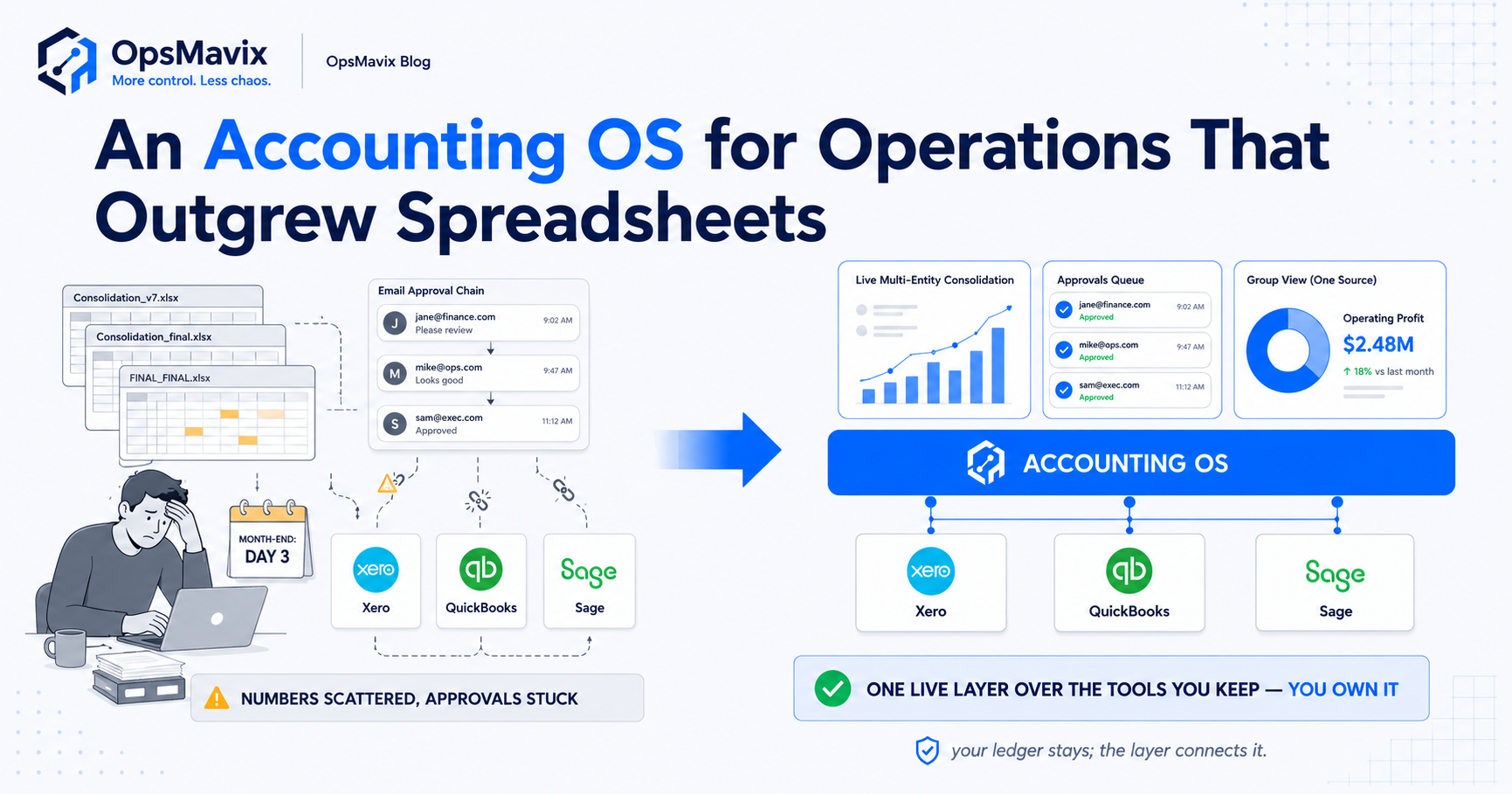
An accounting OS is a connected layer that sits over the ledger you already run — Xero, QuickBooks, Sage — and handles the finance work that ledger was never built to do: invoice and expense approvals, month-end close, multi-entity consolidation, document handling and a live picture across the whole operation. It does not replace your accounts package. Your ledger stays the system of record; the accounting OS is the workflow-and-reporting layer wrapped around it, so finance stops being run out of spreadsheets, email threads and one person’s memory.
Here’s why the term exists. A general ledger is excellent at recording transactions and producing statutory accounts. It is not built to chase three managers for an approval, consolidate four entities into one live view, or stop someone re-keying the same invoice into the ledger, a tracking sheet and a payment run. So finance teams bolt that work onto the side — a folder of spreadsheets, an inbox of “approved, go ahead” emails, a month-end checklist held together by the same person every time. That bolted-on layer is the leak. An accounting OS is that layer done deliberately: built once, around how your finance actually works, on top of the tools you keep. It’s the finance-specific cousin of a business operating system — same idea, pointed at the numbers.
Key Takeaways
- An accounting OS is a layer over your existing ledger (Xero, QuickBooks, Sage), not a replacement for it. The ledger stays the system of record.
- It owns the work the ledger never did well: approvals, month-end close, multi-entity consolidation, document handling and live cross-entity reporting.
- The leak it closes is finance running on spreadsheets and email — slow approvals, manual month-end scramble, re-keying between systems, and no single live picture.
- It fits the business that’s outgrowing spreadsheets and disconnected tools — accounting-heavy or multi-company operations especially.
- The tell you need one: month-end is a manual rebuild every time and no two people agree on the current cross-entity numbers without exporting and reconciling by hand.
- Built right, it’s shaped to your finance workflow, fixed in scope, live in weeks, and yours to own — no per-seat finance tax, no ledger lock-in.
1What an Accounting OS Actually Is
The phrase sounds grand, so strip it down. An accounting OS is the connected operational layer for finance — the system that runs the process around your numbers, while your ledger keeps recording the numbers themselves.
Think of three layers. At the bottom is the ledger: Xero, QuickBooks or Sage, where transactions are posted. At the top is whoever needs the numbers — the founder, the board, the bank. In the middle, in most growing businesses, is a gap filled with spreadsheets, email approvals, PDF folders and re-keying. The accounting OS is that middle layer made into a system: approval routes that record who signed off and when, a month-end that runs to a defined sequence instead of one person’s memory, and reporting that pulls from every entity into one live view. You don’t rip out the ledger. You stop running the work around it by hand.
2The Leak: Finance Running on Spreadsheets and Email
This is worth a system, not a tidy-up, because the gap leaks money and time in ways that compound. Picture the typical accounting-heavy operation. An invoice arrives by email. Someone forwards it for approval. It sits in a manager’s inbox for four days because there’s no queue, just a thread. Once approved — “yep, fine” in a reply — it gets keyed into the ledger, noted on a payable spreadsheet, and added to the payment run. Three entries, one invoice, by hand. Expenses are worse: receipts photographed, dropped in a chat, chased at month-end, reconciled against a card statement line by line.
Then month-end arrives and the real scramble starts. The numbers live in different places — ledger, tracking sheets, bank, cards — so closing means exporting everything and stitching it together until it agrees. One finance lead described their close to us as “three days of copy-paste before I can even start looking at what the numbers mean.” That’s the leak in a sentence. And because it’s all manual, the audit trail is thin: when someone asks who approved this and when, the answer is a search through an inbox. None of it is a software fault. It’s the absence of a layer that should sit between the ledger and the people who rely on it.
3Why Your Ledger Was Never Meant to Close This Gap
It’s tempting to blame the accounts package, but Xero, QuickBooks and Sage do exactly what general ledgers are built to do — record transactions accurately and produce compliant accounts. The gap shows up because finance operations are a different job, and a ledger only stretches so far into it.
Approvals are a good example. A ledger can record that a bill exists; it isn’t built to route that bill through your sign-off chain — under £500 to a manager, over £5,000 to the founder, anything from a new supplier flagged for a second look. Multi-entity is another. Running several companies means several ledgers, and a true group picture means consolidating them — eliminating inter-company transactions, aligning charts of accounts. That’s analysis the ledger doesn’t do for you, so it lands in a spreadsheet. The ledger is the right tool for what it does. The accounting OS exists because the work around the ledger is real, repetitive, and currently done by people instead of a system.
4What an Accounting OS Handles
So what actually lives in this layer? Not everything — only the finance work that’s currently manual, repetitive, and shaped specifically to how you operate. A few core flows show up in almost every accounting-heavy business.
Invoice and expense approvals. A real queue with rules: route by amount, supplier, entity or cost centre; record who approved and when; push the approved bill into the ledger once, not three times. This alone often pays for the system — see invoice approval workflow automation and how to speed up invoice approvals.
Month-end close. The checklist becomes a sequence the system runs and tracks — accruals, reconciliations, inter-company entries, sign-offs — so close is a process with a status, not a memory test.
Multi-entity consolidation. Pull every entity into one live group view, with inter-company transactions handled and the same chart of accounts applied, instead of a monthly consolidation spreadsheet rebuilt by hand.
Document handling. Invoices, receipts and contracts captured, matched to the transaction, and findable — so an audit request is a search, not an archaeology dig.
Live reporting. One dashboard pulling from the ledger and the workflow layer, so cash, payables and entity-level numbers are current without an export-and-reconcile ritual.
5Who Actually Needs One (and Who Doesn’t)
This is not for everyone, and pretending otherwise is how people get sold things they don’t need. The clean fit is the accounting-heavy or multi-company operation that has outgrown spreadsheets but isn’t a candidate for a full ERP rollout — the classic “outgrowing spreadsheets and disconnected tools” middle.
You probably need an accounting OS when:
- Month-end is a manual rebuild every single time, and it owns several days of someone’s week.
- You run multiple entities and “the group numbers” only exist after someone consolidates them in a spreadsheet.
- Approvals live in email — no queue, no rules, no record of who signed off — and bills sit while you chase.
- You re-key the same figures between the ledger, a tracking sheet and a payment run.
- An audit or due-diligence request means hunting through inboxes and folders for the paper trail.
You probably don’t need one when finance is genuinely simple — one entity, low transaction volume, approvals that are just you — and your ledger plus a couple of tidy spreadsheets honestly cope. The test isn’t ambition; it’s whether the manual finance layer is costing you real days and real risk every month. If it isn’t, don’t build it.
6Accounting OS vs Replacing the Ledger vs a Full ERP
The most common mistake is treating this as a choice between “stick with spreadsheets” and “buy a giant ERP.” There’s a middle option, and for most accounting-heavy businesses it’s the right one.
Replacing your ledger is rarely the answer — Xero, QuickBooks and Sage do the ledger job well, your accountant knows them, and migrating away is cost and risk for no gain on the part that already works. A full ERP is the opposite extreme: it absorbs finance into a sprawling suite where you pay for and bend to modules you didn’t need, over a rollout measured in quarters or years. (We unpack that trade in the business operating system piece.) An accounting OS keeps the ledger you trust and adds only the missing operational layer on top, shaped to your workflow. You change the part that’s broken and leave the part that isn’t.
7What a Built-For-You Accounting OS Looks Like
Done right, an accounting OS isn’t a product you log into and reshape your finance team around. It’s built around how your finance already runs, and you own it outright.
It’s shaped to your process — your approval thresholds, your entities, your close sequence — not a generic template you bend to. It connects the tools you already use, sitting on top of Xero, QuickBooks or Sage and syncing instead of re-keying, so the ledger stays the system of record and the OS handles the workflow. It’s scoped to a fixed price — typically a few thousand to low tens of thousands — not six figures with an open meter. It’s live in weeks, because it’s a focused layer over working tools, not a year-long migration. And it’s yours — no per-seat finance tax that climbs as the team grows, no vendor that can sunset it.
The OpsMavix view is plain: don’t replace what works and don’t buy more system than the leak. Start with the finance flow bleeding the most — usually approvals or reporting — make it trustworthy and connected, prove it, then extend across close and consolidation. That’s an accounting OS without the cost of an ERP or the fragility of a spreadsheet stack.
Spreadsheets + Ledger vs Accounting OS vs Full ERP
| Spreadsheets + Your Ledger | Accounting OS (Layer Over Ledger) | Full ERP | |
|---|---|---|---|
| Ledger | Xero / QuickBooks / Sage, untouched | Xero / QuickBooks / Sage, kept as system of record | Replaced by ERP finance module |
| Approvals | Email threads, no record | Routed by rules, full audit trail | Built in, but rigid to its template |
| Month-end | Manual rebuild every time | Tracked sequence with status | Automated, but heavy to configure |
| Multi-entity | Consolidation spreadsheet by hand | Live group view, inter-company handled | Strong, at enterprise cost |
| Re-keying | Constant, across tools | Eliminated — synced once | Eliminated within the suite |
| Cost | “Free” but bleeds days monthly | Fixed scope, typically £3k–£25k | Often six figures once consultants and per-seat are counted |
| Time to value | Already there (and failing) | Weeks | Quarters to years |
| Fit | Simple, single-entity finance | Accounting-heavy / multi-company | Genuine enterprise scale |
| Ownership | Yours, but fragile | You own it outright | Rented; vendor lock-in |
Common Questions
Is an accounting OS the same as Xero or QuickBooks?
No. Xero, QuickBooks and Sage are ledgers — they record transactions and produce accounts. An accounting OS is a layer that sits over your ledger and handles the finance operations the ledger isn’t built for: approvals, month-end close, multi-entity consolidation, document handling and live reporting. You keep the ledger as your system of record and add the workflow layer on top.
Do I have to replace my accounting software to get one?
No, and you shouldn’t want to. The whole point of an accounting OS is to keep the ledger you already trust and your accountant already knows, and connect to it. It syncs with Xero, QuickBooks or Sage rather than replacing them, so you change the manual work around the numbers without touching the part that records them correctly.
How is an accounting OS different from a full ERP?
An ERP absorbs finance into a large suite you configure and bend to, alongside modules for everything else, over a long rollout. An accounting OS is a focused layer over your existing ledger, built around your finance workflow, live in weeks and fixed in scope. It fits the accounting-heavy business that’s outgrown spreadsheets but doesn’t need — or want to fund — a full ERP.
What’s the first thing to build?
Whichever finance flow is leaking most, usually invoice and expense approvals or cross-entity reporting. Make one flow connected, rules-based and trustworthy, prove the time it saves, then extend into month-end and consolidation. Building the whole thing at once is how budgets balloon; building the worst leak first is how you get value in weeks.
How OpsMavix Can Help
OpsMavix builds the accounting OS most finance teams are running by hand — a custom layer over the Xero, QuickBooks or Sage you already use, shaped to how you actually approve, close and consolidate. Not a new ledger, not an ERP you bend to: we map your finance workflow, then connect the parts that leak — approvals, month-end, multi-entity consolidation, documents and reporting — into one system that runs off numbers you trust and own outright. Every build is backed by a founder delivery guarantee.
If month-end is a multi-day scramble, approvals sit in inboxes, and your group numbers don’t exist until someone rebuilds a spreadsheet, that’s a measurable operational leak. Book a Free Operations Leak Audit and we’ll map where your finance work breaks down — and whether you need an accounting OS, one flow fixed first, or nothing built at all.