
Supplier Bank Details Change Process: UK Finance Guide
Stop invoice redirection before payment day. A UK guide to verifying supplier bank detail changes, Confirmation of Payee, approvals and a worked GBP example.
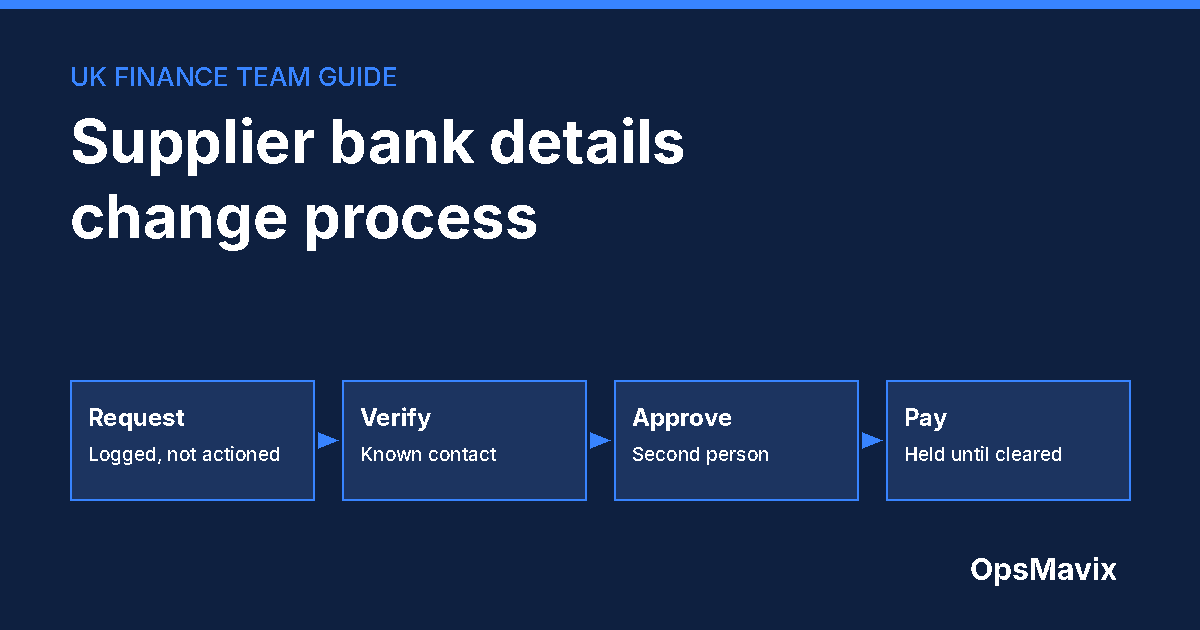
A supplier bank details change process is the set of checks a finance team completes before it pays a supplier at a new account. For UK businesses, the core rule is simple: treat every request to change payment details as unverified until someone has confirmed it through a contact route you already held, a second person has approved the change, and payments to the new account are held until both steps are complete.
The reason is invoice redirection. A criminal impersonates a supplier, often from a compromised or lookalike email address, and asks you to pay a genuine invoice into a different account. The invoice is real, the amount is right and the supplier is one you pay every month. Only the bank details have changed.
The process in 30 seconds
- Log every change request as a request, not as an instruction. Nothing is edited yet.
- Verify through a known contact: a phone number from your existing supplier record or contract, never from the message asking for the change.
- Run a Confirmation of Payee check on the new account and record the result.
- Separate duties: the person who edits the supplier record should not be the person who approves it or releases the payment run.
- Hold payments to changed details until verification and approval are recorded.
- Tell the supplier, through the original contact route, that the change has been made.
- Keep the evidence: who called whom, when, on what number, and what was confirmed.
If supplier invoices, approvals and payment runs are spread across email, spreadsheets and your accounting package, these checks are easy to skip under deadline pressure. That handoff is what an invoice approval workflow is meant to control.
How big is the risk for UK businesses?
UK Finance’s Annual Fraud Report 2026 reports that invoice and mandate scams caused £41.3 million of losses across 2,305 cases in 2025. Both figures were down slightly on 2024 and are the lowest UK Finance has reported for the category, but most of the money lost came from businesses: £28.0 million, or 68% of losses, was on non-personal accounts.
UK Finance defines the scam plainly: the victim tries to pay a legitimate payee, “but the criminal intervenes to convince the victim to redirect the payment to an account they control”. The same report shows £20.0 million, 48% of losses, was returned to victims through refunds or recovered funds. Put the other way round, roughly half was not.
Will the bank reimburse a business?
Do not plan on it. Since 7 October 2024, mandatory reimbursement for authorised push payment scams has applied to Faster Payments and CHAPS, with a maximum of £85,000 per claim set by the Payment Systems Regulator and the Bank of England. That protection is aimed at consumers, micro-enterprises and charities. Banks describe micro-enterprises as businesses with fewer than 10 employees and a small turnover or balance sheet, so most established companies paying supplier invoices at volume fall outside it.
Check your own bank’s terms, but build your controls on the assumption that a redirected supplier payment may not be refunded.
Step 1: Log the request without acting on it
Every request to change payment details should create a record, whether it arrives by email, letter, supplier portal message, phone call or a “new details” note on an invoice. Capture:
- supplier name and account reference;
- how the request arrived and from which address or number;
- the old and proposed bank details;
- any open invoices or scheduled payments affected;
- who received it and when.
At this point, nobody edits the supplier record. Some teams put a payment hold on the supplier immediately so that a payment run cannot go out to either account until the request is resolved.
Watch for the usual pressure signals
Requests to change bank details often come with urgency, a plausible reason (“we have moved banks”, “our account is being audited”) or a request not to call. None of those proves fraud, and none of them changes the process. The same checks apply to every request.
Step 2: Verify through a contact route you already held
The core control is an independent call. Use a phone number from your existing supplier record, contract, or a previous genuine invoice you have already paid, and speak to a contact you know. Do not use a number, link or email address supplied in the change request, because a criminal controls those.
On the call, ask the supplier to confirm the new details by reading them to you, rather than reading them out yourself and asking for a yes. Record the date, time, number dialled, person spoken to and what they confirmed.
Confirmation of Payee is a useful check, not proof
Confirmation of Payee (CoP) checks the name you enter against the name on the receiving account for UK payments. UK Finance explains that results include a match, a close match, no match, or a result where the check is unavailable, and that business payees should be checked against the name registered to their bank account, which may differ from their trading name.
A “no match” or “close match” is a reason to stop and verify again. A “match” tells you the name and account agree; it does not prove the request came from your supplier. Record the CoP result alongside the call notes.
A test payment proves less than it seems
Sending £1 to the new account and asking the “supplier” to confirm receipt only shows that the account exists and someone can see it. If the request is fraudulent, the criminal will happily confirm. Verification has to come from the known contact, not the new account.
Step 3: Approve with a second person
Once verification is complete, a second person reviews the evidence and approves the change. Good practice is to keep three roles apart:
| Role | Responsibility | Should not also |
|---|---|---|
| Requester or processor | Logs the request and completes the verification call | Approve the change |
| Approver | Reviews the evidence and approves the new details | Release the next payment run alone |
| Payment releaser | Releases payments after the change is approved | Edit supplier bank details |
In a small finance team, the same people may cover several roles across different suppliers. The principle is that no single person can both change where money goes and send it there.
If an approver is on holiday, use a defined cover arrangement rather than an informal “just do it”. Our guide to invoice approval delegation covers time-limited cover and limits.
Step 4: Hold payments until the record is complete
Hold any invoice due to the changed supplier until verification and approval are recorded. When the first payment goes to the new details, flag it for an extra review in the payment run.
After the change, notify the supplier through the original contact route that their details have been updated. If the request was not genuine, this is often how the real supplier finds out.
Check what your accounting software records
Find out who can edit supplier bank details in your accounting or payments software, whether the change is logged with the user and time, and whether a payment can be released straight after an edit. If the software cannot enforce the separation, enforce it in the workflow around it and review the change log at each payment run.
A worked GBP example
The figures and supplier below are invented to illustrate the process. They are not an OpsMavix client case.
On a Tuesday, the accounts payable inbox receives an email that appears to come from a regular packaging supplier. It attaches two genuine-looking invoices for £18,400 and £6,250 and says the supplier has moved banks. The payment run is on Friday.
- Log: the processor logs the request and places a hold on the supplier. Total at risk: £18,400 + £6,250 = £24,650.
- Verify: the processor calls the supplier’s accounts contact on the number held in the supplier record since onboarding. The contact has not changed banks and has not sent the email.
- Escalate: the finance manager reports the attempted fraud internally, warns colleagues, and keeps the original email for investigation.
- Pay: the two invoices are paid on Friday to the original, verified account.
Now consider the cost of the control. Suppose the business handles 40 bank detail change requests a year and each verification, approval and record takes 25 minutes. That is 1,000 minutes, about 16.7 hours a year. At an assumed staff cost of £30 an hour, the control costs about £500 a year in time, against £24,650 at risk in this single request.
Those numbers are illustrative. Use your own volumes and costs, but the comparison usually points the same way.
If a payment has already gone to the wrong account
Speed matters. NCSC guidance on business payment fraud is to contact your bank immediately using contact details from its official website, not any details in the suspicious message, and to tell your IT team or provider straight away if an email account may be compromised.
In England, Wales and Northern Ireland, report fraud and cyber crime to Report Fraud, the police service that replaced Action Fraud, at reportfraud.police.uk or 0300 123 2040. In Scotland, contact Police Scotland on 101. UK organisations can also report cyber incidents through the government’s reporting service.
Afterwards, review how the request got through: which check was skipped, by whom, and why. Usually the answer is time pressure, an unclear owner or a payment run that did not show which suppliers had changed details.
Costs, limitations and implementation
Most of this process costs time rather than software. The minimum is a written procedure, a known-contacts list for each supplier, a change log and a payment run that shows recently changed suppliers.
Software helps when volume or turnover makes manual discipline unreliable. Look for:
- a request queue that holds payments automatically when bank details change;
- verification fields that must be completed before approval;
- named approvals with time stamps, separate from the person who made the change;
- a clear flag on the first payment to new details;
- a full history per supplier.
There are limits. No process can make a compromised supplier inbox safe, and a determined criminal may try more than one route. Controls reduce the chance of paying the wrong account; they do not guarantee it. Combine them with good email security and staff awareness. The broader accounts payable software guide covers where AP tools fit, and three-way matching protects against a different risk: paying for goods that never arrived.
A simple checklist for your procedure
- Every bank detail change request is logged, whatever the channel.
- Payments to that supplier are held while the request is open.
- Verification uses a contact route held before the request arrived.
- The CoP result is recorded.
- A second person approves the change.
- The person who edited details cannot release payment alone.
- The first payment to new details is flagged in the run.
- The supplier is told through the original route that the change was made.
- Change history is reviewed at least monthly.
FAQ
How should we verify a change to supplier bank details?
Call the supplier on a number you already held, such as one in your supplier record or contract, and ask them to read the new details to you. Never rely on contact details in the change request itself.
Is an email from the supplier’s usual address enough?
No. Invoice redirection often uses compromised genuine mailboxes or addresses that differ by one character. The sender address is not verification.
Does Confirmation of Payee stop invoice fraud?
It helps by checking the account name, and a “no match” or “close match” should stop the payment until verified. A match does not prove the request is genuine, so it supports the call-back check rather than replacing it.
Will our bank refund a fraudulent supplier payment?
Mandatory APP scam reimbursement is aimed at consumers, micro-enterprises and charities, up to £85,000 per claim for Faster Payments and CHAPS. Most larger businesses are outside it, so any recovery depends on how quickly funds are traced and your bank’s own terms.
Who should approve a bank detail change?
Someone other than the person who received and processed the request, and ideally someone who does not release the payment run alone.
Should we accept changes by phone?
Treat an inbound call the same way as an email: log it, end the call and verify by calling back on a number you already held.
Conclusion
Invoice redirection works because it hides inside normal work: a real supplier, a real invoice and a plausible reason. A short, consistent process takes the judgement out of the moment. Log the request, verify it through a route you already trusted, approve it with a second person and hold payment until the evidence is complete.
Start by checking three things this week: who can edit supplier bank details in your system, where verification is recorded, and whether your next payment run would show a supplier whose details changed yesterday.
How OpsMavix can help
If supplier invoices, approvals and payment runs are spread across inboxes and spreadsheets, a bank detail change can slip through on a busy Friday. Explore invoice approval workflow automation and contact OpsMavix with your current approval route and one recent supplier change. We will map where the checks sit today and what a controlled workflow around your existing accounting package would need to enforce.
Sources and further reading
- UK Finance: Annual Fraud Report 2026. Invoice and mandate scam figures for 2025 are in the full report (PDF, p. 41).
- UK Finance: Confirmation of Payee. How CoP works for personal and business payees.
- Payment Systems Regulator: APP scams reimbursement decision. Start date and the £85,000 maximum for Faster Payments and CHAPS.
- Zempler Bank: APP fraud reimbursement rules. One bank’s explanation of eligibility, including micro-enterprises and the 13-month claim window.
- NCSC: Business payment fraud. What to do if you suspect business email compromise.
- City of London Police: Report Fraud service. The service that replaced Action Fraud.
- OpsMavix: Invoice approval workflow automation. Current service information.
GBP figures in the worked example are hypothetical. This guide is general operational guidance, not legal or financial advice; check your bank’s terms and seek professional advice for your circumstances. Published 23 October 2026.
Keep reading

Getting value from OpsMavix? Add us as a preferred source on Google — you'll see more of our operations content in your AI Overviews, AI Mode and Search.