
Accounts Payable Software UK: Stop Paying Invoices by Hand
A plain guide to accounts payable software for UK businesses: what it captures, routes, matches and pays, where off-the-shelf AP tools stop fitting, and why a business that has outgrown spreadsheets and disconnected tools is often better served by a right-sized owned system wired to its own accounts.
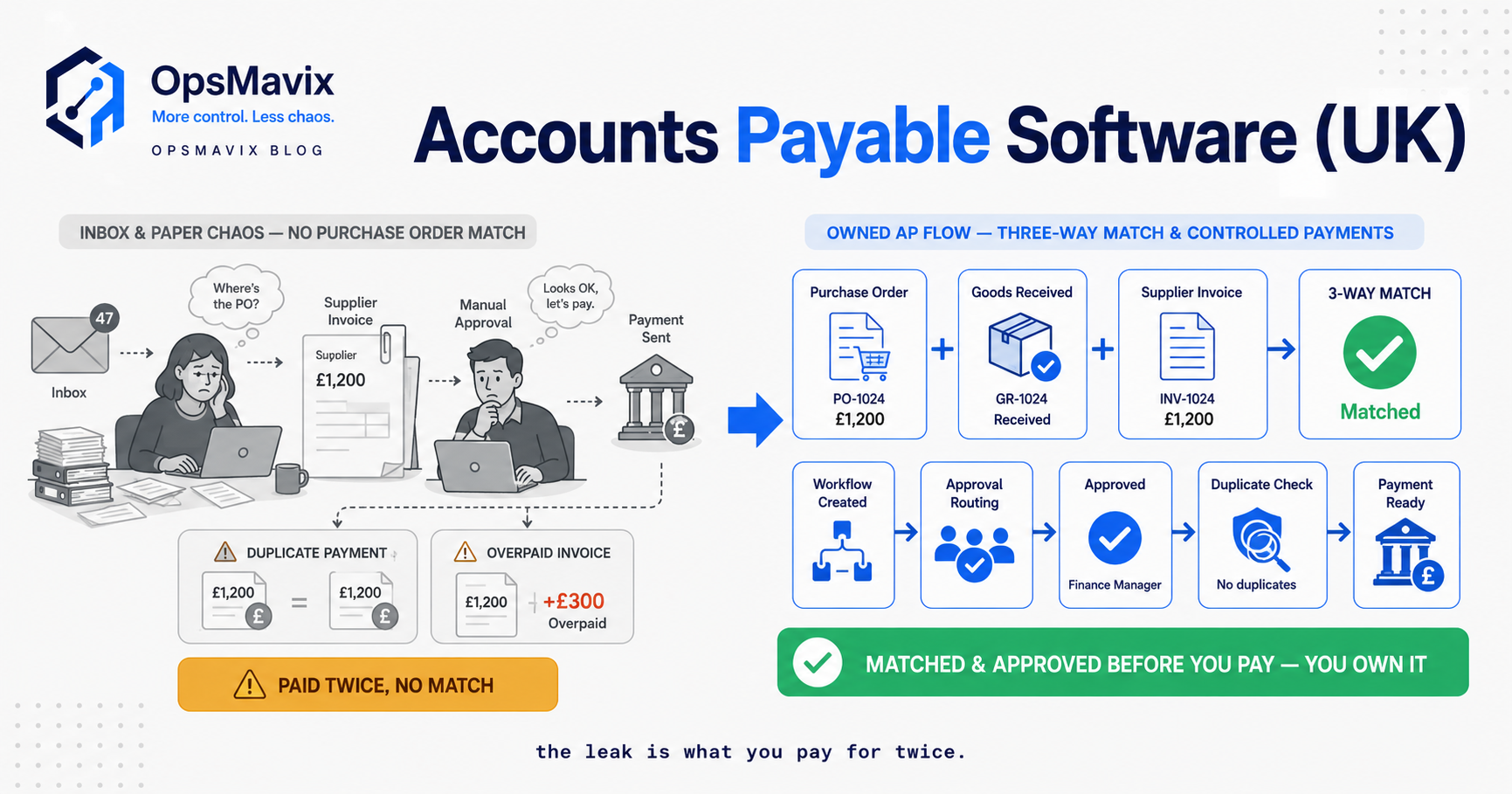
Accounts payable software UK businesses use should help move supplier invoices through capture, evidence checks, approval, ledger posting and payment preparation. The functions vary: some tools manage documents and approvals, while others also connect to payment services. Confirm the actual scope rather than assuming an approved invoice is automatically paid.
The practical problem is often a missing owner or handoff. A bill waits in an inbox, the receipt record is unavailable, or a posting failure is mistaken for completion. A useful system shows the next action, the required evidence and the responsible person, with due dates visible throughout.
This guide explains the controls to demonstrate, the UK late-payment guidance to consult and a realistic way to compare current accounting features, packaged AP tools, integration and custom development. Automation can reduce handling, but it should preserve purchasing, supplier and payment controls.

A historic accounting book illustrates recorded obligations; an AP workflow also needs evidence, authority and payment status.
Image credit: Øyvind Holmstad, CC BY-SA 4.0. Displayed at a reduced size; no additional edits.
Key Takeaways
- Distinguish capture, matching, approval, posting and payment, because each confirms something different.
- Review extracted invoice data, especially supplier identity, references, coding and totals.
- Give exceptions an owner and deadline, rather than leaving them in an unassigned queue.
- Matching outcomes depend on configuration, and a warning is not necessarily a payment hold.
- Check UK late-payment terms and current guidance, without assuming every late bill has the same entitlement.
- Compare full costs and demonstrated controls, then pilot normal invoices and exceptions.
In this guide:
- 1. Define the AP Workflow and Responsibilities
- 2. Capture Invoices Without Treating OCR as Approval
- 3. Match the Evidence Appropriate to the Purchase
- 4. Route Approvals and Escalate Missing Evidence
- 5. Manage Due Dates and UK Late-Payment Exposure
- 6. Separate Posting from Payment Release
- 7. Compare Accounting Features, AP Tools and Development
- 8. Pilot the Complete Invoice Lifecycle
- Frequently Asked Questions
- How OpsMavix Can Help
1. Define the AP Workflow and Responsibilities
Map the actual stages
Accounts payable concerns amounts owed to suppliers. The supporting workflow may span a document tool, purchasing system, ledger and payment platform. Define which stage each application owns.
An invoice can be captured but unreviewed, approved but unposted, or posted but excluded from a payment run. Use explicit states rather than one broad “done” label.
| Stage | Decision or evidence |
|---|---|
| Capture | Correct document and extracted information |
| Validation | Supplier, reference, coding and totals reviewed |
| Matching | Defined order, receipt or acceptance records compared |
| Approval | Required authority recorded |
| Posting | Ledger accepted the transaction |
| Payment | Approved payment action and confirmed status |
Keep authority clear
Define who can change supplier records, approve expenditure, resolve discrepancies and release payment. A workflow should support the required separation of responsibilities rather than give one user every permission for convenience.
Include non-PO invoices, advance payments and credit notes in the scope. Forcing every purchase through a fictional receipt can weaken the evidence rather than strengthen it.
2. Capture Invoices Without Treating OCR as Approval
Capture once and preserve the source
A tool may read invoice fields using OCR or another extraction method. The result can reduce typing, but it still needs validation and an accessible source document.
Test poor scans, multiple invoices in one file, changed supplier layouts and handwritten additions. A plausible total is not proof that the supplier account or tax treatment is correct.
Check duplicates and corrections
Use the supplier, invoice reference and other relevant fields in the duplicate-review policy. A duplicate with a different reference may need another check; no single identifier catches every case.
If data is corrected, retain the original document and the change history. Define what happens when a supplier sends a replacement invoice or credit. Avoid silently editing the supplier’s document to make a match pass.
Our invoice approval workflow guide explains the surrounding route. Capture is one input to that process, not a substitute for the decisions that follow.
3. Match the Evidence Appropriate to the Purchase
Choose the matching policy
Two-way matching compares the invoice and purchase order under configured rules. Three-way matching adds receipt evidence. Services may require approved time, milestone acceptance or a service receipt.
A matching feature name does not guarantee identical checks across products. Ask which quantities, prices, charges and cumulative amounts are compared, and how permitted differences are handled.
Test what a discrepancy stops
A warning may allow the invoice to proceed with approval, or a configured hold may stop a particular stage. Demonstrate invoice entry, posting and payment selection.
Hypothetical example: an order is for 100 units at £4, the warehouse records 96 received, and the invoice bills 100. The billed goods amount is £400; the received quantity corresponds to £384 at the reference price. The four-unit difference needs resolution under the commercial terms and approved exception route.
Do not invent a receipt of 100 to clear the screen. Record the facts and decide whether the correct response is later receipt, a corrected invoice, credit or authorised exception.

Receipt evidence connects physical delivery to the supplier invoice review.
Image credit: FIONASUN, CC0 1.0. Displayed at a reduced size; no additional edits.
4. Route Approvals and Escalate Missing Evidence
Make the queue actionable
An invoice waiting for approval should show the responsible person, due date, missing evidence and next action. Route by the authorised policy, which may involve value, entity, project or cost centre.
Define delegation and absence cover. A reminder sent to someone who cannot approve the transaction is only another notification, not an escalation path.
Review changes after approval
If an amount, supplier, entity or relevant coding changes, define when approval must be repeated. Keep the original decision and subsequent change visible.
| Exception | Possible owner | Evidence to resolve |
|---|---|---|
| Missing receipt | Receiving or service owner | Delivery or acceptance record |
| Price mismatch | Buyer | Approved agreement or variation |
| Suspected duplicate | AP reviewer | Existing invoice and posting |
| Wrong entity | Finance reviewer | Correct purchasing and supplier relationship |
| Approver unavailable | Defined delegate | Authority under the policy |
These are example roles; your organisation should assign the actual responsibilities. Track unresolved exceptions separately from routine approval waiting time.
5. Manage Due Dates and UK Late-Payment Exposure
Use the agreed terms and applicable guidance
Record invoice dates, receipt dates and payment terms. Distinguish a genuine dispute from an invoice simply waiting for internal approval. Software can surface deadlines; it cannot guarantee adequate funds or that every commercial dispute is resolved.
GOV.UK’s late commercial payment guidance describes statutory interest of 8% plus the Bank of England base rate for qualifying business-to-business debts and notes the effect of a contractual interest rate. Check the terms and applicable position rather than assuming the same calculation applies to every invoice.
Check debt-recovery bands correctly
GOV.UK’s recovery-cost guidance gives these fixed sums:
| Qualifying debt | Fixed recovery sum |
|---|---|
| Up to £999.99 | £40 |
| £1,000 to £9,999.99 | £70 |
| £10,000 or more | £100 |
A £9,400 debt falls in the £70 band, not the £100 band. Interest and any further entitlement require the applicable terms and guidance; the table is not a current interest-rate quotation.
Review overdue items before each payment cycle and retain decisions about disputes, holds and agreed changes.
6. Separate Posting from Payment Release
Confirm that the ledger accepted the bill
A connector can submit an invoice while the ledger rejects an account code or required field. Show accepted, rejected and uncertain results, with stable source references.
Test a retry after a timeout so the same bill is not posted twice. Keep coding and tax treatment under finance review, using the actual product and edition proposed.
Keep payment controls in the correct place
Payment preparation may produce a proposal or export rather than move money. Confirm what the AP tool does and which service performs the final payment.
Supplier bank-detail changes require their own approved verification. A matching result or manager approval does not independently authenticate the bank account. Retain the organisation’s payment authority and review process.
Reconcile payment status back to the ledger and workflow. “Sent to bank” and “paid” are different events, and failed or returned payments need an owned exception route.
7. Compare Accounting Features, AP Tools and Development
Demonstrate the same invoices
Use a clean PO invoice, a non-PO bill, a service acceptance, a duplicate, a credit and a changed invoice. Compare the actual workflow rather than the length of a feature list.
| Route | Where it can fit | What to demonstrate |
|---|---|---|
| Current accounting functions | Requirements fit existing capability | Coding, approvals and payment preparation |
| Packaged AP application | Standard document and approval workflows fit | Matching, evidence and integration scope |
| Improved integration | Working tools have an unsupported handoff | References, retries and reconciliation |
| Focused custom workflow | A valuable approval or evidence gap remains | Authority controls, validation and support |
| Full ERP | Wider purchasing, stock and finance requirements justify it | Complete process and migration |
Compare the full cost
Include project work, subscription tiers, capture volumes, payment-service fees, migration, training and support. Custom software still needs maintenance and external services.
A full ERP can be appropriate; OpsMavix can build full ERPs as well as focused systems. Choose from the requirements, not an assumption that a particular architecture is always cheaper.
8. Pilot the Complete Invoice Lifecycle
Use exceptions as acceptance tests
Run the pilot through ledger posting and the intended payment-preparation stage. Do not stop at a clean approval screen.
Acceptance checks should include:
- Extracted fields reconcile to the original document.
- Supplier and entity mappings select the intended record.
- Duplicate review and replacement documents follow the policy.
- Matching uses the required receipt or service evidence.
- Approval, delegation and changes enforce the agreed authority.
- Due dates and unresolved exceptions remain visible.
- A rejected or uncertain posting cannot appear complete.
- Payment preparation preserves the defined release controls.
- Documents and decisions can be retrieved and exported.
- Support and recovery responsibilities work in practice.
Measure active effort and delay separately
Record handling time, approval waiting time, unresolved exception age and posting failures. A reduction in handling releases capacity; it is not automatically a cash saving.
Expand after the finance team can explain each state and resolve exceptions without undocumented intervention. The useful result is a maintainable control process, not a promise that no invoice will ever be late.
Frequently Asked Questions
What does accounts payable software do?
Depending on scope, it supports invoice capture, validation, matching, approvals, posting and payment preparation. Confirm which functions the proposed tool actually performs.
Is OCR enough to approve an invoice?
No. Extracted information needs validation and the required evidence and authority checks. Preserve the original supplier document.
Does three-way matching automatically stop payment?
Not necessarily. Warning, approval and hold behaviour depends on configuration. Demonstrate the failed match through the payment-selection stage.
Can services require receipt evidence?
Yes. Approved time, milestone acceptance or a service receipt may be required. Define the policy instead of assuming services need no delivery confirmation.
What recovery band covers a £9,400 debt?
The GOV.UK fixed-sum table places qualifying debts from £1,000 to £9,999.99 in the £70 band. Other entitlement depends on the applicable position.
Does AP software verify supplier bank changes?
Only to the extent of the implemented controls. Keep the approved independent verification and payment-release process; invoice approval alone does not establish bank authenticity.
Can our accounting package be sufficient?
Yes, where its actual functions meet the requirements. Test the product, edition, plan and exceptions before adding another application.
Is custom AP cheaper than a subscription?
Not inherently. Compare implementation, ongoing services, support and remaining work over the same period, using demonstrated benefits.
Where should we start?
Trace one clean and one disputed invoice from arrival to posting and payment preparation. Identify the missing evidence, authority or handoff, then pilot a specific improvement.
How OpsMavix Can Help
OpsMavix builds invoice approval workflows that connect purchasing evidence, responsible decisions and finance records.
We assess current accounting and AP capabilities, map the unsupported handoffs and define the control requirements before proposing configuration, integration or development. The scope can be focused or part of a full ERP.
We can help structure approval states, link receipts and acceptance records, surface due dates and exceptions, reconcile posting results and plan a pilot with usable exports and handover.
If supplier bills keep waiting without a clear next action, book an Operations Leak Audit. Bring a recent invoice and its supporting records so we can assess the actual gap.
Keep reading

Getting value from OpsMavix? Add us as a preferred source on Google — you'll see more of our operations content in your AI Overviews, AI Mode and Search.