
Smartsheet Consultant for Operations Workflows
Smartsheet-style workflows help businesses improve task tracking, approvals, dashboards, reporting, and daily operations visibility.
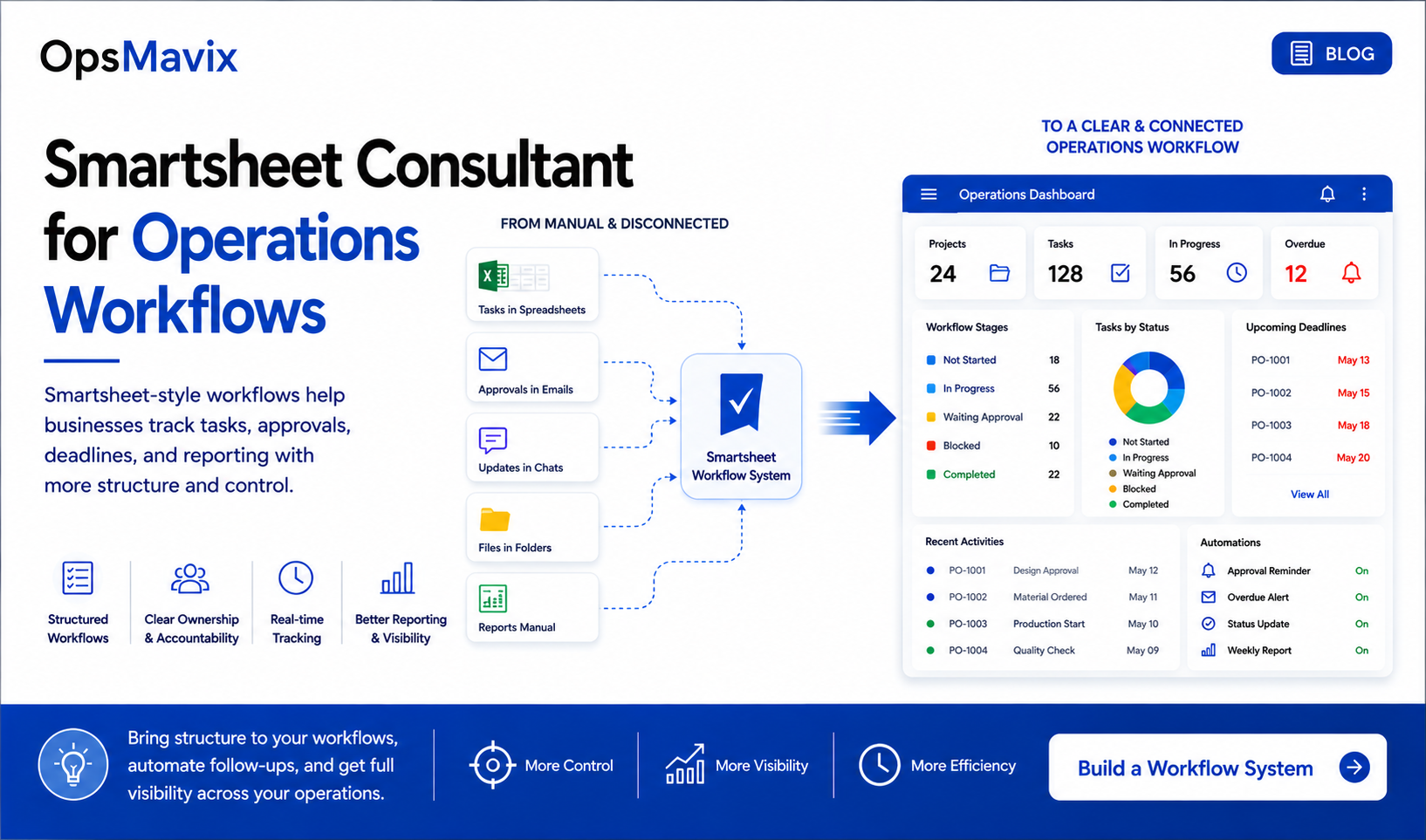
Spreadsheets often give a growing business its first way to organise work. They are familiar, flexible, and easy to adapt when the team needs another task list, deadline tracker, or weekly report.
The challenge appears when the work starts moving between people and departments. A task is recorded in a sheet, the approval arrives by email, the latest update sits in a chat, and the manager has to ask three people what happens next.
That is when businesses begin looking for a Smartsheet consultant for operations workflows. They need clearer ownership, visible progress, dependable approvals, and less time spent chasing information.
A useful workflow system brings those elements together around the way the business actually operates. It should help each person understand their next action and help management see where work needs attention.
A structured workflow connects the work, the responsible person, and the next decision.
In this guide:
- Why operations workflows break
- What Smartsheet-style workflows help manage
- The questions your workflow should answer
- An approval workflow example
- Automation that reduces follow-up
- Choosing the right approach
- Planning and measuring the implementation
- Frequently asked questions
- What to do next
- How OpsMavix can help
1. Why Operations Workflows Break
Most workflows become difficult gradually. A process that worked when five people shared the same room can become unreliable when more requests, departments, and customers are involved.
The same symptoms tend to appear:
- Tasks exist in several spreadsheets with different owners or dates.
- Decisions are made in email without updating the main record.
- Documents are saved separately from the work they support.
- Approvals depend on somebody remembering to follow up.
- Reports require a manual check before management can trust them.
- Important knowledge sits with one person.
The business can remain busy while losing visibility over its commitments. People spend more time coordinating work, but nobody has a dependable view of the whole process.
A status is only useful when people agree what it means
“In progress” can mean that work has started, that a request is waiting for information, or that somebody intends to look at it later.
Those situations require different actions. If the same status covers all three, management cannot distinguish active work from a queue that has stopped moving.
Define stages using observable conditions. For example, “awaiting customer information” should mean the team has requested specific information and cannot proceed until it arrives. The record should show what is missing and who will follow up.
Ownership often disappears at the handover
A salesperson may consider a request complete when it is sent to operations. Operations may consider it ready only after receiving an agreed scope, delivery date, and customer details.
Without a defined handover, both teams can believe they have done their part while the request remains unassigned.
A stronger workflow defines what must be present before the next person accepts responsibility. This is one reason spreadsheets can stop working as a business grows: the difficulty increasingly sits between the rows and the people using them.
2. What Smartsheet-Style Workflows Help Manage
Smartsheet-style workflows organise work around records, stages, owners, due dates, requests, and management views.
The term needs some care. A Smartsheet implementation uses the Smartsheet platform. A custom system described as “Smartsheet-style” may provide similar workflow features using different technology. Confirm the proposed platform, subscriptions, access arrangements, and maintenance responsibilities before starting a project.
Smartsheet’s official automated workflow guidance describes reminders, update requests, approval requests, and conditional actions. Their usefulness depends on how well they match the process being managed.
Common applications include:
| Workflow | Typical difficulty | Useful structure |
|---|---|---|
| Project delivery | Milestones and blockers are scattered across team updates | Owners, due dates, dependencies, and exception reporting |
| Client onboarding | Required information arrives in separate messages | An intake record, completeness check, and agreed handover |
| Internal requests | Work enters through several channels | A shared queue with priority, owner, and next action |
| Approvals | Nobody knows who must decide or how long it has been waiting | An assigned approver, decision status, and escalation rule |
| Recurring operations | Repeated tasks depend on memory | A scheduled checklist with evidence of completion |
| Management reporting | Updates are rebuilt manually each week | Consistent records feeding agreed measures |
Start with the decisions people need to make
A task owner needs to know what to do next. A coordinator needs to know what is unassigned. A manager needs to know which deadline or commitment is at risk.
These are different views of the same operation. Designing around those needs is more useful than giving every user the same large table.
A project operations dashboard can bring relevant status and reporting together, provided the underlying records are updated through a reliable process.
3. What a Useful Workflow System Should Answer
A workflow should reduce the number of questions that require a message or meeting.
For each active record, someone opening the system should be able to understand its position without reconstructing the history from several places.
| Question | Information the workflow should contain |
|---|---|
| What stage is this in? | A defined status with a clear meaning |
| Who owns the next action? | A named responsible person |
| When is it needed? | A due date and, where relevant, a separate customer commitment |
| Why is it blocked? | A reason, required action, and person responsible for resolving it |
| What needs approval? | The decision requested, supporting evidence, and approver |
| What changed? | An appropriate record of important changes and decisions |
| What happens after completion? | The next handover or an explicit closure condition |
Keep responsibility specific
Assigning work to “Operations” may identify the department, but it does not always identify the person expected to act.
A shared queue can work well if somebody owns its triage. Once work is accepted, assign a responsible person and define how reassignment happens during absence or overload.
Make overdue and blocked work separate
A task can be blocked before its deadline. It can also be overdue while work continues normally.
Treat those as distinct conditions. A manager may need to resolve a missing decision today even though the delivery date is next week.
Define completion carefully
“Work finished” may still leave customer confirmation, documentation, review, or invoicing outstanding. Separate these milestones when different people own them.
This makes the remaining work visible and prevents a completed status from hiding unfinished handovers.

Review the questions people ask repeatedly. They reveal which information the workflow needs to make visible.
4. A Practical Approval Workflow Example
Consider a business that receives supplier invoices by email and records approval status in a spreadsheet. This is an illustrative example, not a client case study.
Finance forwards an invoice to a department manager. The manager asks a colleague whether the goods arrived. The colleague replies in a separate thread. By the end of the week, finance knows the invoice exists but cannot easily confirm whether it is approved, disputed, or still waiting for information.
A more structured approval workflow could use the following stages:
- Received: capture the invoice reference, supplier, responsible department, document, and relevant dates.
- Under review: check whether the information is complete and whether any supporting evidence is missing.
- Awaiting approval: route the request to the person authorised to make that decision.
- Returned for information: record what is missing and assign the person who must resolve it.
- Approved or rejected: record the decision, decision-maker, and relevant explanation.
- Handed to finance: make the outcome available for the next accounting step.
The exact fields and controls should match the organisation’s process. Approval in a workflow should also remain distinct from posting an invoice or making a payment in the accounting system.
Decide what happens when the answer is not yes
A workable design covers more than approval.
If the request is rejected, the submitter needs to know why. If information is missing, the record needs an owner while it waits. If the approver is absent, the business needs an agreed delegation route.
Also decide which changes require a fresh approval. A decision on one amount or scope should not automatically be treated as approval of a materially changed request.
Smartsheet’s workflow documentation explains that approval requests pause the workflow until a response is received. The business still needs to decide what each response means and which actions should follow.
Measure the waiting time
A queue showing requests awaiting approval is useful. A queue showing how long each request has waited is more actionable.
Define when the approval clock starts, whether returned requests remain in that measure, and who reviews overdue decisions. Those definitions prevent a dashboard from producing numbers that different departments interpret differently.
For businesses with repeated approval chasing, invoice approval workflow automation can provide a focused starting point for improving visibility and handovers.
5. How to Automate Follow-Up Without Creating More Noise
Automation should support a clear rule. A reminder cannot solve an undefined responsibility, and a notification cannot make an incomplete request ready for action.
For each automation, specify the event, condition, recipient, intended action, and stopping point.
| Situation | Possible automated action | Rule to agree first |
|---|---|---|
| A new request arrives | Notify the queue owner | Who is responsible for reviewing incoming work? |
| A task is assigned | Request acknowledgement or send an alert | Does every assignment need a notification? |
| An approval remains pending | Remind the approver | When should it escalate, and to whom? |
| A deadline approaches | Alert the task owner | Which completed or cancelled items should be excluded? |
| A blocker is recorded | Notify the person able to resolve it | What information must explain the blocker? |
| A weekly review is due | Summarise outstanding exceptions | What decisions should the review support? |
Ask for the update where it belongs
An update request should direct the recipient towards the record that needs attention. A generic email asking for progress can create another conversation that someone must copy back into the system.
Smartsheet supports update requests as part of its automated workflows. Choose the fields people need to complete and keep the request focused.
Test the actual source of a change
Automation behaviour can depend on how a value changes. Smartsheet documents restrictions involving cross-sheet formulas and cell links for certain actions, including approval requests, in its workflow automation guidance.
A practical implementation should test the real update route, including any connected sheets or integrations. A rule that works during a manual demonstration may behave differently when production data arrives another way.
Make every reminder stop at the right time
Completed, cancelled, and reassigned work should not continue producing irrelevant messages. Define those conditions before launch and include them in the pilot.
Assign someone to maintain the automations. That person should know how to investigate failures, change recipients, and adjust rules when the process changes.
6. Smartsheet, a Spreadsheet, or a Custom Operations System?
A business can need better workflow control without needing to replace every tool it already uses.
The right approach depends on the process, the connections required, and the consequences of errors.
| Approach | When to consider it | What to examine |
|---|---|---|
| Improve existing spreadsheets | The workflow is simple, the team is small, and handovers are manageable | Ownership, agreed statuses, consistent data entry, and reporting effort |
| Implement Smartsheet | The main need is coordinating tasks, requests, approvals, and management visibility | Platform fit, permissions, automation behaviour, subscriptions, and ongoing administration |
| Build a custom operations system | Work involves specialised rules or several connected operational processes | Data relationships, integrations, controls, support, ownership, and maintenance |
Understand the boundary of the workflow
Tracking an order through a set of stages is different from controlling stock reservations, accounting entries, or production consumption.
If those transactions drive the workflow, decide which system owns them and how status moves between systems. Re-entering the same information in a new tracker can create another reconciliation task.
A wider custom operations system may be appropriate where the business needs those processes connected more closely.
Treat access as a design requirement
Decide who should see and change each type of information. Internal delivery notes, supplier documents, customer details, and management figures may need different access arrangements.
Smartsheet’s sharing permission guidance sets out access at sheet, report, and workspace level. Review the intended sharing model during design, especially where external collaborators are involved.
Ask for a clear implementation scope
A proposal should identify the workflows included, the reports required, the data to be migrated, the integrations involved, and the training provided.
It should also separate implementation work from platform subscriptions, optional products, and ongoing support. This makes it easier to compare proposals against the same requirements.

The right approach connects the workflow to the information and controls the business already relies on.
7. How to Plan and Measure a Workflow Implementation
A focused implementation starts with one process that causes regular friction and has a clear owner.
Map the current process with the people doing the work
Follow a real request from entry to completion. Include the emails, unofficial lists, and side conversations people use when the main tracker is incomplete.
Record where work waits, where information is entered twice, and where ownership becomes unclear. Those findings should shape the build.
Agree stages and transition rules
For every stage, define who owns it, what information is required, and what allows the record to move forward.
Keep the initial design understandable. Too many overlapping statuses can make data entry inconsistent and reports difficult to interpret.
Build the smallest useful version
A first version might contain an intake form, an active work queue, an approval step, and an exception dashboard.
Give each element a purpose. If a field does not support a decision, action, or necessary record, question whether it needs to be collected.
Pilot normal work and exceptions
Use representative requests with the people who will operate the system. Test rejection, cancellation, reassignment, missing information, changed deadlines, and reopening completed work.
Ask users to explain the next step without help. Where they cannot, improve the workflow instructions or the design before expanding the rollout.
Measure outcomes using agreed definitions
Useful measures include:
- Open requests without a named owner.
- Time from submission to the first review.
- Requests waiting beyond the agreed approval period.
- Work returned because information is missing.
- Time spent preparing the weekly operations report.
- Completed work still waiting for its next handover.
Capture a baseline before the pilot and compare the same measures afterwards. Avoid claiming time savings based only on the number of automations created.
Give the system a long-term owner
Document who maintains the workflow, who approves changes, and how users report a problem. Train the administrator as well as the daily users.
Agree when old trackers stop accepting new work. Keeping two competing operational records indefinitely undermines the clarity the new system is meant to provide.
Frequently Asked Questions
What does a Smartsheet operations workflow consultant do?
The work can include reviewing the current process, defining stages and responsibilities, configuring the platform, creating reports, setting up automation, and supporting adoption. The scope should state which of these activities are included.
Is a Smartsheet-style workflow the same as Smartsheet?
No. The phrase can describe a similar approach built using another platform. Confirm whether the project uses Smartsheet itself or a custom application, and ask how licensing, ownership, and support will work.
Can we improve the workflow without replacing our existing software?
Often, the first step is to clarify ownership, handovers, and reporting around an existing process. Where systems need to exchange information, define the authoritative source and the integration requirements before adding another tracker.
Can approvals and reminders be automated?
Smartsheet provides workflow automation for these purposes. The implementation still needs suitable conditions, permissions, recipients, exception handling, and testing. Confirm that the required capabilities are available in the proposed subscription and configuration.
Can a dashboard fix unreliable reporting?
A dashboard can make information easier to see, but its usefulness depends on the underlying records. Agree status definitions, update responsibilities, and report calculations before using the results to manage performance.
How much does a workflow implementation cost?
The scope determines the effort. Relevant factors include the number of workflows, complexity of approvals, data cleanup, integrations, reports, training, and support. Request a proposal that separates the build from recurring platform and maintenance costs.
Which workflow should we improve first?
Choose one that creates repeated manual follow-up, has a clear business owner, and can be measured. A focused approval queue or client onboarding process can provide a more manageable pilot than redesigning the entire operation at once.
What To Do Next
Choose one workflow that people chase manually every day. Bring together the person who starts it, the people who act on it, and the manager responsible for its outcome.
Map the following:
- What starts the workflow?
- Which information is required at that point?
- What are the stages and who owns each one?
- Which decisions need approval?
- What happens when work is rejected or blocked?
- What tells the team that a handover is complete?
- Which exceptions should management see?
- How will you know whether the new process is working?
Use the answers to define a small improvement with a clear outcome. This gives a consultant or development partner a practical brief and gives the team a shared understanding of what should change.
How OpsMavix Can Help
OpsMavix helps growing businesses turn scattered spreadsheets, emails, and messages into structured operations workflows.
We work from the real process: how work enters the business, who handles it, which decisions matter, and where visibility is lost. From there, we can help design the stages, ownership, approvals, dashboards, and automation needed to manage it more clearly.
That can include:
- Mapping existing workflows and identifying unclear handovers.
- Defining statuses, responsibilities, and completion rules.
- Designing task, deadline, and approval tracking.
- Creating team views and management dashboards.
- Reducing repeated reminders and manual reporting.
- Planning a focused pilot and practical team handover.
If you are exploring a Smartsheet consultant or a custom workflow development partner, start by describing the operational problem you need to solve. The platform and delivery approach should follow from those requirements.
Talk to OpsMavix about your operations workflow and bring the process that takes the most time to chase. We can help you identify the gaps and define a clearer way to manage the work.
Keep reading
Getting value from OpsMavix? Add us as a preferred source on Google — you'll see more of our operations content in your AI Overviews, AI Mode and Search.