
Project Cost Management Software: Know Margin Before It Is Gone
Project cost management software tracks budget, committed cost, actual spend and forecast on live project work, so margin stops being a number you only learn at handover. This guide compares the honest three ways to buy it for a project-based business that has outgrown spreadsheets and disconnected tools.
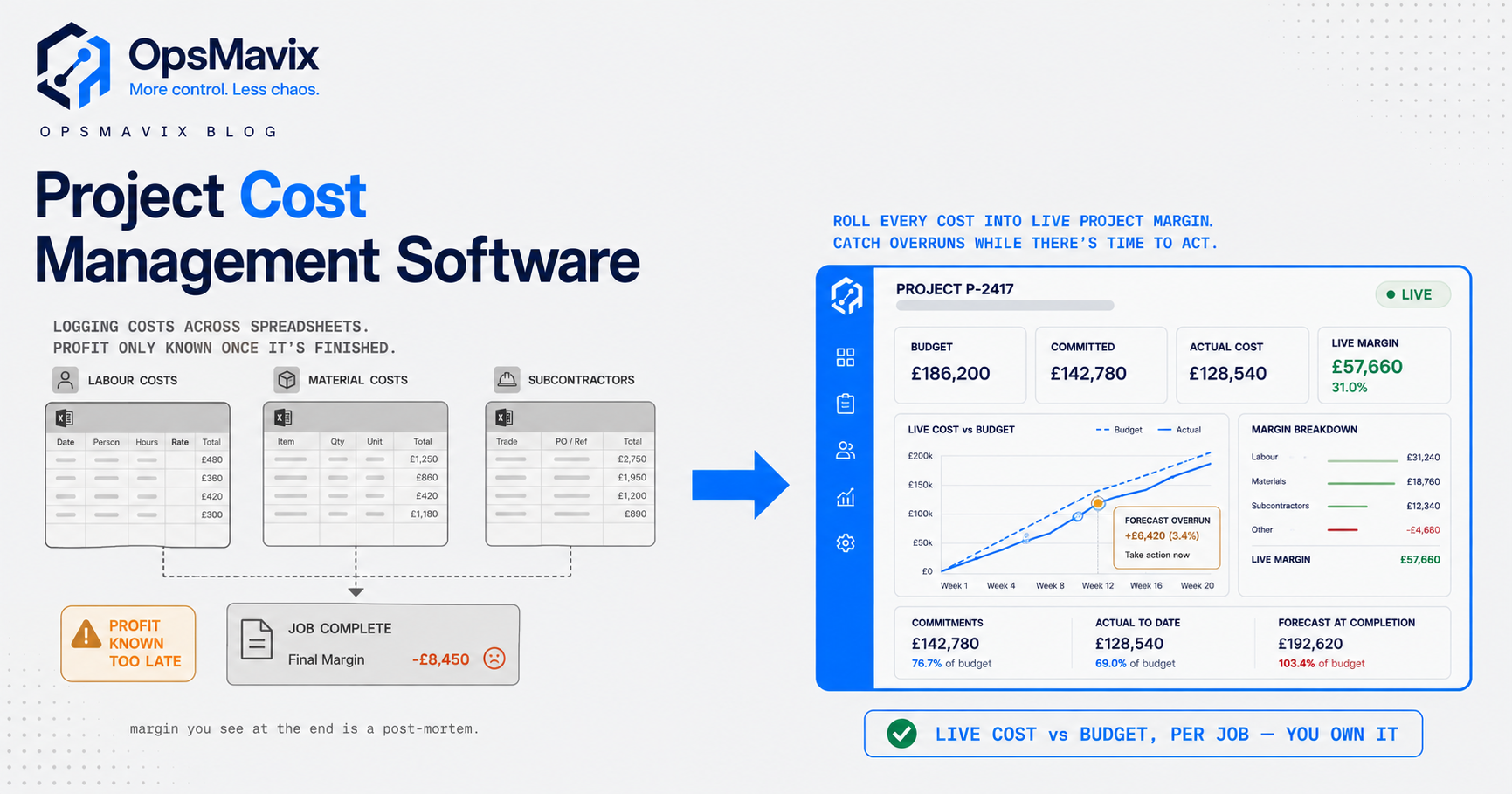
Project cost management software is the system a project-based business uses to plan a budget, track what has been committed and spent against it, and forecast where the job will actually land financially before it lands there. For a trade, a fit-out firm, an agency or an engineering shop, that is the difference between steering a project and reading its post-mortem.
The pain is specific and it repeats. You quote a job at a healthy margin, the work goes fine, and then the final numbers come in and the margin has quietly leaked away. Nobody stole it. It drained out through variations that were never priced, subcontractor orders placed but never logged against the budget, and hours that overran a week before anyone noticed. By the time the profit and loss confirms it, the money is already spent and the next three quotes are built on the same blind assumptions.
What Project Cost Management Software Actually Does
Strip away the marketing and project cost management runs on four linked jobs. Cost estimating predicts what the work will cost under the planned scope. Cost budgeting turns that estimate into a fixed baseline, the official reference point every later number is measured against. Cost control is the ongoing work of gathering actual costs and comparing them to that baseline. Forecasting projects where the job will finish using the trend so far, rather than assuming the plan still holds. The four processes are set out plainly by Invensis Learning, and forecasting is the one that lets you act before an overrun becomes irreversible.
Good software makes those four jobs a single live picture per project. It holds the budget, absorbs purchase orders and subcontractor commitments the moment they are agreed, pulls in actual invoices and logged hours as they arrive, and recalculates the forecast final cost and remaining margin on every change. The point is not to produce a tidy report after the fact. It is to keep the margin number honest while the job is still open and there is still time to do something about it.
That last part is what separates real project cost management from generic project management. A task board tells you whether the work is on schedule. It says nothing about whether the work is still profitable. Those are different questions, and a project can be dead on time and quietly losing money at the same time.
The Blind Spot It Fixes: Margin You Only See at the End
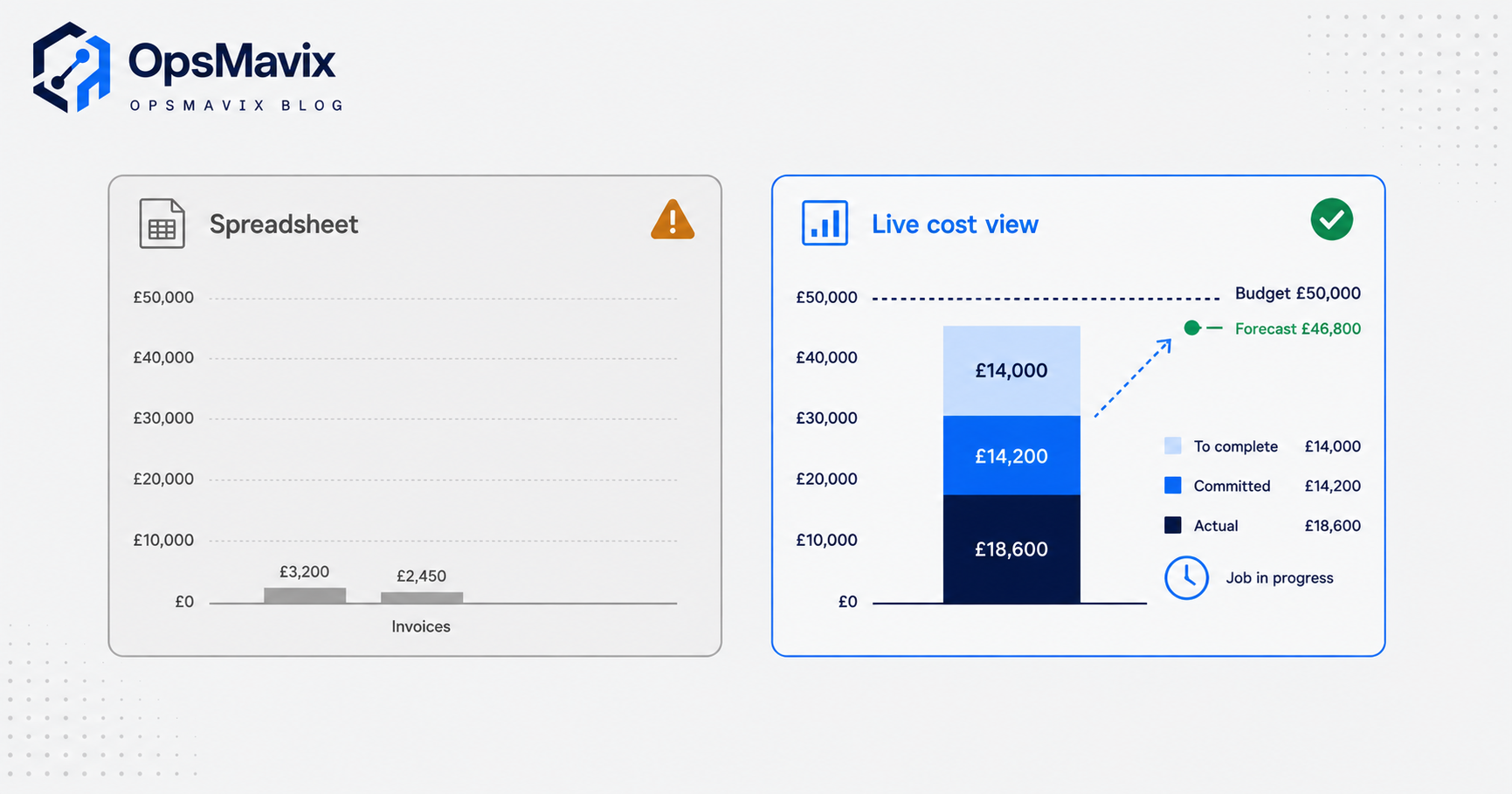
The classic failure is committed cost. Most spreadsheet and lightweight setups only record money when the invoice arrives. But the budget is really spent the moment a purchase order or subcontract is signed, not weeks later when the bill lands. Procore’s guidance on the subject is blunt: committed costs “encumber budget” as soon as the agreement is signed, and without tracking them your financials only show what has been invoiced, not what has already been agreed. That gap is where projects go over budget in silence. You still see headroom on the report while, in reality, the money is already promised away.
The result is what professional services teams call margin fade. You know the exact margin at the end of a job, but by then every decision that set that margin has already been made. The firms that stay profitable are the ones tracking margin in-flight. Rocketlane frames project profitability as a metric that “requires continuous monitoring throughout the project’s lifecycle” rather than assessment only at completion, with healthy gross margins in professional services typically landing in the 30 to 60 percent range. A single unpriced variation, a subcontractor who runs two days long, an over-servicing habit nobody flagged, and that range collapses.
The stakes are not abstract. In UK construction, the National Audit Office reported that 70 percent of projects exceeded their budgets, with overruns averaging 18 percent. On a job carrying a slim margin, an 18 percent cost overrun does not dent the profit, it erases it. Project cost management software exists to make that overrun visible at 3 percent, when a conversation still changes the outcome, instead of at 18 percent, when it only explains the loss.
Budget, Committed Cost, Actual, Forecast: The Four Numbers
If you take one thing from this guide, take these four numbers. Every serious cost view is built from them, per cost code or work package, updated live.
- Budget (baseline). What you priced the work at. Fixed at the start and only changed through approved variations, so you always have an honest reference to measure against.
- Committed cost. Money contractually promised but not yet invoiced: purchase orders, subcontracts, approved variations. This is the number spreadsheets miss and the one that hides overruns.
- Actual cost. What has genuinely been invoiced and paid, plus logged labour. The hard, real spend to date.
- Forecast final cost. Committed plus actual plus your best estimate of the cost still to come. Subtract it from the contract value and you have live remaining margin.
The equation that matters is simple: committed cost plus actual cost plus cost-to-complete gives your forecast, and budget minus forecast is your margin. When those four numbers sit in one place and recalculate on every change, the software has done its job. When committed cost is missing, or the four live in three different tools that never agree, you are flying on the budget line alone and finding out the truth at handover. The skill this replaces is covered in our guide on how to calculate job costing, which walks through the same maths by hand.
Generic Tool vs Full ERP vs Owned System
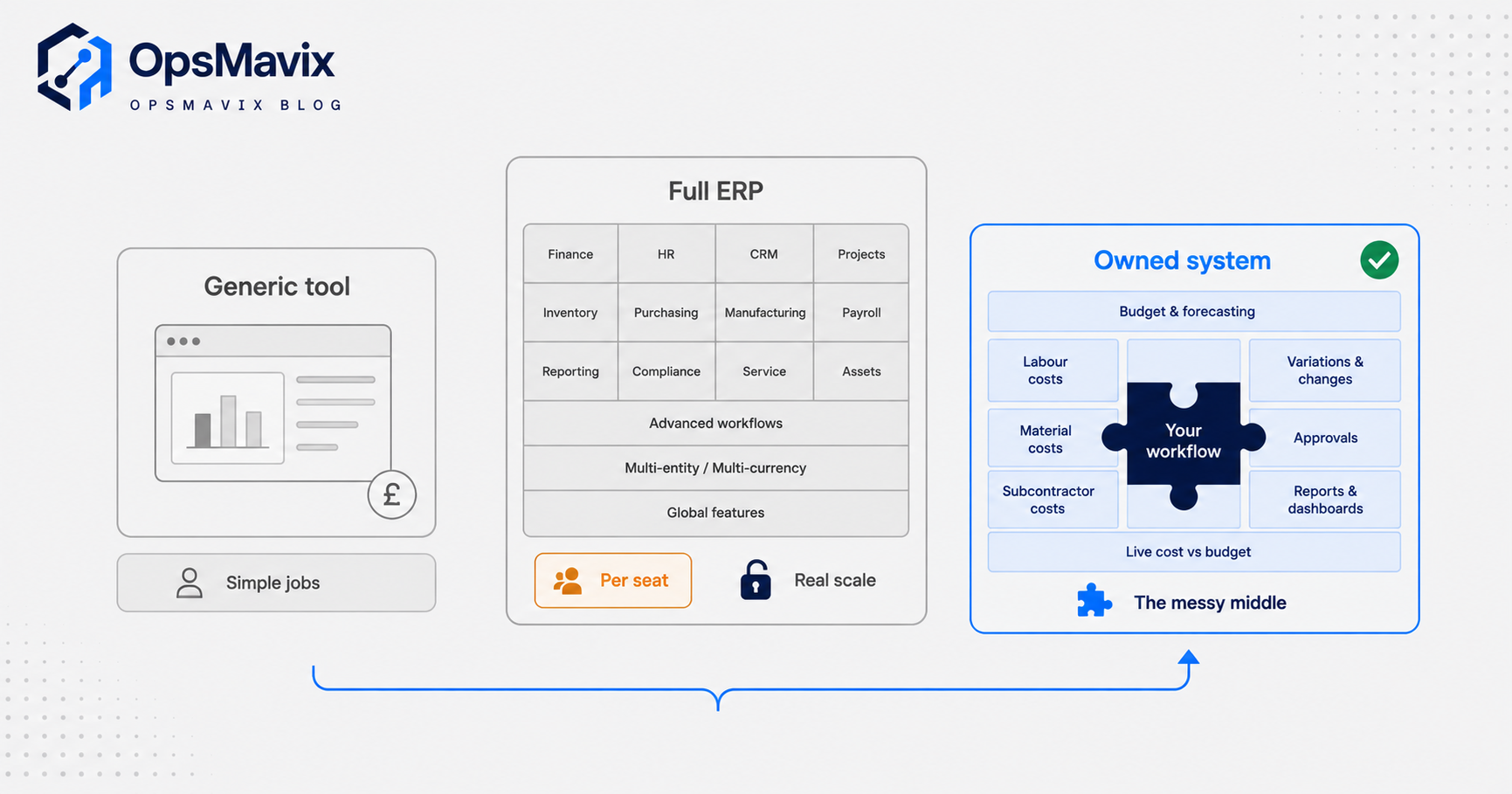
There is no single right answer, only the cheapest option that closes your actual leak. Three shapes cover the market. A cheap generic tool is fine until you outgrow it. A full ERP does everything but is expensive, slow to implement, charged per seat forever, and you bend your process to fit it. A right-sized owned system is built around how your projects actually run and can expand later. Match the shape to your business, not the logo.
| What matters | Generic/cheap tool | Full ERP | Right-sized owned system |
|---|---|---|---|
| Committed-cost tracking | Often manual or absent | Yes, deep | Built to your exact cost codes |
| Fit to how you run jobs | You adapt to the template | You reshape the business to fit | Shaped around your real workflow |
| Cost (3-year view) | Low, per-seat creeps as you grow | High: licence, implementation, annual | Higher build, no per-seat, flattens over time |
| Time to live | Days | Months to a year plus | Weeks, staged |
| Live margin per project | Rarely, or bolted on | Yes, once configured | Yes, front and centre |
| Ownership | Rented, vendor roadmap rules | Rented, deep lock-in | Owned outright, expandable |
| Best for | Simple, low-value jobs | Genuine scale and complexity | The messy middle |
Read the table by your own situation. If your projects are small and few, a generic tool or a well-built spreadsheet genuinely is enough, and paying for more is waste. If you are a large, multi-entity contractor with the team to run an implementation, a full ERP earns its cost. The trouble is the middle: businesses running enough project work that margin leaks hurt, mixing labour, materials and subcontractors in ways no template quite holds, but nowhere near ready to absorb an ERP rollout and its permanent per-seat bill. That is where an owned system stops being a luxury.
A Worked Example: A UK Fit-Out Job
The following is illustrative and not a claim about a specific client. A commercial fit-out firm wins a job at a contract value of £120,000, priced with a target margin of 20 percent, so a budgeted cost of £96,000.
Six weeks in, the spreadsheet looks calm. Invoices received total £41,000, well inside budget, so the site manager reports the job as healthy. What the spreadsheet does not show: the firm has already issued purchase orders for joinery and flooring worth £28,000 and signed an electrical subcontract at £22,000. None of it is invoiced yet, so none of it appears. There have also been two client-requested changes, agreed verbally on site, that added roughly £9,000 of unbudgeted work nobody has priced back into the contract.
Put the real numbers together. Actual £41,000, plus committed £50,000, plus the £9,000 of unpriced variation still to be done, plus an estimated £14,000 of remaining labour and sundries. Forecast final cost: £114,000 against a £96,000 budget. The 20 percent margin has quietly become around 5 percent, and the only reason to stop is that the software surfaced it in week six.
With committed cost tracked live, the forecast crosses the budget line the day the electrical subcontract is signed, not at final account three months later. That is a week where the firm can still re-price the variations with the client, before the work is done and the leverage is gone. The tool did not save the money. It bought back the time to save it. Doing this reliably across every live job is exactly the problem we cover in tracking project profitability without spreadsheets.
Integrations and Why Ownership Matters
Cost data does not live in one place. Committed cost starts in your purchasing, actual cost lands in your accounting package, labour comes from timesheets, and the contract value sits in your quotes or CRM. Project cost management software is only as honest as the connections feeding it. If the accounting sync is manual, or subcontractor orders live in an inbox rather than the system, the four numbers drift apart and the forecast quietly stops being true. The integrations that matter are the specific ones your money flows through, not a badge claiming a hundred connectors you will never touch.
This is where ownership does real work. Rented software connects to your stack on the vendor’s terms and their timetable. When your accounting tool changes, or you add a new way of pricing variations, you wait for their roadmap or pay for a partner. An owned system is built around the cost codes, the approval steps and the exact tools you already run, and it changes when your process changes, on your schedule. For a project business, where every trade prices and tracks work slightly differently, that fit is not cosmetic. It decides whether committed cost is captured the moment an order is placed or lost until the invoice arrives. The broader trade-off between renting and owning your costing engine is set out in our guide to job costing software.
FAQ
What is the difference between project cost management software and project management software?
Project management software tracks tasks, schedules and who is doing what. Project cost management software tracks money: budget, committed cost, actual spend and forecast margin per job. A project can be perfectly on schedule and losing money at the same time, which is why the two answer different questions and why a task board alone leaves margin invisible.
Why is committed cost so important?
Because it is the money you have already promised but not yet been billed for. Track only invoices and your reports show headroom that does not exist, since signed purchase orders and subcontracts are real spend the moment they are agreed. Committed cost is the number that turns a surprise overrun at final account into a visible one weeks earlier, while you can still act.
Can I do this in a spreadsheet?
For a handful of small, simple jobs, yes, and you should not pay for more than you need. The spreadsheet breaks when jobs multiply, variations pile up and committed cost has to be tracked live across several people. At that point the manual updates lag reality, versions diverge, and the margin number you are steering by is days or weeks out of date.
How is this different from a full ERP?
A full ERP includes cost management inside a much larger system covering finance, stock, HR and more. It is powerful and, at genuine scale, worth it. For a mid-sized project business it is usually expensive, slow to implement and charged per seat indefinitely, and you adapt your process to fit it. A right-sized owned system does the cost-control job around how you already work and expands into the rest later if you need it.
What does project cost management software cost in the UK?
Generic tools run at a monthly per-seat subscription, which is cheap to start and climbs as your team grows. A full ERP typically means a significant licence plus implementation and annual fees. An owned system is a larger upfront build with no per-seat charge, which tends to flatten below the rented options over a few years once seat creep and workaround admin are counted. The honest answer is to price the three-year total, not the sticker.
How OpsMavix Can Help
OpsMavix builds right-sized operations systems for businesses that have outgrown spreadsheets and disconnected tools, and project cost visibility is one of the most common leaks we close. We map how your jobs are quoted, ordered and delivered, then build a system that tracks budget, committed cost, actual spend and forecast margin live, per project, around your real cost codes and the accounting tools you already use. You own it, there is no per-seat fee as you grow, and it expands as your operation does. If margin keeps disappearing before you can see it going, Book a Free Operations Leak Audit.
Sources
- Invensis Learning: Project Cost Management. The four core processes: estimating, budgeting, control and forecasting.
- Procore: Committed Costs in Construction. Definition of committed cost and why it encumbers budget before invoicing.
- Rocketlane: Project Profitability Metrics. Profitability as continuous monitoring, plus typical professional-services margin ranges.
- Digital Construction Week: Why Construction Projects Still Struggle With Failure Costs. Reports the National Audit Office finding that 70 percent of UK projects exceeded budget, averaging 18 percent overruns.
Keep reading
Getting value from OpsMavix? Add us as a preferred source on Google — you'll see more of our operations content in your AI Overviews, AI Mode and Search.