
Job Shop Software: What It Actually Costs You, and What Nobody Tells You Before You Sign
Most job shop software guides are written by a vendor that ranks itself first. This one is too, so read it accordingly. The difference is that every claim here is sourced, the review data behind it is published, and we tell you where the other systems are the better buy.
Job shop software is the system a high-mix, low-volume manufacturer uses to quote work, route each job through operations that differ every time, capture labour hours on the shop floor and compare estimated cost against actual before the job ships. It is distinct from MRP, which plans repetitive production from a stable bill of materials.
Every guide to job shop software has the same problem, and this one does too: it is written by somebody who sells software. The honest thing is to say that at the top rather than bury it, so here it is. OpsMavix builds custom operations systems and full ERP solutions for UK product businesses. We are one of the options at the end of this article. For plenty of job shops we are the wrong one, and we will tell you exactly when.
What makes this different from the other comparisons is not the disclosure. It is that the review data behind it was counted rather than asserted.
Who this is for, and who it is not for
This is written for the owner or operations manager of a high-mix, low-volume shop. Structural steel, architectural metalwork, precision machining, sheet metal, fabrication and assembly. Somewhere between about 10 and 150 people. Every job has its own routing, its own quantity and its own due date, which is precisely why the software built for repetitive production keeps failing you.
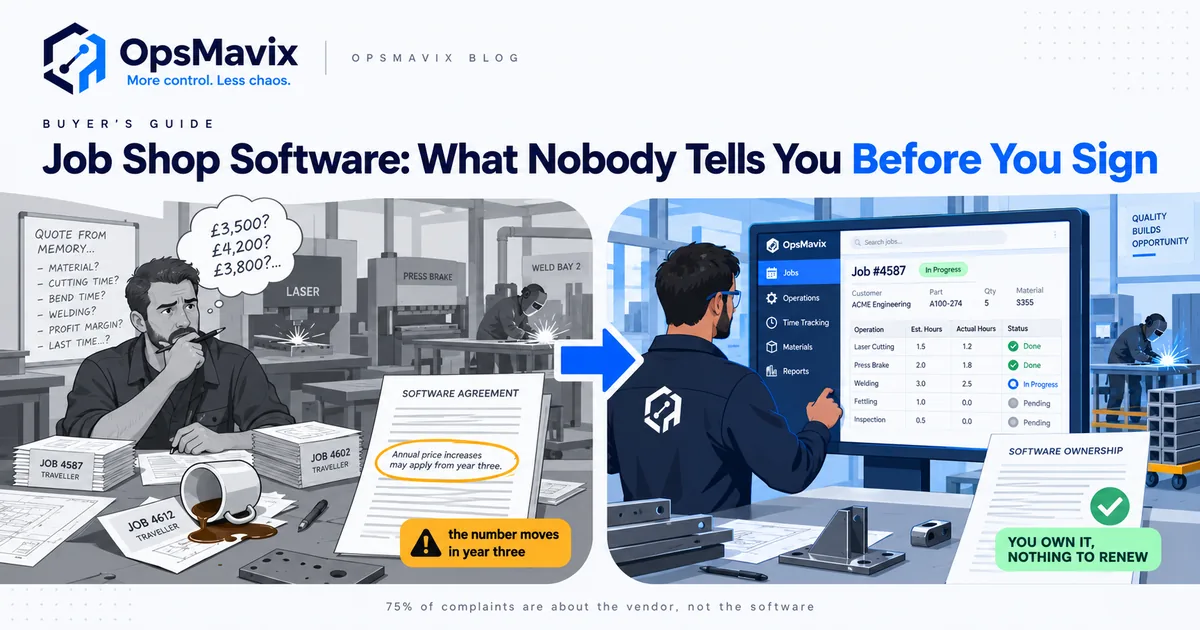
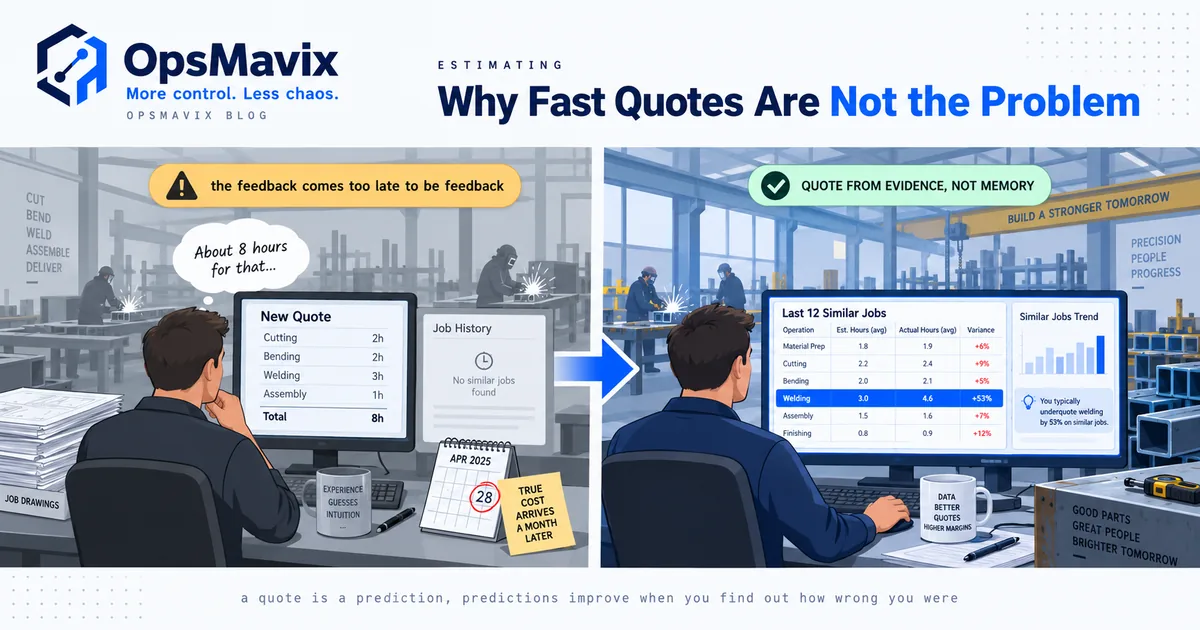
You probably recognise the state you are in. The work is good. The order book is full. And yet nobody can answer, on the day a job ships, whether it made money. The traveller card is the system of record and it lives under a coffee cup. Quotes go out on gut feel because the estimator does not have last year’s actuals in front of them. The laser runs flat out while three welders wait on parts nobody flagged.
If that is not you, this article will waste your time. If you run repetitive production of the same part in volume, you want MRP, not job shop software, and the two are not interchangeable.
What does job shop software actually have to do?
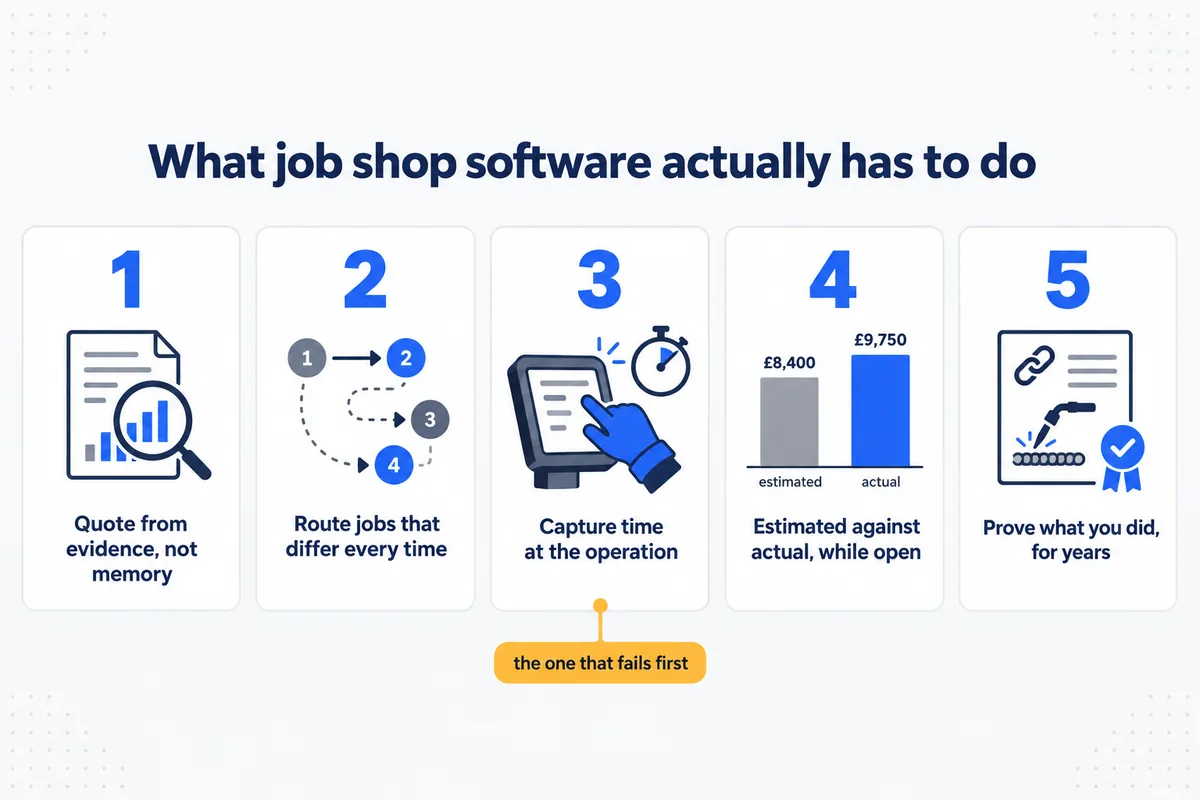
Job shop software has to do five things: quote from evidence, route a job whose operations differ every time, capture time at the operation, show estimated against actual while the job is still open, and prove what was done. Strip away the feature lists and there are five jobs. Everything else is decoration.
- Quote from evidence rather than memory. The estimator needs last year’s actual hours for a similar job, not a number somebody remembered.
- Route a job through operations that differ every time. Cut, bend, fit, weld, finish, QC and dispatch, in an order that changes per job.
- Capture time at the operation, not the day. Set-up separately from run. On the floor, by people wearing gloves, in under five seconds.
- Show estimated against actual while the job is still open. After it ships is a post-mortem, not management.
- Prove what you did. Material certs, weld records, who did what, traceable for years, because bigger contracts demand it.
A system that does four of these and not the third one will fail, because the third is the one that depends on people who are busy and dirty and do not care about your software.
The systems, and what each one publishes
Here is a decision most comparison articles quietly dodge. Almost none of these vendors publish a price. So instead of inventing figures, this table records what each vendor makes public versus what requires a sales call, which is verifiable, and which tells you something real about how they sell.
| system | positioning | pricing published |
|---|---|---|
| MIE Trak Pro | Job shop and fabrication ERP, US-centred | No, quote only |
| ProShop ERP | Engineering-first, strong on precision and compliance | No, quote only |
| JobBOSS² (ECI) | Long-standing job shop ERP, large installed base | No, quote only |
| Global Shop Solutions | Full manufacturing ERP with estimating | No, quote only |
| Infor VISUAL | Enterprise manufacturing ERP | No, quote only |
| MRPeasy | Small-manufacturer MRP, self-serve | Yes, published per-user tiers |
| Fishbowl | Inventory and manufacturing, QuickBooks-adjacent | Partly |
| EZIIL | Steel fabrication specific, 15 to 150 people | Yes, flat team-size pricing |
| SYSPRO | Manufacturing and distribution ERP | No, quote only |
| Odoo | Modular open-core ERP, manufacturing app | Yes, published per-app and per-user |
| OpsMavix | Custom operations system or full ERP, built for your process, you own it | Yes, band published from £3,000 |
Checked September 2026. Vendors change pricing pages often, so verify before you decide anything.
Two things fall out of that table immediately.
First, “quote only” is a pricing strategy, not an accident. It means the number is set by what the salesperson thinks you will pay, which correlates with your headcount and how badly you need to buy. That is legal, normal, and worth knowing before you walk in.
Second, per-user pricing quietly taxes growth. If the meter runs on users, every welder you put on the system costs you again. Shops respond by only licensing the office, which defeats the entire point, because the data you need lives on the floor.
Taken one at a time, here is what the main options are and who each one fits.
MIE Trak Pro
MIE Trak Pro is an ERP built specifically for job shops and fabrication businesses, covering quoting and estimating, scheduling, shop floor data collection, inventory and job costing in one system. It is modular, so a shop can start with the parts it needs and add more later. It is aimed at discrete manufacturers running mixed work rather than long production runs, and it is sold through a quoted process. It suits a shop that wants a manufacturing-specific ERP rather than a general business system bent into shape.
ProShop ERP
ProShop ERP is an engineering-led, paperless system that came out of a working machine shop, and it is unusually strong on quality and compliance workflow alongside the ERP basics. Document control, non-conformance handling and inspection records are captured as part of normal work rather than bolted on afterwards. It suits precision machining and fabrication shops whose certification obligations are as demanding as their scheduling, and where the audit trail matters as much as the despatch date.
JobBOSS²
JobBOSS², from ECI Software Solutions, is one of the longest-established job shop ERPs, formed by bringing the JobBOSS and E2 Shop product lines together. It covers quoting, order entry, scheduling, shop floor data collection, job costing and accounting for make-to-order manufacturers. The installed base is large, which is a practical advantage: there are usually shops nearby with an opinion worth asking for. It suits a buyer who would rather have a mature, well-trodden product than a newer one.
Global Shop Solutions
Global Shop Solutions is a full manufacturing ERP with estimating, scheduling, inventory, shop floor data collection and accounting, aimed at discrete manufacturers who want one vendor across the whole business rather than an operations layer beside their accounts package. Because the estimate and the job live in the same system, actuals are available to inform the next quote without an integration. It is a broader purchase than a job shop point solution and it is implemented as such.
MRPeasy
MRPeasy is a cloud MRP and manufacturing system aimed at small manufacturers, covering production planning, stock, purchasing, basic CRM and job costing. It is self-serve and publishes per-user tiers, so it can be evaluated without entering a sales process, which makes it a useful anchor before you talk to vendors who quote. It is built around MRP logic, so it fits smaller shops making repeat products more comfortably than it fits genuinely high-mix routing.
EZIIL
EZIIL is built for steel fabrication specifically rather than manufacturing in general, and it aims at project-based shops of roughly fifteen to a hundred and fifty people. It covers quoting, production planning, drawing and document handling, QR-based shop floor reporting and material traceability, and it charges on flat team-size tiers rather than per user. That model matters if you intend to put the whole floor on the system. It suits a fabricator whose process is close to standard.
Odoo
Odoo is a modular open-core business platform with a manufacturing app alongside accounting, inventory, purchasing and CRM, and it publishes its pricing per app and per user. The licence position is only part of the picture: open core moves responsibility rather than removing cost, because configuration, integration and ongoing maintenance land with you or with an implementation partner. It suits businesses that have the internal appetite, or a good partner, to own that work.
The thing the feature tables never show you
Go and look at any of the comparison tables on the competing articles for this topic, this one included. They compare features with ticks and crosses. Every serious system will have a tick in nearly every row, because these are mature products and the features converged a decade ago.
Feature tables cannot separate these systems. So what does?
There is one place where customers speak without a salesperson present, so that is where the answer is.
What 2,324 reviews say goes wrong after you sign
We collected 2,324 public reviews across 19 systems that UK product businesses actually run, including Odoo, NetSuite, Katana, Epicor, MRPeasy and Fishbowl, and coded all 840 negative reviews by what the customer was actually complaining about. The full method, the rule set and the measured precision are published, so the work is checkable rather than something to be taken on trust.
The headline finding is not the one a feature comparison would predict.
| what the complaint was about | share of negative reviews | UK only |
|---|---|---|
| Support quality or responsiveness | 50.1% | 50.0% |
| Functionality gaps | 28.8% | 33.8% |
| Reliability and bugs | 21.2% | 23.1% |
| What sales promised versus what arrived | 18.8% | 20.5% |
| Integrations | 18.7% | 23.1% |
| Price increases | 16.7% | 22.3% |
| Contract and cancellation terms | 16.0% | 13.0% |
| Implementation and onboarding | 13.7% | 12.4% |
| Value for money | 9.9% | 11.8% |
| Account management | 7.1% | 5.2% |
Categories overlap, because one review can carry several complaints.
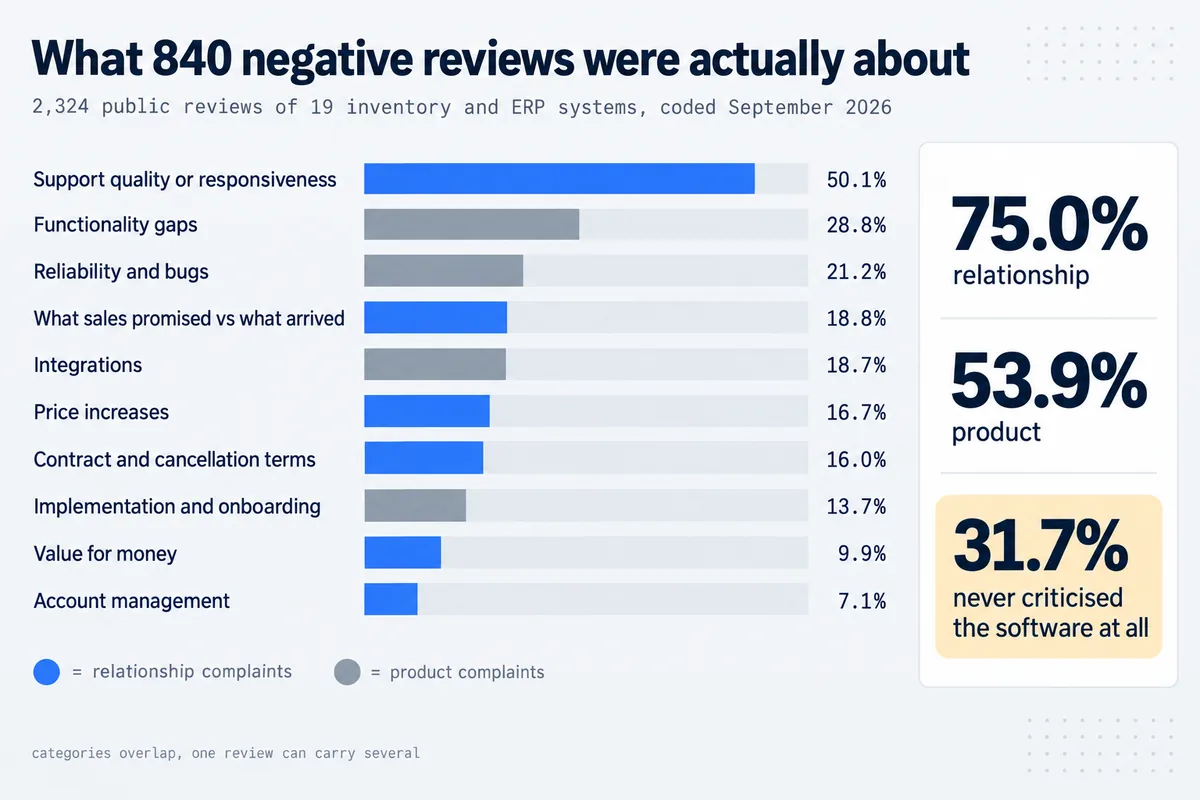
Group them and the picture is stark:
- Relationship complaints (support, commercial terms, account management, what sales promised): 75.0% of negative reviews
- Product complaints (bugs, missing function, integrations, implementation): 53.9%
- Relationship complaints with no product complaint at all: 31.7%, which is 266 reviews
Close to a third of unhappy customers never criticise the software. They criticise the company selling it. The product worked. The relationship did not.
There is a second finding worth your attention if you are a UK buyer. UK reviewers complain about price increases noticeably more than the global average, 22.3% against 16.7%. Combine price rises, value for money and lock-in and commercial complaints reach 41.0% of UK negative reviews.
The loyalty penalty
Here is the one that should change how you evaluate.
Split the negative reviews by whether the reviewer mentioned being a long-term customer, and the gap is wide. Reviewers citing several years of use complain about price and contract terms 57.9% of the time, against 33.2% for newer customers.
Read that again, because it is the whole argument. The longer you stay, the more likely your complaint is about money rather than the product. You do not get grandfathered for loyalty. You get repriced, because by year three your data is inside their system, your team is trained on it, your integrations are wired to it, and your leverage is gone.
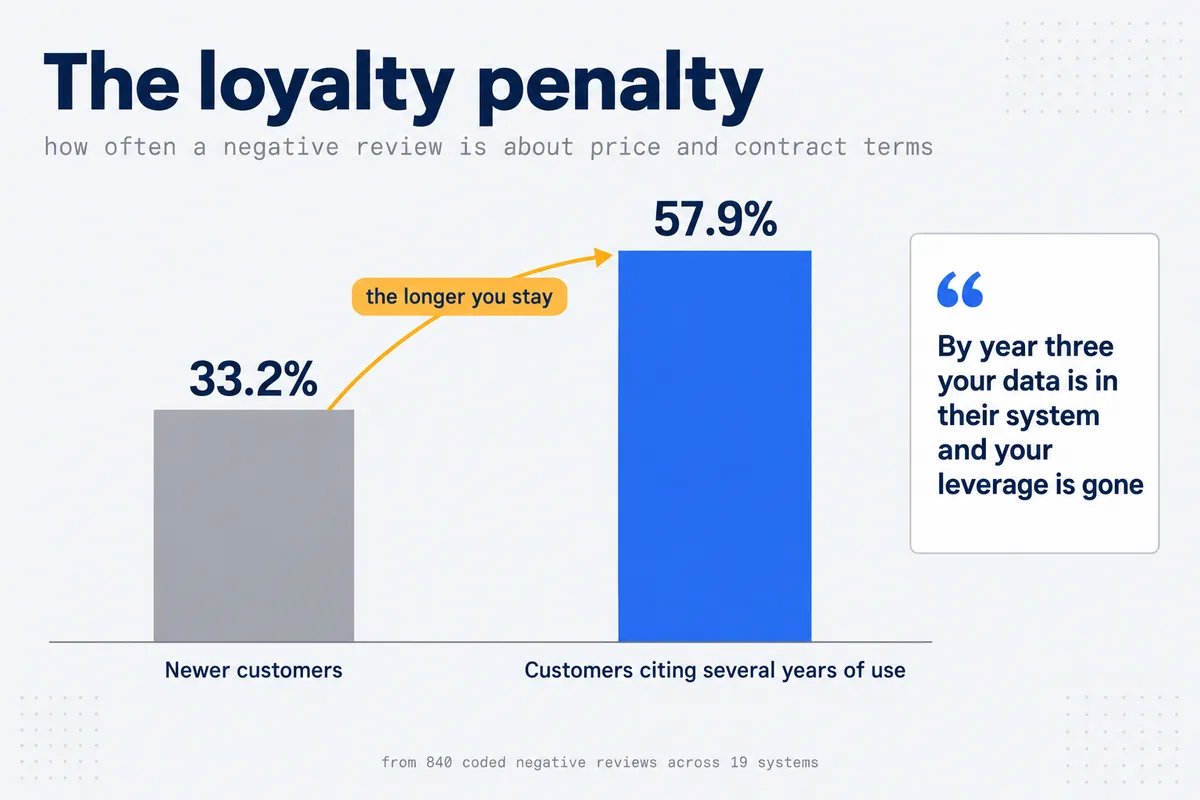
That is not a bug in any particular vendor. It is what a subscription business is supposed to do. The mistake is buying as though it will not happen to you.
One more thing to carry into the sales calls. Compare how reviews arrive, and 5-star reviews are around six times more likely to have been requested by the vendor than 1-star reviews are. The badge on a vendor’s website is substantially a measure of how hard they ask. The unprompted signal is concentrated in the complaints. Read those first.
Buy, subscribe, or own: three different purchases
Most comparisons treat every option as the same kind of purchase with different logos. They are not.
| what you get | if you stop paying | who holds the code and data | |
|---|---|---|---|
| Subscription (most of this list) | A licence to use it on their terms | Access ends or drops to a limited tier | The vendor |
| Perpetual licence plus maintenance | A version you keep, support you rent | You keep running an ageing version | The vendor holds the code |
| Owned system | A system built for your process | Nothing to stop, it keeps running | You do |
Neither column is automatically right. A subscription is a genuinely good deal when the software fits your process closely, because somebody else carries the maintenance, the security patching and the roadmap. That is a real service and it is worth paying for.
It becomes a bad deal in two situations. When your process is unusual enough that you spend the licence and then spend again on workarounds. And when the meter runs on the number you are trying to increase.
When is packaged job shop software the right answer?
Packaged job shop software is the right answer when your process is already close to standard, when you need the system live in weeks with no build phase, and when nobody in the building wants to spend time defining how the work should run. Buying the right thing matters more than buying from any particular vendor, this one included. Take the packaged systems seriously if any of these describe you:
- Your process is close to standard. If a system built for job shops already matches how you route, quote and cost work, buy it. Do not pay to rebuild what exists.
- You want it live in weeks with no build phase. EZIIL, for instance, publishes flat team-size pricing and quick deployment for steel fabricators of 15 to 150 people, which is a genuinely well-aimed offer for that shop.
- You have no internal appetite for decisions. A packaged system decides for you. That is a feature when nobody in the building wants to define a process.
- You are below the size where a build makes sense. If your whole operation runs on one spreadsheet and four people, a £3,000-plus build is not your best next pound.
If two or more of those are true, close this article and go book demos with MIE Trak Pro, ProShop, JobBOSS² and EZIIL. That is the honest recommendation.
When is an owned system the right answer?
An owned system is the right answer when the process itself is what wins the work, when the bill would otherwise grow with the business, and when the records have to outlive any supplier relationship. The reverse case, stated as plainly.
Your process is the thing that makes you money. High-mix shops usually win work because of something specific they do: a finishing capability, a compliance regime, a way of nesting or scheduling nobody else manages. Packaged software makes you pay twice for that. Once for the licence, then again in the workarounds, the spreadsheets alongside, and the operations nobody logs because the screen does not fit the job.
You do not want the bill to grow with the business. Look again at what the meter runs on across the market. Users. Orders. Locations. Integrations. Every one of those is a number you are actively trying to increase. In the review data, long-term customers complain about price and contract terms 57.9% of the time. That is what the meter feels like in year three.
You want the thing you run on to be an asset. You hold the code, the data and the hosting account. There is no renewal, no notice period and no repricing conversation, because there is nothing to renew.
You need traceability that is genuinely yours. If you hold EN 1090 or similar, your production records are a compliance obligation that outlives any supplier relationship. Records inside somebody’s subscription are records you rent.
How do you run the evaluation without getting sold to?
You run the evaluation without getting sold to by testing the things a demo is never rehearsed for: how fast support answers a real ticket, what the commercial terms do in year three, and whether the shop-floor screen works in a glove. Whatever you buy, the data above suggests a specific way to run the process. Most of these questions are uncomfortable to ask, which is exactly why they work.
Ask about year three, in writing.
- What is the maximum annual price increase, and is that cap contractual?
- What is the notice period, and what happens on the renewal date if I miss it?
- If I add ten people to the shop floor, what changes on my invoice?
- What does it cost to get my data out in a usable format, and in what format exactly?
Test support before you sign, not after. Support is the single largest complaint category at 50.1%, twice the rate of missing features. Raise a real ticket during the trial and time the response. You are evaluating the company as much as the product.
Ask what sales promised versus what arrived. 18.8% of negative reviews are about that gap. Get every capability that matters written into the contract, not the slide deck. If it will not go in writing, it is not a feature.
Read the 1-star reviews first, not the 5-star ones. The 5-star reviews are six times more likely to have been solicited. The complaints are where the unprompted information lives.
Insist on seeing the shop-floor screen on a phone, in a glove. Not the office dashboard. If time capture at the operation is awkward, the whole system fails, because you will not get the data and without the data none of the reporting means anything.
A worked example: the five-year number nobody puts on the quote
Software decisions get made on the first invoice and regretted on the fifth. Here is how to run the arithmetic before you sign, using a shape that turns up constantly: a 24-person fabricator, six people in the office, eighteen on the floor.
You cannot do this with real vendor prices because almost nobody publishes them, which is the point of the exercise. So do it with the structure instead, and make the salesperson fill in your blanks.
Step one. Write down what the meter runs on. Not the price. The unit. Ask directly: “If nothing about my business changes except that we grow 20%, what on my invoice grows?” The answers cluster into users, sites, orders, modules or nothing. Write down which one.
Step two. Project your own growth against that unit. If the meter runs on users and you intend to put the floor on the system, your user count is not six, it is twenty four. Ask what twenty four costs, not what six costs. This single question changes the number more often than any negotiation does, and vendors quote the office headcount by default because that is what most buyers ask about.
Step three. Add the increase. Ask for the contractual cap on annual increases. If there is no cap, that is the answer, and you should model a meaningful annual rise rather than assuming flat. The review data explains why: reviewers citing several years of use complain about price and contract terms 57.9% of the time.
Step four. Add the things that are not in the base. Implementation. Training. The integration to your accounts package. The traceability module. Additional sites. Support tiers. Ask for each in writing.
Step five. Add the cost of the workarounds. This is the one nobody counts and it is often the largest. If two operations do not fit the system and stay on a spreadsheet, that spreadsheet has an owner, and that owner has a salary. Half a day a week of someone’s time is a real annual cost and it does not appear on any invoice.
Step six. Add the exit. What does it cost to get your data out, in what format, and how long does notice run. If the answer is vague, price the vagueness.
Now do the same six steps for a build. The shape is different rather than automatically cheaper: a larger number at the start, then hosting at cost, then nothing unless you ask for more work. There is no user count, no renewal and no exit, because there is nothing to exit from.
Which comes out ahead depends entirely on your numbers, and it does not always land in favour of a build. What is true is that most shops never run the comparison at all. They compare a monthly figure against a project figure, decide the monthly one is smaller, and find out in year four that they were comparing two different things.
What will the demo not show you?
The demo will not show you the floor screen in a glove, a routing that changes mid-build, one plate split across three jobs, or a real month-end, and those are the four places a job shop system actually breaks. Demos are rehearsed, and they are rehearsed on the happy path. The four things below are where systems actually break in a job shop, and none of them appear unless you insist.
The floor screen, on the floor, in a glove. Not the office dashboard on a laptop. Ask to see clock-on at an operation on the actual device your welders would use, with gloves on, standing up. If it takes more than a few seconds, or needs a keyboard, or the screen is unreadable in daylight, the data will not get captured and everything downstream is decoration. This is the single highest-value question in the entire evaluation and almost nobody asks it.
A job with a routing that changes mid-build. Every job shop has them: the customer revises the drawing after cutting has started. Ask them to show you the revision going through the live system, with the already-logged hours intact and the traceability preserved. Watch how many clicks it takes and who is allowed to do it.
The split. Ask them to take one plate, cut it into three parts that go to three different jobs, and then show you the material traceability on each part. This is where paper systems die and it is where some software systems quietly do too.
A real month-end. Ask to see estimated against actual for a completed job, and ask specifically how many days after dispatch that view becomes accurate. If the answer involves waiting for the accounts to close, the feedback arrives too late to change any quote.
Bring your own job to the demo. Not a made-up one. A real drawing, a real routing and the real hours it took, so you can check their numbers against something you already know.
Our production tracking system for manufacturers shows what an owned job-shop build covers when the demo stops short.
FAQ
What is the difference between job shop software and an ERP?
Job shop software is usually a subset of ERP aimed at high-mix, low-volume production: quoting, routing, shop-floor time capture and job costing. An ERP adds finance, purchasing, inventory and often CRM around it. Plenty of the products above are full ERPs marketed as job shop software. Ask which modules you are actually buying and which are extra.
Do I need MRP as well?
Only if you make repeat products from a stable bill of materials. Classic MRP plans material against forecast demand. A job shop buys mostly to order, so MRP often adds ceremony without adding control. Get quoting, routing and job costing right first.
How much does job shop software cost in the UK?
Most vendors on this list do not publish a price, which means it depends on your headcount and on the negotiation. The ones that do publish, such as MRPeasy, Odoo and EZIIL, are worth checking directly because they will anchor your expectations before you enter a quoted process. Our own builds start at £3,000, fixed before work begins.
We already have Sage or Xero. Does this replace it?
No, and be wary of anyone who says it should. Your accounting system is fine at accounting. What it cannot do is tell you which job made money, because it never sees the hours. The right shape is usually operations software feeding the accounts, not replacing them.
Can we start small?
Yes, and you probably should. The highest-value first step in almost every fab shop we have looked at is not full ERP. It is capturing time at the operation and putting estimated against actual in front of the estimator. That alone changes what you quote next month.
How long does implementation actually take?
Implementation and onboarding appear in 13.7% of negative reviews, so this is worth pinning down rather than accepting a range. Ask two specific questions: how many working days of your team’s time does it need, and what is the definition of done. Vendors quote elapsed weeks, which is not the same thing. A twelve-week implementation that consumes forty days of your operations manager is a much bigger purchase than the invoice suggests.
Will the shop floor actually use it?
This is the risk that sinks most of these projects, and it is behavioural rather than technical. Two things predict adoption. First, whether clock-on takes seconds rather than a login. Second, whether the people on the floor ever see anything back from it. A system that only feeds the office is one that the floor correctly identifies as surveillance and quietly works around.
What if we already have an ERP that half works?
Then replacing it is usually the wrong first move, because you would be re-buying the parts that work in order to fix the parts that do not. The common gap in this situation is floor capture and job costing. Adding that alongside an ERP that handles purchasing and finance adequately is a smaller, cheaper and much safer project than a migration.
Do we need barcodes or QR codes?
For traceability, effectively yes, and it is cheaper than people expect. The important detail is not the scanner, it is that the label survives the process. A label that comes off during cutting or gets painted over at finishing has not solved anything.
What happens to our historical job data?
Ask this before signing, not after. You want the last few years of quoted-against-actual history in the new system, because that history is what makes the estimator better. If migration of historical jobs is quoted as an extra, that is worth knowing while you still have leverage.
Is open source an option?
It can be, and Odoo publishes its pricing which makes it easy to evaluate. Be clear-eyed about what open source moves rather than removes: the licence cost falls, and the implementation and maintenance responsibility rises. In our dataset Odoo carries 1,254 public reviews with 47% rated 1 or 2 star, which is worth reading through rather than summarising. The complaints are instructive about what self-managed really means.
How do we avoid buying more than we need?
Write down the five jobs from earlier in this article, score your current pain on each out of ten, and only shortlist systems that fix your two highest scores. Most overbuying happens because the demo is impressive in areas where you had no problem.
About this article, and its limits
Written by Martin Gjini at OpsMavix, September 2026.
Three honest limitations, since the point of this article is that unsourced claims should not be trusted.
The review dataset is Trustpilot only, English only, and covers 19 inventory and ERP systems rather than job shop software specifically. Several products on this page, including MIE Trak Pro, ProShop and JobBOSS², are not in it. The findings describe how buyers of business operations software get treated after they sign. We think that generalises, but it is an inference and you should treat it as one.
We sell one of the options. Every article on this topic is written by someone with a stake, and this one is no exception. That is why the section on when packaged software wins names real competitors and real reasons.
We have not published named customer results. Several of the comparison pages you will read quote figures like “up to 15% margin improvement” with no named customer and no documentation. We are not going to do the same in reverse. Our case studies are anonymised at the clients’ request and carry no outcome claims we cannot evidence.
The full dataset, the coding rules and the measured precision are published at what actually goes wrong with inventory and ERP software. The vendor-by-vendor breakdown is at our comparisons.
If you want to see what an owned system looks like before you talk to anybody, the fabrication shop control room demo is clickable and needs no sign-up.
Keep reading
Getting value from OpsMavix? Add us as a preferred source on Google — you'll see more of our operations content in your AI Overviews, AI Mode and Search.