
Pre-Order Stock Management: UK Online Shop Guide
Sell stock before it lands without overselling. A UK guide to pre-order caps, inbound allocation, dispatch dates, consumer rules and a GBP example.
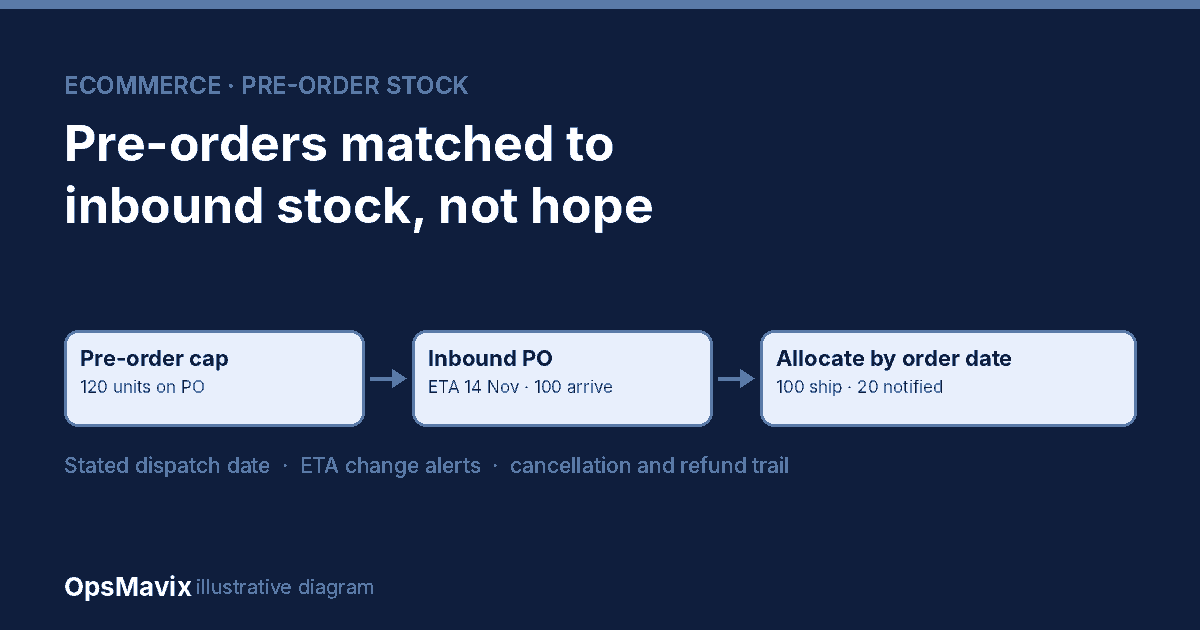
Pre-order stock management means selling goods you do not yet hold while keeping every pre-order tied to real inbound stock, a stated dispatch date and a fair allocation rule. For a UK online shop, the practical question is not whether your storefront can accept a pre-order. It is whether you can say, at any moment, how many pre-orders each incoming purchase order will cover and which customers wait if the delivery is short.
Pre-orders can protect cash flow and gauge demand, but they create obligations. Under the Consumer Rights Act 2015, if no delivery time is agreed, goods must be delivered without undue delay and within 30 days. A pre-order usually means you are agreeing a later time, so the date you state matters, and so does what you do when the supplier slips.
The OpsMavix ecommerce inventory automation system is a relevant starting point when pre-orders sit in Shopify or a marketplace while the real supply picture lives in a spreadsheet of purchase orders. This guide covers the workflow, the UK rules worth knowing and how to test software. It is operational guidance, not legal advice.
Why pre-orders break stock control
A typical failure looks like this. A shop turns on “continue selling when out of stock” for a new product, expecting a delivery in two weeks. Orders keep arriving across Shopify and a marketplace. The supplier ships fewer units than ordered and a week late. Nobody can say quickly which customers are covered, and customer service starts promising dates from memory.
Three separate quantities are being confused:
- On hand: units physically in your warehouse.
- Inbound: units on confirmed purchase orders, with an expected arrival.
- Committed: units already promised to customers, including pre-orders.
The idea behind available to promise applies directly: what you can safely sell is on hand plus confirmed inbound, minus what is already committed. A pre-order process makes that calculation explicit for stock that has not arrived.
What Shopify’s out-of-stock setting does and does not do
Shopify’s help centre describes Continue selling when out of stock as a product or variant setting that lets customers buy items that are out of stock, and lists pre-orders as one reason to use it. It requires inventory tracking to be on.
It is a useful switch, but it does not by itself:
- link pre-orders to a specific purchase order or arrival date;
- stop selling at a cap based on what is actually inbound;
- decide which customers receive a short delivery;
- reflect the same limit across other channels you sell on.
Shopify also notes that with multiple locations, an item can show as out of stock online if the location that fulfils online orders is at zero or below, even when another location has stock. Pre-order logic therefore needs to respect your fulfilment locations as well. Apps and other platforms offer dedicated pre-order features; test them against the workflow below rather than assuming.
The UK rules worth knowing
The following points summarise primary legislation for consumer sales in the UK. Check the current text and take advice for your own terms.
| Rule | What it says | What it means for pre-orders |
|---|---|---|
| Consumer Rights Act 2015, s.28 | Without an agreed time, deliver without undue delay and no more than 30 days after the contract | State the agreed delivery time or period clearly; do not rely on the 30-day default for stock you know arrives later |
| CRA 2015, s.28 (late delivery) | If delivery is late, the consumer may treat the contract as at an end where delivery was refused or timely delivery was essential, or may set an appropriate additional period | Track which pre-orders are past their stated date and act before customers do |
| CRA 2015, s.28(9) | If the consumer ends the contract, the trader must reimburse all payments without undue delay | Your system needs a clean cancel-and-refund path for pre-orders |
| Consumer Contracts Regulations 2013, Sch. 2(j) | Before a distance contract, give the arrangements for delivery and the time by which you undertake to deliver | Show the pre-order dispatch or delivery date before checkout, not only in a later email |
| CCR 2013, reg. 30 | The cancellation period for goods ends 14 days after the goods come into the consumer’s possession; for multiple goods delivered on different days, 14 days after the last | Mixed baskets with a pre-order item can extend the cancellation window for the whole order |
Whether you take payment at order or at dispatch is a commercial and payment-provider decision. Either way, record it on the order so finance and customer service can see what has been charged.
A practical pre-order workflow
1. Open pre-orders against a confirmed purchase order
Only open a product for pre-order when there is a supplier confirmation with a quantity and expected arrival date. Record the purchase order reference on the pre-order listing.
2. Set a pre-order cap
Set the cap at or below the confirmed inbound quantity, minus any units reserved for wholesale customers or other channels. Some shops hold back a buffer for short deliveries. When the cap is reached, the product should stop accepting pre-orders on every channel.
3. Show a dispatch date you can support
Base the customer-facing date on the supplier’s arrival date plus your receiving and picking time. If the supplier says 14 November and you need two working days to receive and pick, the earliest honest dispatch date is later than 14 November.
4. Keep pre-orders separate from sellable stock
Pre-order demand should not reduce today’s on-hand stock or block in-stock orders for other products in the same basket. Decide how mixed baskets ship: hold the whole order, or split shipment and accept the extra carriage cost.
5. Allocate arriving stock by a written rule
Order date is the most common and easiest to explain. Whatever rule you choose, apply it consistently across channels and record which pre-orders were covered by which receipt.
6. Handle changes quickly
When an arrival date moves or a delivery is short, identify affected orders, update the stated date, notify customers and offer cancellation where appropriate. Our backorder management guide covers the communication side in more depth.
7. Close the pre-order cleanly
Once all pre-orders are allocated and dispatched, switch the product back to normal stock behaviour. Leaving the out-of-stock setting on is a common source of later overselling.
Worked UK example: a short delivery
Hypothetical example, all prices in GBP including VAT and invented for illustration. A shop places a purchase order for 120 units of a new product with an expected arrival of 14 November. It opens pre-orders with a cap of 120 at £45 each, across its own site and one marketplace.
| Step | Quantity |
|---|---|
| Confirmed on purchase order | 120 units |
| Pre-order cap | 120 units |
| Pre-orders taken | 120 orders of one unit |
| Units actually received | 100 units |
| Pre-orders covered, by order date | 100 |
| Pre-orders not covered | 20 |
Because the shop capped pre-orders at the inbound quantity and allocated by order date, it knows immediately that the last 20 orders are not covered. The value of those orders is 20 × £45 = £900.
The shop now has a clear decision. It can notify those 20 customers with a new date based on the supplier’s revised shipment, offer cancellation and a refund, or source the missing units elsewhere. Without a cap, the same marketplace might have kept accepting orders past 120, turning a 20-unit shortfall into a larger one with no clear queue.
Now a cost view. Suppose that without linked records, working out who is covered and contacting customers takes eight hours of staff time at an assumed £15 per hour, or £120 per incident, before refunds, extra carriage or lost goodwill. These figures are invented. Measure your own pre-order incidents before building a case for new software.
Comparing approaches fairly
| Approach | Useful fit | What to demonstrate |
|---|---|---|
| Storefront “keep selling” setting | Occasional single-channel pre-orders with reliable suppliers | How you stop at a cap and track which orders are covered |
| Pre-order app on the storefront | Regular pre-orders on one main channel | Cap enforcement, dispatch date display, partial allocation and cancellation |
| Multichannel inventory platform | Pre-orders across several channels | One shared cap across channels and linkage to purchase orders |
| Focused connected system | Pre-orders tied to purchasing, warehouse and finance workflows | Purchase order linkage, allocation history, change notifications and refunds |
A packaged tool may already be enough. Test it with your awkward cases before commissioning anything new. A custom workflow can make sense when pre-orders are a regular part of the business and the gap is the connection between purchasing, channels and the warehouse. Our free oversell guard tool is one way to sanity-check exposure first.
Costs and limitations
Budget for product and listing changes, purchase order data cleanup, channel integrations, customer email templates, testing, staff training and support. If you split mixed baskets, include the extra carriage.
The main limitation is supplier reliability. Software can make a late or short delivery visible quickly, but it cannot make the goods arrive. Build buffer time into stated dates where your supplier history justifies it.
Also check marketplace rules. Marketplaces set their own requirements for pre-orders, handling times and cancellations, and these may be stricter than your own site’s policy.
Pre-order software test checklist
- Open a pre-order against a purchase order and confirm the cap applies on every channel.
- Take orders up to the cap and confirm the listing stops selling.
- Receive a short delivery and show which orders are covered, by your allocation rule.
- Move the arrival date and show which customers need a new date.
- Cancel and refund an uncovered pre-order and confirm the stock and finance records.
- Place a mixed basket and confirm how it ships.
- Close the pre-order and confirm the product returns to normal stock behaviour.
Frequently asked questions
Can I take payment for a pre-order upfront?
Many shops do, depending on their payment provider and terms. Record when payment was taken, and make sure you can refund promptly if the customer ends the contract under the Consumer Rights Act.
What if I do not give a delivery date?
Under section 28 of the Consumer Rights Act 2015, the default is delivery without undue delay and within 30 days. For pre-orders arriving later, state the agreed time or period before checkout.
When does the 14-day cancellation period start for a pre-order?
For goods, it normally ends 14 days after the customer receives them. If one order is delivered on different days, it runs from the last delivery.
Should pre-orders reduce my stock count?
They should count as committed demand against inbound supply, not reduce physical on-hand stock. Keeping the two separate avoids blocking in-stock sales.
How should I allocate a short delivery?
Use a written rule, usually order date, and apply it across all channels. Record which orders each receipt covered.
Keep pre-orders tied to real supply
Good pre-order stock management turns a supplier’s purchase order into a clear promise: how many you can sell, when they will ship and who waits if the delivery is short. Start with caps and a written allocation rule, then connect purchasing and channels so the promise updates itself.
If your pre-orders live in a storefront while purchase orders and arrivals live in a spreadsheet, see how OpsMavix ecommerce inventory automation keeps one live count across channels. Bring an anonymised recent pre-order, its purchase order and the delivery you actually received. Send an enquiry to scope the workflow around your shop.
Sources and further reading
- Consumer Rights Act 2015, section 28: Delivery of goods — default delivery period, late delivery and refunds; reviewed 21 October 2026.
- Consumer Contracts Regulations 2013, Schedule 2 — pre-contract information including delivery time; reviewed 21 October 2026.
- Consumer Contracts Regulations 2013, regulation 30 — cancellation period for goods; reviewed 21 October 2026.
- Shopify Help Center: Selling when out of stock — the out-of-stock setting and multi-location behaviour; reviewed 21 October 2026.
- OpsMavix: Available to promise (ATP)
- OpsMavix: Ecommerce order management process flow
The workflow and GBP figures in this article are hypothetical examples, not client results, legal advice or a promise of particular software capabilities. The cover is an OpsMavix illustrative diagram.
Keep reading

Getting value from OpsMavix? Add us as a preferred source on Google — you'll see more of our operations content in your AI Overviews, AI Mode and Search.