
Multi-Vendor Ecommerce Operations System: Case Study
A design case study: one order path from customer portal to invoice for a made-to-order business buying from several suppliers. No client results claimed.
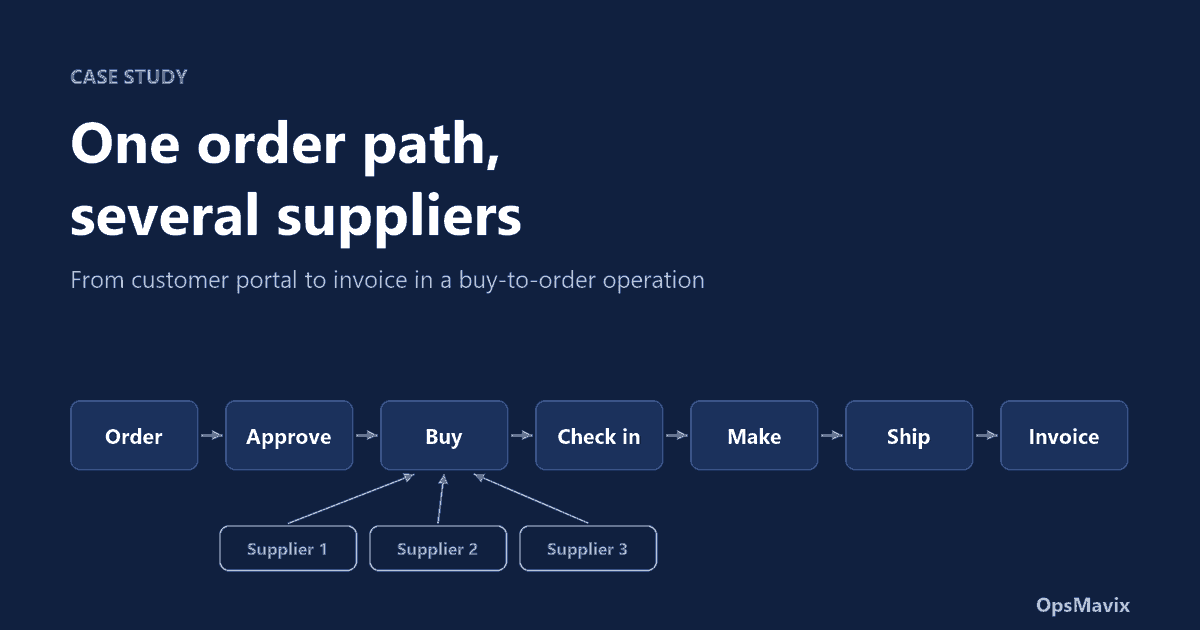
A multi-vendor ecommerce operations system is one record of an order from the moment a customer places it to the moment it is invoiced, in a business that buys what it sells from several suppliers. This case study covers how we designed that order path for a made-to-order operation, the rules we had to decide along the way, and how we tested the logic before building any real screens.
“Multi-vendor” here means the supply side. The business sells under its own name, holds almost no stock, and buys from whichever supplier carries each product once an order is confirmed. That is a different problem from a marketplace with many sellers, and most packaged order tools handle it badly because they assume the goods are already on a shelf.
The operation
The business sells customised products to trade customers. A customer’s staff order from a private portal that shows only their company’s approved catalogue. Each catalogue item is a standard supplier product with the customer’s own customisation applied in-house before dispatch.
Four facts shaped everything that followed:
- No stock is held as a rule. An order triggers a purchase. Goods arrive, are checked, customised, boxed and sent.
- Several suppliers. One customer order can need goods from two or three of them, arriving on different days.
- Some customers give each employee an annual allowance. Orders over it need the customer’s own manager to agree.
- A small team. One person often covers purchasing, goods in and dispatch on the same day.
The first demonstration of a system for this business went wrong for a simple reason: it showed picking from stock as the step after confirmation. In a buy-to-order operation that step does not exist. The lesson was to stop designing screens and write down the path.
One catalogue row drives three jobs
The most useful finding was in the customer’s existing spreadsheet. Every catalogue row already held three things:
| What the row holds | Who needs it |
|---|---|
| The customer’s own product code and price | The portal and the invoice |
| The supplier’s code for the standard product | Purchasing |
| The customisation details: what, where and how | Production |
So the rule for the system became: the customer orders their code, purchasing buys the supplier’s code, production reads the customisation details. One row, three jobs, no retyping. If a purchase order is ever typed by hand from a sales order, this link is what is missing.
The order path
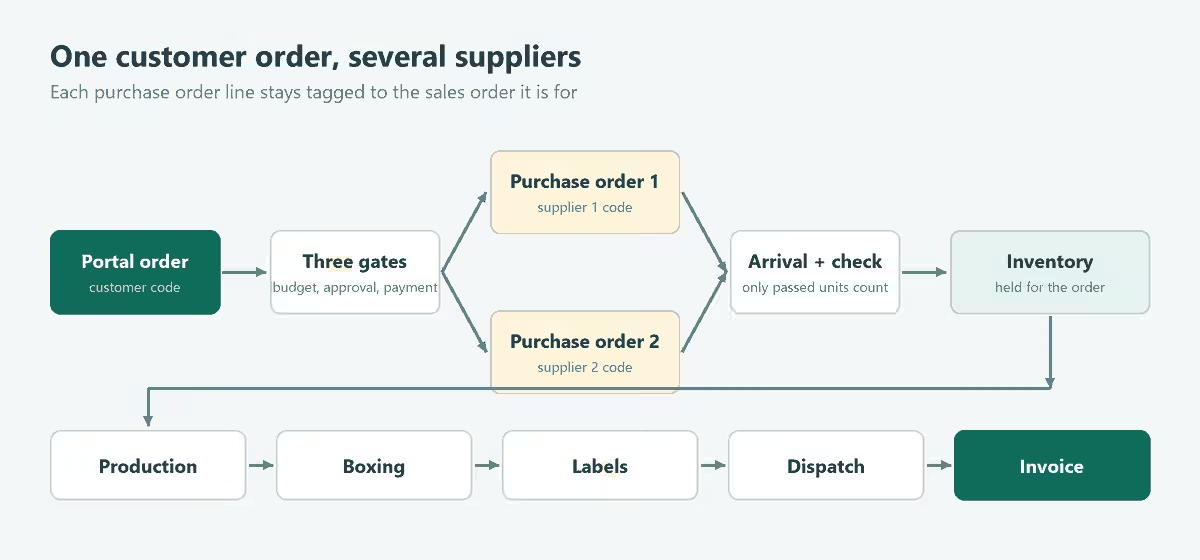
| Step | What happens | Owner |
|---|---|---|
| 1. Portal order | Product, sizes and quantities chosen; basket checked against the allowance | Customer’s employee |
| 2. Approval | Customer’s manager for over-budget orders, then the seller’s own approval | Customer manager, office |
| 3. Money check | Proforma payment, credit limit or account on stop | Accounts |
| 4. Purchase order | Free stock used first; the shortfall goes on one order per supplier | Purchasing |
| 5. Arrival | Delivery is in the building, nothing trusted yet | Warehouse |
| 6. Quality check | Quantity, product and condition confirmed line by line | Warehouse |
| 7. Inventory | Passed goods held against the order that needs them | System |
| 8. Production | Each unit marked done uses up one unit of stock | Production |
| 9. Boxing | Box count entered, one courier label per box | Warehouse |
| 10. Dispatch | Tracking email and invoice sent | Warehouse, accounts |
| 11. Returns | Credit note or a no-charge remake | Office |
Three gates before any money is spent
Because nothing is stocked, the purchase order is the moment the business spends cash. We put three separate gates in front of it, and each answers a different question.
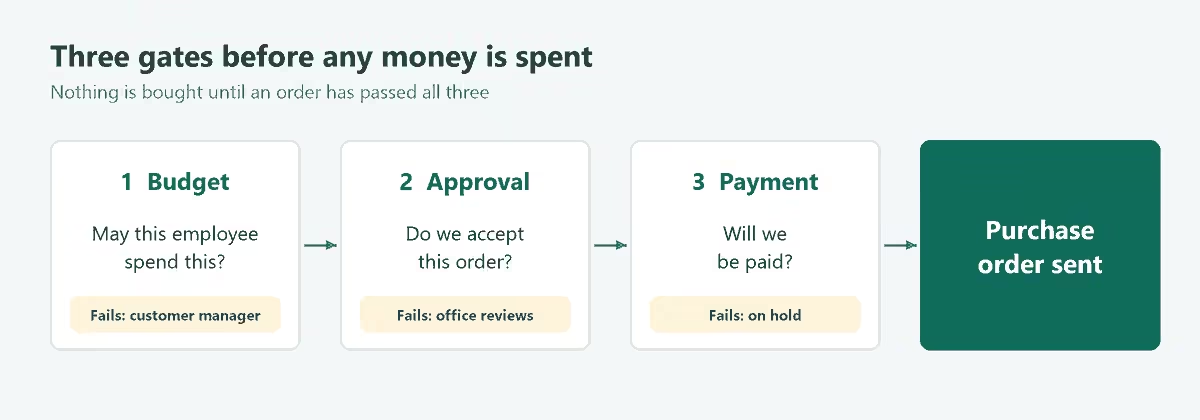
- May this employee spend this? Within the allowance, yes. Over it, the order is either blocked or sent to the customer’s manager, depending on that customer’s setting.
- Do we accept this order? The seller chooses automatic or manual approval. Automatic passes clean orders straight through. Anything new, such as artwork the seller has not produced before, always waits for a person.
- Will we be paid? Proforma customers pay before anything is bought. Credit customers are checked against a limit: unpaid invoices plus released orders not yet invoiced. An order that would take the account over the limit is held, and releases itself when an invoice is paid.
A hold lasts only as long as its cause. When the account comes off stop, a payment arrives or the limit is raised, the order releases itself without anyone having to remember it.
A rule worth copying: new artwork needs the customer’s sign-off on a proof, but that runs alongside purchasing. The goods are bought while the proof is out, so approval adds no days. Production simply refuses to start until the proof is approved.
Buying across several suppliers
Each released order line is converted to the supplier’s code. The system first uses any free stock, then groups what is left into one purchase order per supplier, with every line tagged to the sales order it is for. That tag does a lot of work later: when the delivery is checked in, the system already knows whose goods are whose.
Two supplier problems needed explicit rules:
- Out of stock. The supplier gives a date and the line goes on back order. It is then not expected in the next delivery, the customer is told, and it shows as overdue once the date passes. If the customer will not wait, the units come off the order and their allowance is given back. Our backorder management guide covers the customer side.
- Different arrival days. Each order carries one of two delivery rules: send when complete, or send what is ready. The second lets production start and a first shipment go while another supplier’s goods are still due.
Arrival is not acceptance
We kept “arrived” and “checked” as two statuses. Arrival only records that a delivery is in the building. Stock is added when a person confirms how many units on each line passed.
| Check result | What the system does |
|---|---|
| All passed | Stock added and held for its order |
| Short or damaged | Passed units added; the balance stays due from the supplier |
| Over-delivered | The extra becomes free stock, used before the next purchase |
One short line holds only the order it belongs to. Every other order on the same delivery carries on.
Production, plain lines and spoilage
An order reaches production when its goods are in and its artwork is approved. Staff mark units done one at a time or a whole line at once, and each unit done removes one from inventory.
Three cases needed their own rules.
- A plain line with no customisation skips the production queue and is picked straight for boxing.
- New artwork needs something to go on. It is refused on an order made up only of plain lines. This rule was added after testing; the reason is under “What random testing found” below.
- A spoiled unit is scrapped, and the system puts a replacement back into purchasing on its own, so the order waits for exactly one unit instead of someone remembering to reorder it.
Worked example
Hypothetical example, all figures invented and in GBP excluding VAT unless stated. An employee with a £200 allowance orders 8 units of product A at £12.00 from supplier one and 3 units of product B at £18.00 from supplier two. The order is marked “send what is ready”.
| Event | Result |
|---|---|
| Order placed | £150.00 against a £200.00 allowance, so no manager approval is needed |
| Purchase orders | Two: 8 of A to supplier one, 3 of B to supplier two |
| Supplier two out of stock | Line B on back order with an expected date |
| Supplier one delivers, all pass | 8 of A in stock, held for the order |
| One unit of A spoiled in production | Scrapped; 1 replacement appears in purchasing |
| First shipment | 7 of A boxed and dispatched; invoice £84.00 plus £16.80 VAT |
| Replacement and B arrive | 1 of A and 3 of B completed |
| Second shipment | Invoice £66.00 plus £13.20 VAT |
The two invoices come to £150.00 net, which is the order. Supplier one delivered 9 units of A in total: 8 were used and 1 was scrapped. Nothing is left over and nothing is unexplained, which is the point of the next section.
How the logic was tested
We kept the rules in one file with no screen code, so they could be run on their own. Then we tested them four ways.
1. Scenario tests. 61 short tests, each starting from an empty system and walking part of the path: an over-budget order, a short delivery, a cancelled order whose goods still arrive, a spoiled unit, a part shipment, a credited return. Each test also tries the wrong thing, such as dispatching before boxing, and confirms it is refused.
2. Rules that must always hold. After every action the whole system is checked against statements that should never be false:
- stock never goes below zero;
- stock held for orders equals what those orders are waiting to use;
- units received equal units in stock plus units used plus units scrapped;
- nothing is bought for an order that has not passed all three gates;
- nothing reaches production without an approved proof where one is needed;
- no order stays on hold after the cause of the hold has gone;
- an invoice exists exactly when a charged shipment has been dispatched;
- the invoices on a finished order add up to the order.
3. Breaking the rules on purpose. To check the tests themselves, we broke 20 rules one at a time, for example letting a proforma order through unpaid or ignoring a short delivery. Every break was caught by at least one test.
4. Random testing. Scenario tests only prove the paths somebody thought to write. So we ran 5,000 sequences of 200 random actions each, valid and invalid, and checked the always-true rules after every single step. About 20,000 orders reached dispatch across those runs. We also checked that a refused action changes nothing: when the logic says no, the system must be exactly as it was.
What random testing found
One real mistake, and it was not rare. It appeared in about a quarter of the first 2,000 random runs. None of the written scenarios had tried it.
| Question | Answer |
|---|---|
| What was the mistake? | New artwork could be attached to an order made up only of plain lines. |
| Why did it matter? | Plain orders skip production. So the order was boxed and dispatched with its artwork proof never approved. |
| Why had nobody written a test for it? | It is a combination no sensible person would enter on purpose. A real portal user would do it by accident within a week. |
| What was the fix? | Artwork is refused unless the order has a line it can go on. As a second guard, a plain order no longer skips production while a proof is outstanding. |
After the fix, all 61 scenario tests pass, the 5,000 random runs are clean, and the mistake has its own two tests so it cannot come back unnoticed.
What we learned
- Write the path before the screens. A status table with one owner per stage settled more questions than any mock-up.
- Find the moment money is spent. In a buy-to-order business it is the purchase order, so that is where the checks belong.
- Tag every purchased unit to its order. Goods in, allocation and part shipments all depend on it.
- Decide the awkward cases early. Back orders, short deliveries and spoiled units are where a simple flow stops being simple.
- Test the paths nobody wrote. Passing every scenario we could think of was not enough. The one real mistake came from a combination we had not imagined.
- Ask what the business does not need. Barcode scanning on the production floor and automatic price suggestions were both dropped. A printed sheet per order was preferred.
Limits of this case study
The model does not yet cover invoice due dates and automatic overdue holds, a second supplier for the same product, carriage charges, or returned goods going back into stock. Supplier ordering was modelled as a sent document, not a live API connection. Random testing can only catch what the always-true rules check: it shows that stock, money and order states stay consistent, not that the rules themselves are the right ones for a given business. No time or cost savings are claimed, because the system has not been measured in live use.
Frequently asked questions
How is this different from a multi-vendor marketplace?
A marketplace has many sellers and one storefront. This operation has one seller and many suppliers. The work is on the buying side: turning one customer order into the right purchase orders and bringing the goods back together.
Do we need this if we hold stock?
Partly. The approval gates, quality check and dispatch steps still apply. The purchasing step changes from “buy per order” to “replenish”, and a packaged tool may then be enough. See our guide to the pick and pack warehouse process.
Can a packaged system do this?
Some of it. Test any tool with your awkward cases first: an order split across two suppliers, a short delivery, and a customer who will not wait for a back order. If it handles those, you may not need anything custom.
Start with your own order path
If orders in your business are retyped between a storefront, a purchasing spreadsheet and a production list, the first step is the same one we took here: write the path down, one owner per stage, and decide the awkward cases.
See how the OpsMavix wholesale order management system and ecommerce inventory automation connect orders, purchasing and dispatch. Bring one recent order that went wrong and the purchase orders behind it, then send an enquiry to scope the workflow around your operation.
The order path, rules and figures in this article come from a design and testing exercise and are illustrative. They are not client results or a promise of particular software capabilities. The cover and diagrams are OpsMavix illustrative diagrams.
Keep reading
Getting value from OpsMavix? Add us as a preferred source on Google — you'll see more of our operations content in your AI Overviews, AI Mode and Search.