
Warehouse and Inventory Management Software: The Combined Buyer's Guide
Warehouse and inventory management software should do two jobs at once: run the physical work on the floor — bins, picking, dispatch — and keep a live, accurate stock count as a result. This guide is for growing UK businesses that have outgrown spreadsheets and disconnected tools, and it shows why a WMS bolted onto a separate stock tool leaks at the seam, and when a right-sized owned system is the smarter buy.
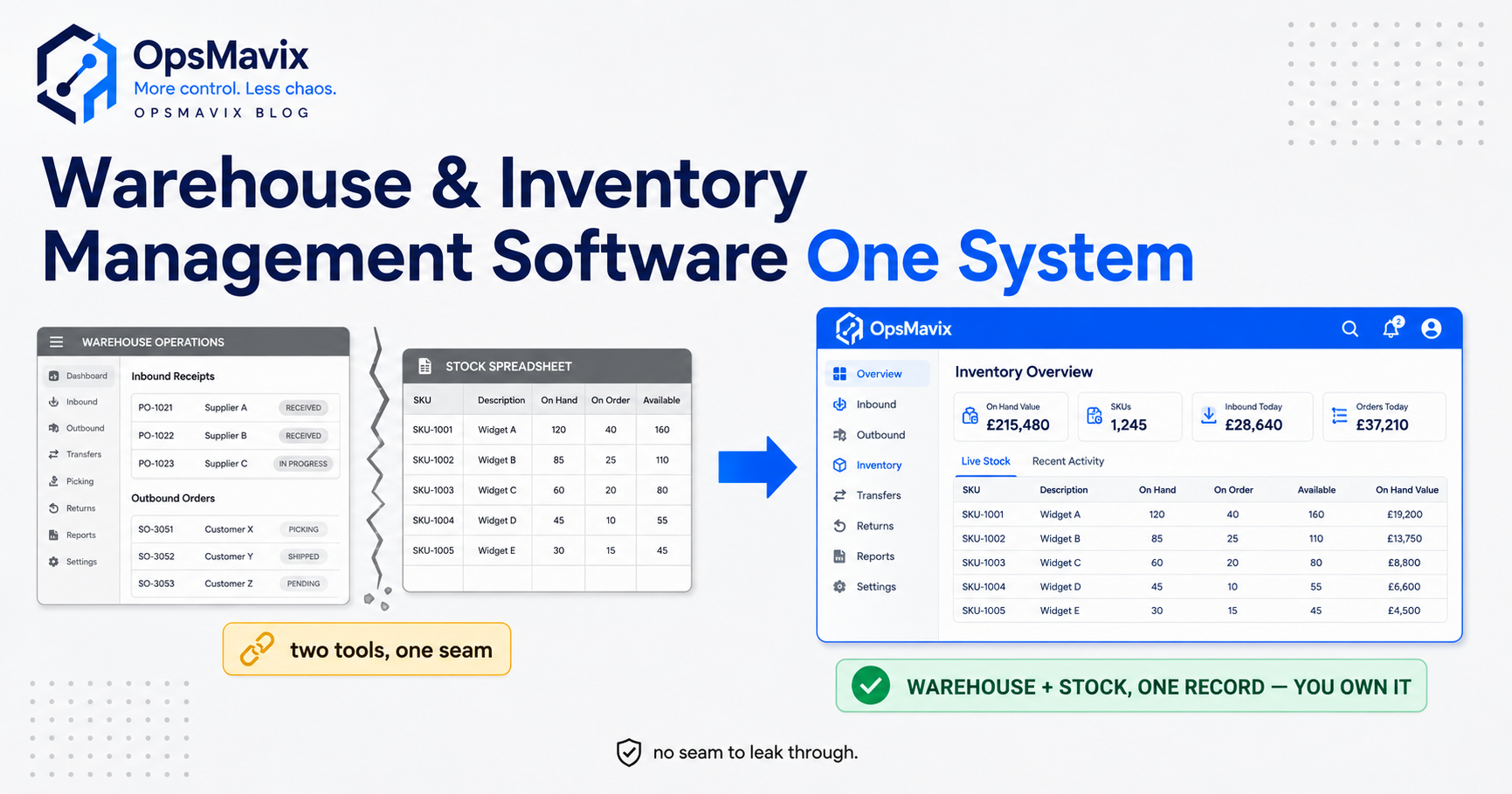
Warehouse and inventory management software is the system that does two things that are usually sold separately: it runs the physical work inside your building — receiving, putting stock away, telling pickers where to go, confirming what leaves the door — and it keeps a live, truthful count of what you actually have, updated automatically as that work happens. The point of combining them is simple. The count and the floor are the same reality. Every pick, every put-away, every dispatch is both a physical event and a change to the number. When one system owns both, the number on screen matches the shelf because it was captured at the moment the shelf changed.
Most businesses arrive here from pain, not from a shopping list. The picker who walks to a bin the sheet swears is full and finds it empty. The website that sells three of something you have one of. The stocktake that never reconciles and quietly gets overwritten. The order that ships short, comes back as a return, and takes an apology with it. All of those trace to the same crack: the work happening in the warehouse and the record of what you own drifting apart. Bolting a warehouse tool onto a separate stock tool doesn’t close that crack. It builds a seam for the drift to leak through.
Quick summary: Inventory accuracy is worse than most owners assume — 58% of retail brands and D2C manufacturers run below 80% inventory accuracy, according to a Fluent Commerce global report cited by Unleashed. Separately, the average warehouse runs a 1 to 3% pick error rate and a single picking error can shave up to 13% off that order’s profitability, according to Cin7. Those two numbers are the same problem seen from two ends — and they get worse, not better, when the floor and the count live in different software.
Contents
- What “Warehouse AND Inventory” Software Actually Means
- The Bolt-On Blind Spot: Where the Seam Leaks
- What the Combined System Actually Does
- Off-the-Shelf vs Full ERP vs Right-Sized Owned System
- Integrations, and Why Ownership Matters
- A Worked Example: The £14,000 Seam
- FAQ
- How OpsMavix Can Help
- Sources
What “Warehouse AND Inventory” Software Actually Means
It helps to be precise, because the market blurs these on purpose. Inventory management answers how much do I have, and where across my sites and channels — it is a count and a value. Warehouse management answers where exactly is it in this building, and how do I move it accurately and fast — it is bins, pick routes, and scan-confirmed movement. They are genuinely different disciplines, and for a good introduction to the warehouse half on its own, what is a warehouse management system covers it in plain English.
Combined warehouse and inventory management software refuses to treat them as two systems. It treats the count as a by-product of running the floor properly. When a delivery is scanned in, the count goes up and the stock gets a bin address in the same action. When a picker scans an item out, the count goes down and the order line is confirmed in the same action. There is no overnight sync, no export, no “we’ll reconcile it Friday.” The record and the reality move together because they are the same record.
That is the whole idea in one line: the floor updates the count, and the count reflects the floor, in real time, with no seam in between. Everything else in this guide is about what happens when that seam exists — and what it costs to close it.
The Bolt-On Blind Spot: Where the Seam Leaks
Here is the setup almost every growing UK operation stumbles into. You start with a stock spreadsheet or a cheap inventory app. The warehouse gets busy, so you add a warehouse tool — or a warehouse module — to handle picking. Now you have two systems that both think they own the truth about your stock, and they talk to each other through a sync that runs on a schedule, not in real time. That gap is the blind spot, and it leaks in four predictable places.
- Timing drift. The warehouse tool knows an order shipped at 2:14pm. The inventory tool finds out at the next sync — maybe hours later. In between, the website oversells, the reorder fires off a stale number, and a second order gets promised stock that already left the building.
- Two versions of the truth. When the numbers disagree — and they will — nobody knows which system is right. Staff learn to distrust both and start “just checking the shelf,” which is the exact manual habit the software was meant to kill.
- Reconciliation tax. Someone spends hours every week chasing why the two tools disagree, keying corrections into one or both. That work produces nothing except the appearance of order.
- Blind cost. Because no single system sees receiving, storage, picking and the live count together, nobody can point to where the money actually leaks. You feel the loss in returns and dead stock without ever seeing its source.
This is why the accuracy numbers are so grim. When more than half of businesses run below 80% inventory accuracy, it is rarely because they bought bad software. It is because they bought two pieces of software and left a seam between them for the count to fall through. A combined system removes the seam entirely: there is one record, and it is right because the floor writes to it directly.
What the Combined System Actually Does
Strip away the badge and the combined category earns its keep across a finite, concrete list of jobs. The trick is that each one updates the physical picture and the count in the same motion.
- Receiving. Checks the delivery against the purchase order, flags shorts and over-deliveries, and both increments the count and assigns a bin the moment stock is scanned in.
- Put-away and bin locations. Every item has a physical address — aisle C, bay 12, level 2 — and the system knows how many sit there. Fast movers land near dispatch, heavy items low, batch and expiry grouped where it matters.
- Live inventory accuracy. The count is never a nightly snapshot. It changes at the instant of each scan, across every channel that reads from it, so the website and the trade counter see the same truthful number at the same second.
- Directed, scan-confirmed picking. The system routes the picker to the right bin, tells them what to take, and verifies item and quantity by scan before the line can be marked picked. This is where most errors are born and most of the payback lives.
- Packing and dispatch. Verifies the packed order against what was ordered, produces labels and paperwork, and records the goods leaving — closing the loop and decrementing the count in one action.
- Cycle counting that reconciles. Instead of one dreaded annual stocktake that overwrites the numbers, rolling counts reconcile expected against actual by location, catching drift while it is small and surfacing shrink you could never see before.
- Reporting on both halves at once. Picks per hour, error rates, ageing stock, dead locations, stock value by bin — because one system holds the floor and the count, it can finally show you where they cost you together.
Notice this is a specific list, not a hundred modules. That fact is the whole buying decision, and it is where the next section earns its place.
Off-the-Shelf vs Full ERP vs Right-Sized Owned System
When the warehouse and the count start hurting together, the market offers two loud answers and quietly hides a third. Answer one: buy an off-the-shelf combined platform, or bolt a warehouse app to your stock app and hope the sync holds. Answer two: switch on the warehouse and inventory modules of a full ERP. The third — a right-sized system you own, built around how your warehouse actually moves stock, with the floor and the count unified by design — is the one nobody is paid to sell you, and it is often the correct one.
Be fair to each. A cheap off-the-shelf tool is immediate and, if your operation is fairly standard, may fit straight out of the box. A full ERP genuinely does everything and can be the right call when the question stops being “warehouse and stock” and becomes “the entire business.” A right-sized owned system wins in the wide middle: real specifics the generic tools handle awkwardly, and a preference to own the thing rather than rent it forever.
| Factor | Cheap off-the-shelf / bolt-on | Full ERP (WMS + inventory modules) | Right-sized owned system |
|---|---|---|---|
| Floor and count unified | Two tools synced on a schedule | Unified, but inside a heavy platform | One record by design, no seam |
| Fit to your warehouse | You bend to the tool’s assumptions | You bend the business to the ERP | Built around how you actually move stock |
| Bin-level locations | Basic or generic | Yes, generic model | Modelled to your exact layout |
| Live multi-channel accuracy | Lags at the sync gap | Real-time within the suite | Real-time, shaped to your channels |
| Odd processes (kitting, batch, returns) | Often awkward or extra add-ons | Extra modules, extra cost | First-class if they matter to you |
| Cost model | Cheap, but leaks at the seam | Per-seat / per-module, forever | Build once, then you own it |
| Time to value | Fast but fragile | Months, consultant-led | Scoped to the leak you actually have |
| Ceiling | Walls fast as you grow | High, but you pay for all of it | Extend it because you own the code |
| Data ownership | Split across two vendors | Lives in the vendor’s platform | Your database, your rules |
The honest read: there is no universally right answer, only a right-sized one. If a cheap combined app genuinely fits your operation, use it and don’t overspend to look sophisticated — and the best warehouse management system software is a fair place to compare the off-the-shelf field. The question is only worth escalating when the generic tool becomes a wall, or when the bolt-on seam is quietly costing you more than a proper system would.
Integrations, and Why Ownership Matters
A warehouse never runs alone. The combined system has to speak to the sales channels that consume the count — website, marketplaces, trade counter, EPOS — to the courier for labels and tracking, to accounts for stock valuation, and often to suppliers for purchase orders and reorders. Where the stock question is really an order-flow question across those channels, a wholesale order management system is the piece that sits alongside it. The integrations are not optional extras; they are how a count stays honest across every place a customer can buy.
This is where ownership stops being a philosophy and becomes money. With a bolt-on stack, each integration lives at a vendor’s mercy: they change an API, deprecate a connector, or move a feature to a pricier tier, and your seam breaks on their timetable. With a right-sized owned system, the integrations are yours — built to the exact channels you sell through, changed when your business changes, and never held hostage to a renewal. You own the database, the rules, and the connections, which is what lets the system grow with you instead of walling you in. If you later need it to scale all the way to a full ERP, you extend what you own rather than rip and replace.
There is a narrower version of this worth naming. If your real pain is purely that the count is wrong across channels — not that the building is chaos — you may not need the warehouse half at all yet. In that case an inventory automation system that keeps stock live and accurate across every channel is the cheaper, sharper fix. Match the tool to the actual leak, and don’t buy the warehouse floor to solve a counting problem.
A Worked Example: The £14,000 Seam
Numbers make it concrete. The figures below are illustrative — not a claim about a specific client — but the shape is one warehouse managers recognise on sight.
The business. A UK homeware and kitchenware distributor. Turnover around £3.1 million a year, roughly 4,500 active SKUs, three aisles of racking plus a bulk area, and five warehouse staff. Orders arrive from a trade phone line, a growing website, and two marketplaces — about 140 order lines a day.
The setup. Stock lives in a cheap inventory app. Picking runs on a separate warehouse tool added last year. The two sync every couple of hours. On paper it looks like a real system. In practice it leaks at the seam.
The pain. The marketplaces oversell during the sync gap, forcing cancellations and dented seller ratings. Pickers still walk to bins the count says are full, running the operation at roughly the industry-standard 2% pick error rate — every wrong pick a return, a re-ship and an apology. One person spends most of a day each week reconciling why the two tools disagree, and the annual stocktake overwrites rather than reconciles, so true shrink is a mystery. Sat underneath it all: accuracy hovering in the same sub-80% band most businesses live in.
The over-buy temptation. A vendor pitches a full tier-one ERP suite at several thousand pounds a month plus a five-figure implementation and a months-long rollout — most of which this distributor would never switch on.
The right-sized fix. Instead: one system where receiving, bin-level put-away, scan-confirmed picking and the live count are the same record. Real-time stock pushed to the website and both marketplaces so the sync gap simply ceases to exist. Rolling cycle counts that reconcile. Built once on cheap handhelds, owned outright, shaped to this warehouse’s exact layout and channels.
The outcome. The oversell cancellations largely stop because every channel reads one live number. Scan-confirmed picking pulls the error rate toward the sub-1% range good operations reach. The weekly reconciliation day disappears. Add up the lost marketplace ratings and cancelled orders, the returns and re-ships from a 2% error rate on 140 lines a day, the reconciliation labour, and the dead cash in stock nobody could locate, and a distributor this size can reasonably carry a £14,000-a-year seam — recurring every year until the floor and the count become one record. The right-sized build pays for itself well inside its first year.
FAQ
What is the difference between warehouse and inventory management software?
Inventory management answers how much do I have and where across my channels — it is a count and a value. Warehouse management answers where exactly is it in this building and how do I move it accurately — bins, pick routes and scan-confirmed movement. Combined warehouse and inventory management software does both in one system, so the count updates as a by-product of running the floor. If your only problem is a wrong number, inventory software alone may be enough. If the building itself is chaos, you need the warehouse half too.
Can’t I just connect a separate warehouse tool to my stock app?
You can, and plenty of businesses do — but you inherit a seam. Two systems each think they own the truth about your stock and talk through a scheduled sync rather than in real time. That gap is where oversells, stale reorders and endless reconciliation come from. A bolt-on works while volumes are low; it starts costing real money once channels multiply and the sync gap turns into daily error. A combined system removes the seam because there is only one record.
Do I need a full ERP to get this?
Usually not. A full ERP does unify the warehouse and the count, but inside a large, expensive platform where you pay per seat and per module forever and bend your business to its assumptions. Most growing UK warehouses use only a slice of it. If your real need is honest bin locations, scan-confirmed picking, live multi-channel accuracy and cycle counts that reconcile, a right-sized owned system delivers exactly that — cheaper, faster to go live, and shaped to your layout — and can still scale to a full ERP later if you genuinely outgrow it.
How does combining the two improve inventory accuracy?
Because accuracy drifts at the seam between systems, not usually within them. When the floor and the count are one record, every scan — receiving, put-away, pick, dispatch — updates the number at the exact moment the shelf changes, with no sync lag for the count to fall behind. That is what closes the gap that leaves most businesses below 80% accuracy. Scan-confirmed picking then attacks the other half of the problem, cutting the wrong-item and wrong-quantity errors that separate the count from reality.
Is this overkill for a small warehouse?
The trigger is not size, it is specificity: more than one aisle, several people updating stock, multiple sales channels reading the same count, or order errors climbing as you grow. When those appear, unifying the floor and the count pays for itself. The mistake is jumping straight to an enterprise platform. A right-sized owned system gives a smaller warehouse exactly the control it needs and nothing it doesn’t.
How OpsMavix Can Help
OpsMavix builds right-sized, owned operations systems for growing UK warehouses and distributors — businesses that have outgrown a spreadsheet or a bolted-together stack, but have no reason to rent a full enterprise ERP they’d use a fraction of. Instead of selling you a platform, we map how stock actually moves through your building and across your channels — where the sync gap oversells, where pickers waste miles, where errors are born, where the count drifts below the shelf, and where cash sits ageing in bins nobody can find — then build the specific system that closes those leaks: one record where receiving, bin-level put-away, scan-confirmed picking, live multi-channel accuracy and cycle counts that reconcile are the same thing, owned outright by you and extended as you grow. It’s the practical layer between spreadsheets that have run out of road and an enterprise suite that’s overkill. If your warehouse and your stock count are leaking picker hours, cancelled orders and stock you can’t locate, start by finding out exactly where: Book a Free Operations Leak Audit
Sources
- Unleashed Software (citing Fluent Commerce Global State of the Industry Report) — 58% of retail brands and D2C manufacturers run below 80% inventory accuracy; nearly 40% cancel at least 10% of orders: https://www.unleashedsoftware.com/blog/inventory-management-statistics/
- Cin7 — the average warehouse runs a 1–3% pick error rate; a single picking error can shave up to 13% off an order’s profitability; automated picking cuts errors by up to 70%; manual tracking averages 63–65% inventory accuracy: https://www.cin7.com/blog/wms-picking-accuracy/