
Custom Client Portal: What to Agree Before You Commission One
A custom client portal is a private online workspace built around a business's own customer workflows, permissions and connected systems. Commissioning one...

A custom client portal is a private online workspace built around a business’s own customer workflows, permissions and connected systems. Commissioning one means deciding which actions it supports, who controls the records, what happens when something fails, and how the business will maintain or move it later.
Quick summary: Buy a custom client portal when a necessary workflow cannot be handled adequately by an existing product, then agree scope, ownership and acceptance before development. The UK government’s Cyber Security Breaches Survey 2025/2026, published 30 April 2026, reported that 47% of businesses used two-factor authentication, making account protection a question to verify rather than assume.
The revealing moment in a portal demonstration may happen after a permission is removed. Leave the user’s tab open and try the same action again. A menu disappearing is useful feedback, but the important question is whether the system still permits the underlying access.
By Jorgo Bardho, founder of OpsMavix.
When is an off-the-shelf portal enough?
An off-the-shelf portal is enough when it handles your required client tasks, access rules and exceptions without creating an unreasonable administrative burden. Start with the portal included in software you already use. A custom build needs a specific reason beyond wanting your own colours and logo.
Test a real working sequence: invite a client, receive a document, answer a question and complete the relevant transaction. Then repeat it with a revised file, a second company contact or an interrupted payment. Standard products may already handle the difficult part well enough.
| Route | Sensible when | Check before committing |
|---|---|---|
| Existing system’s portal | The work already lives in that system | Client access, permissions, included features and export options |
| Separate configurable portal | Standard document, message and task workflows fit | Subscription limits, integrations and responsibility for duplicate records |
| Custom client portal | Necessary rules or connections remain unmet | Written scope, ownership, acceptance tests and ongoing maintenance |
Customisation also has degrees. Configuring a standard product, adding an integration and developing a new application create different obligations. Ask the supplier to identify which route they are proposing. A branded interface does not tell you whether you own the application or rent access to it.
Use our client portal examples to compare the tasks different portals support. Once you find the closest pattern, document the exact gap. If the problem is inconsistent staff follow-up, first decide who owns the work; software cannot supply that business decision.
How do you scope a custom client portal?
You scope a custom client portal by defining the customer action, the staff response, the authoritative record and the exceptions for each workflow. Describe the outcome before the screen. “Upload a document for this account and reporting period” is more useful than “build a document dashboard”.
Write each workflow from beginning to end. State who starts it, what information is required, who can approve or reject it and what counts as completion. Include the record created in another system. Otherwise, the client-facing task may finish while the internal work remains unassigned.
Separate account access from individual permission. A customer company may have a finance contact who can pay invoices and an operational contact who can upload documents. Decide whether either can invite colleagues, see historic records or act for another branch before developers infer those rules.
Give every connection a named record owner. An accounting system may own invoice balances; the portal displays them and initiates allowed actions. Specify how updates arrive, what happens when a connection fails and who investigates. A second editable balance creates work that a polished interface cannot remove.
Record exclusions alongside inclusions. A first release might cover documents, messages and invoices while leaving stock allocation or production scheduling in the existing system. If a requested screen depends on unreliable operational data, resolve that dependency in the scope rather than promising a screen full of guesses.
The brief should contain sample records, expected outcomes and decision owners. Keep a change log when requirements move. A useful change request states the new behaviour, its effect on cost and timing, and what existing work must be retested before it becomes part of the agreement.
For a broader procurement framework, our custom software for business guide covers the surrounding build decision. The portal brief should stay narrower: the actual external users, the actions they need and the internal work those actions trigger.
How much does a client portal typically cost?
A client portal typically has setup or development costs plus ongoing hosting, software and support costs; the amount depends on the scope. Published prices can illustrate a particular package. They do not establish a reliable average for a bespoke application with different users, integrations and responsibilities.
Ask for the quote in separate parts: discovery, implementation, migration, testing, training and ongoing operation. Confirm which third-party charges sit outside it. Compare suppliers using the same requirements and exclusions, otherwise the cheaper proposal may simply leave more work with your team.
The main cost drivers are specific: the number of distinct workflows, permission rules, external systems, historical records to migrate and exceptions to handle. A payment button with ordinary invoices is a different scope from partial payments, credits, reversals and synchronisation with another ledger.
Theseus: a published module price with defined limits
Cyber Media Solutions’ G-Cloud 14 Theseus pricing document, checked 26 September 2026, lists a client portal module at £4,600 deployment plus £2,500 annually for one service. The annual fee applies in the first year: £4,600 + £2,500 = £7,100, excluding VAT, for that module alone.
The underlying service and additional users are separately priced. The tables concern organisations serving populations of 100,000 to 250,000. This is a scoped platform add-on, not a bespoke portal market average or an OpsMavix quote.
Own the code, the records and the exit route
Put ownership in the contract. UK copyright ownership guidance explains that commissioning a work does not automatically make the commissioner its copyright owner. Have the agreement distinguish bespoke work, pre-existing supplier components and third-party software, with the rights needed to operate and maintain each.
Code access is only one part of a workable handover. Ask for the repository, deployment instructions, database structure, export process and a register of external services. Identify who controls the domain, hosting, payment account and recovery details. A future maintainer needs a functioning route into the system.
Specify usable data exports. A download of documents without the links to their clients, categories or invoices may be difficult to reconstruct. Agree the export format and include relationships, relevant history and file metadata. Ask the supplier to demonstrate an export before the final handover.
Where a supplier processes personal data on your behalf, the ICO’s contract guidance requires a written processing arrangement covering the applicable obligations. End-of-contract terms include return or deletion, subject to legal retention requirements. Commercial access to files and data-protection responsibilities both need attention.
Describe exit support before anyone needs it. Who assists a replacement developer, what information is supplied and how is that work charged? Retain a practical period for transition. Owning bespoke code should give you choices, but moving a live service can still require technical work.
Our ownership and data-portability approach explains how we frame those decisions. Read the actual proposal against your requirements, including hosting and maintenance. Ownership of the delivered system does not eliminate cloud charges, payment-provider fees or the work needed to keep dependencies current.
Build privacy and security into the specification
List the personal information the portal needs, why it is needed, who may access it and when it should be deleted. Do this before importing historical records. A document vault with long retention still needs a justified retention policy and a way to apply it.
Require permission checks for the actual request, including direct document links and exports. Authorisation guidance calls for checking permissions on every request. The supplier should demonstrate that one client cannot retrieve another client’s information by changing an address or record identifier.
Map where files, database records, logs and backups are processed, including access by overseas support staff. Use the international-transfer guidance to assess the arrangements. A UK-facing brand or a chosen storage region does not, by itself, answer every transfer question.
ICO and UK GDPR: design around the purpose
The ICO says, “You must put in place appropriate technical and organisational measures to implement the data protection principles effectively and safeguard people’s rights.” Its guidance places privacy considerations at design time and throughout the service’s life.
For a portal, document the purpose, necessary information, access and retention for each workflow. Confirm controller and processor responsibilities and whether a data protection impact assessment is required. Those decisions depend on the processing and risks; a supplier’s generic compliance badge cannot settle them.
NCSC: protect accounts and prove recovery
The NCSC recommends passkeys for important accounts where available, with strong passwords and two-step verification where passwords remain in use. Include administrator access and account recovery in the design, not just the customer sign-in screen.
Its backup guidance is another practical starting point. Agree what is backed up, who monitors it and how restoration is tested. A hosting service being available does not establish that your particular records and files can be restored after an error.
The decisions behind our accounting portal build
Our work for CPAs & Business Advisors, a Colorado CPA firm, included its marketing site and client portal. When we built it, we used four roles: client, employee, admin and super admin, with per-employee permission toggles that take effect without requiring a new login.
The build includes a document vault organised by year and category, threaded messages, invoices and reporting. Those are confirmed implementation facts. The commissioning lesson is to specify the rules behind those capabilities, including what happens when someone’s access or an invoice changes.
Cloudflare: know which services the application depends on
This build runs on Cloudflare’s edge platform, using Workers, the D1 database and R2 file storage. That identifies the application’s hosting, database and file-storage dependencies, rather than leaving “cloud hosting” as an undefined line in the proposal.
For a buyer, the practical questions are who controls those accounts, how usage is billed and how another maintainer would deploy or export the system. This architecture is a fact about our build, not a claim that every portal should use the same services.
Stripe: specify invoice changes as well as payment
The portal uses Stripe invoicing with a custom pay page, partial payments, credit notes and write-offs. The build handles invoice edits through a void-and-reissue workflow. That is the implemented choice described here, not a claim that every field on every sent invoice is immutable.
Stripe’s invoice lifecycle documentation distinguishes draft invoices from finalised invoices and permits some changes to open invoices. Ask a supplier to show how its chosen correction path preserves the relationship between the original record, replacement and payment history.
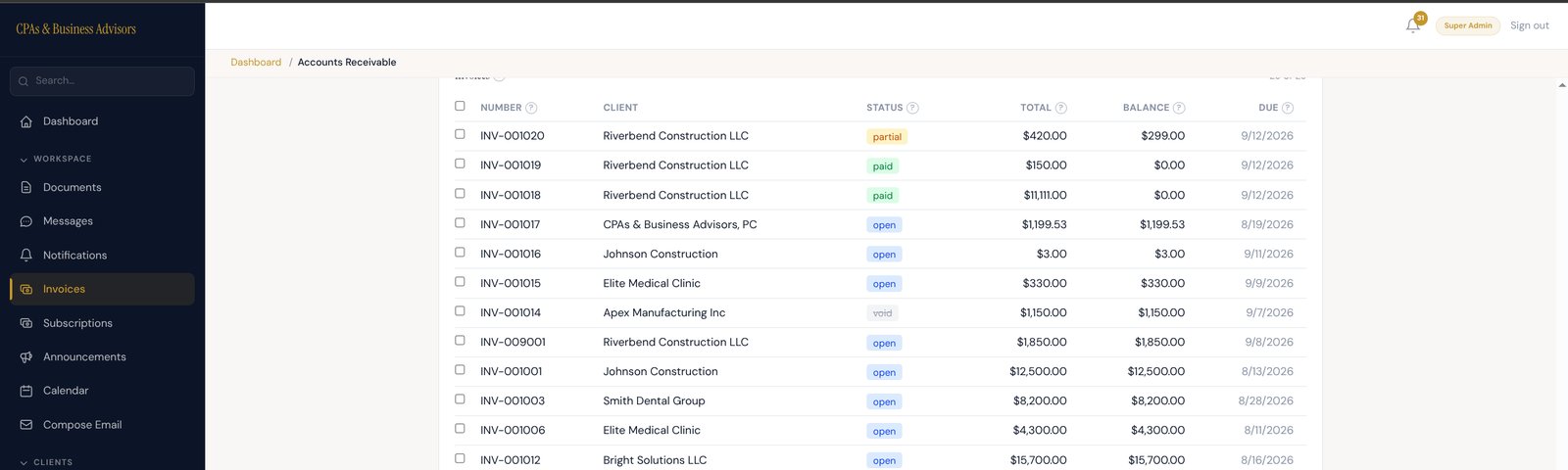
The invoice list from the portal’s test environment, using demo clients. Partial, paid, open and void invoices sit side by side.
How do you prove a portal is ready for acceptance?
You prove a portal is ready for acceptance by running agreed workflows and failure cases with representative records, then inspecting both the client result and the internal record. Signoff should refer to evidence. A demonstration of successful login and one uploaded file leaves much of the work untested.
Use a test account for each role and at least two separate client organisations. Check allowed actions as well as denied ones. Remove a permission while a session is open, try a previously saved link and confirm that the server rejects access that is no longer authorised.
Test payment events that arrive late or more than once. The payment provider’s webhook guidance documents duplicate deliveries and events arriving out of order. Your acceptance requirement should be business-readable: the same confirmed payment must not create a second receipt or an incorrect outstanding balance.
Include corrections and reversals. Demonstrate a partial payment, a credit note and the chosen invoice-edit workflow. Check what the client sees, which original records remain available and what staff see in reports. A successful payment alone cannot establish that the surrounding commercial records stay coherent.
Check document failures too: an interrupted upload, an unsupported file and an attempt to retrieve another client’s document. Agree file restrictions and useful error messages. Ask how suspicious uploads are handled. The client should know whether the submission completed and what to do if it did not.
Our build is covered by 116 automated end-to-end tests. That count is not an independent security certification. For your project, ask for the test list, latest results and remaining defects, rather than treating a large test count as sufficient proof.
Set an acceptance gate with named reviewers. Record which defects block release, which may be accepted with an agreed remedy and who can approve that decision. Tie signoff to the agreed scope, including staff administration and exports, so the final review covers the working service.
Budget for the work after launch
Assign a maintenance owner before launch. The arrangement should cover dependency updates, monitoring, backup checks, incident response and changes in connected services. Set the difference between fixing a defect, responding to an outage and developing a new feature, because those require different expectations and capacity.
Keep test and live environments separate. Use sample information for demonstrations and routine testing, with controlled procedures for any real data that is needed. Agree who may release changes, how a failed release is reversed and how the business is informed of an interruption.
Give the business an operating checklist for invitations, leavers, permission reviews and payment questions. Staff should know where to report an issue and what evidence to supply. Otherwise, ordinary administration can become an informal support queue that nobody included in the original proposal.
Schedule a review of the first real workflows after launch. Look for incomplete submissions, repeated questions and tasks staff still copy into another tool. Our guide to spreadsheets that stop working as a business grows explains the wider warning signs; use observed problems to prioritise changes.
Measure outcomes using an agreed baseline. Document-request handling time, failed submissions or payment-support queries can be useful, provided you compare like with like. We have no measured portal savings to publish for the accounting build, so those measures remain a recommendation rather than a case-study result.
Where OpsMavix fits
OpsMavix builds custom internal systems and full ERPs, including client portals connected to the way a business already works. We agree the scope up front and provide client ownership of the delivered system. The fit depends on a real workflow or integration requirement.
Bring the process, the current tools and the exception that keeps causing work. We can then assess whether the answer is configuration, a targeted connection or a custom build. Any delivery guarantee concerns the agreed delivery; it is not a guarantee of financial results.
Frequently Asked Questions
How do I build a custom client portal?
Define the users, workflows, permissions, records and exceptions first. Test whether existing software meets those requirements. If a build is justified, agree scope, ownership, security responsibilities, acceptance evidence and maintenance before development. Start with a demonstrable workflow and extend from working results.
What is the best client portal for a small business?
The best option is the least costly one that reliably handles your necessary work and access requirements. That may be the portal in your existing software. A custom portal becomes worth considering when a specific rule or connection remains unmet after configuration has been assessed.
Does owning the portal mean there are no ongoing costs?
No. You can own the bespoke system while still paying for hosting, storage, payment processing, maintenance and third-party services. Ask which accounts and charges are yours, which support is included and what happens when usage grows. Ownership and operating cost are different contract questions.
Is a client portal safe?
A client portal can protect information when its design, configuration and operation match the risks. Check authentication, permissions, client separation, recovery, updates and incident handling. Verify behaviour and test evidence. A login screen, cloud-provider name or compliance claim cannot establish the safety of the whole application.
Can another developer maintain a custom portal later?
Yes, if the contract, code, accounts and documentation allow a workable handover. Ask for deployment instructions, database and file exports, dependency details and relevant access. Have the supplier demonstrate the process. Possessing a copy of the source code is useful, but a replacement maintainer needs more.
Final takeaway
Commission a custom client portal around a necessary workflow and a reviewable agreement. Establish what clients can do, what staff must see, which system owns each record and how exceptions are handled. Then make ownership, security, acceptance and maintenance concrete enough to test. The quote becomes meaningful when everyone is pricing and accepting the same working service.
See what an ERP built around your business could look like →