
ABC Cycle Counting: Count What Matters, More Often
ABC cycle counting applies ABC classification to your rolling stock counts — A items counted often, C items rarely — so effort lands where the value and the risk are. Here's how to classify, set frequencies per class, run the rota and avoid the classic mistakes.
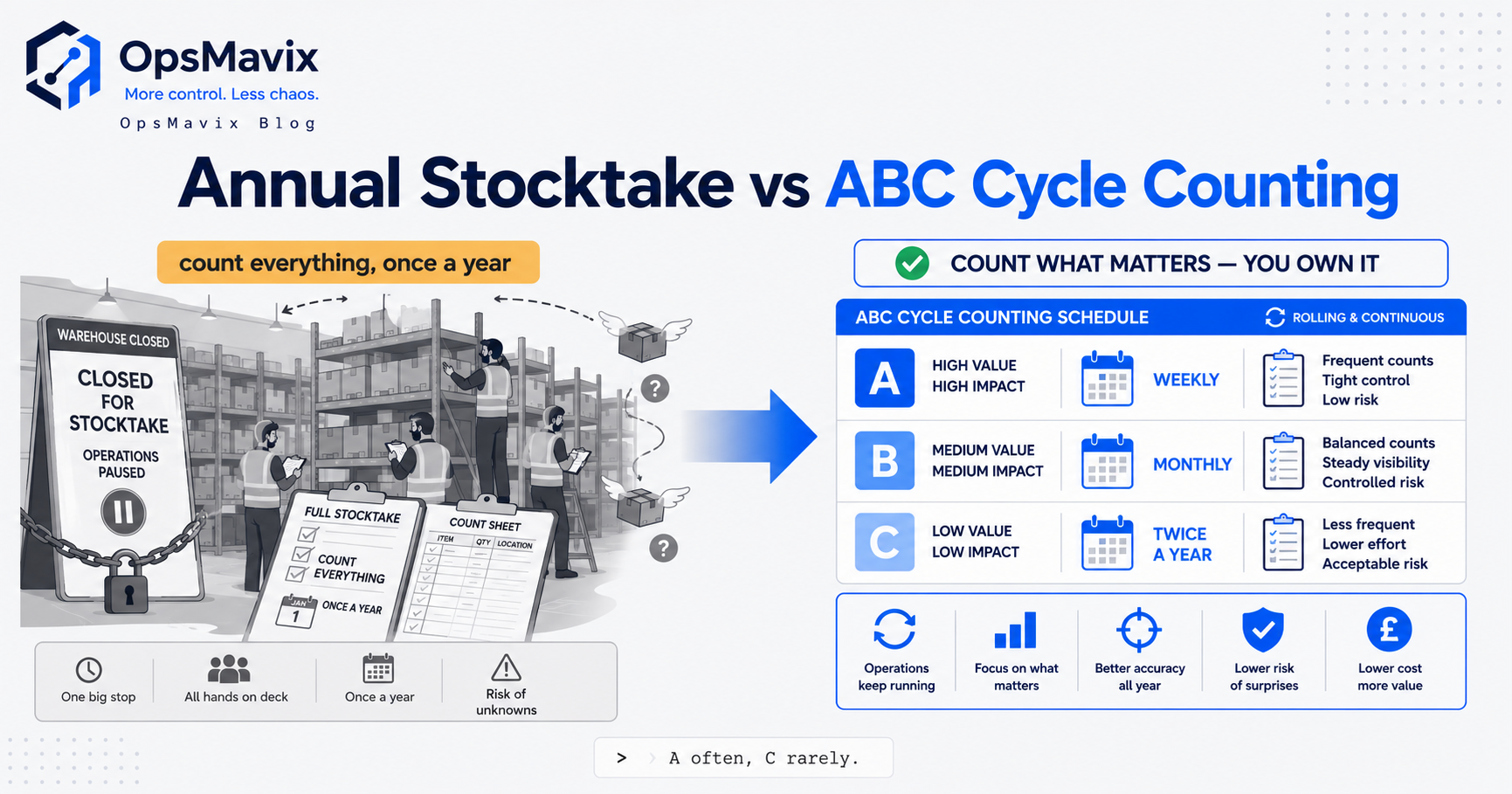
ABC cycle counting uses item classes to set how often stock is physically verified. It combines a rolling count programme with a priority policy, so higher-exposure items receive more attention while the catalogue still has defined coverage. The classification is useful only when it leads to a schedule the team can complete and a controlled way to resolve discrepancies.
Financial value is one input. Movement frequency, previous errors, criticality and the consequence of shortage can also justify additional counts. Keep those reasons explicit: a low-value production component may need frequent verification without changing its financial ABC class.
This guide explains how to set frequencies, calculate the workload, control movements during a count and investigate the result. It also explains why scanning a barcode is different from counting physical units, and why a cycle-count programme does not automatically replace every wider stocktake requirement.

Schedule counts around identifiable items and locations, with a clear boundary for stock movements.
Key Takeaways
- ABC cycle counting connects priority to frequency, with coverage and overdue counts visible.
- Financial class and counting priority can differ. Record overrides for movement, criticality or discrepancy history.
- Calculate the complete workload, including walking, physical counting, recounts and investigation.
- Control movements during the count. A difference is uninterpretable if its transaction cutoff is unclear.
- Separate count results from approved adjustments, retaining evidence, reasons and an audit trail.
- A rolling programme supports ongoing accuracy, but its wider stocktake and reporting role must be agreed with the responsible people.
In this guide:
- 1. Define the Count Scope and Priority
- 2. Set Frequencies Your Team Can Maintain
- 3. Calculate the Daily Workload
- 4. Run a Count with a Clear Cutoff
- 5. Review Variances, Recounts and Adjustments
- 6. Combine Scheduled Counts with Event Triggers
- 7. Connect the Programme to Wider Stock Control
- 8. Pilot the Tools and Measure Improvement
- Frequently Asked Questions
- How OpsMavix Can Help
1. Define the Count Scope and Priority
Decide what one count means
A count might cover an item across the warehouse, an item-location combination, a bin, or a lot within a location. Those units create different workloads and coverage measures.
If an item exists in five bins, recording one bin does not necessarily verify the warehouse-wide item balance. Define the count scope in the task and in completion reporting.
For stock held on behalf of clients, include ownership. For traceable stock, include the required lot or serial identity. A correct total can conceal stock recorded against the wrong owner or batch.
Use ABC as a starting point
Our ABC analysis guide explains the financial ranking. For counting, review movement frequency, past discrepancies and criticality alongside that classification.
| Input | Why it can change count priority |
|---|---|
| Unit value or financial exposure | A small quantity error may be costly |
| Frequent transactions | More opportunities for recording mistakes |
| Recurring discrepancies | Existing process problems need closer verification |
| Criticality | A low-value shortage can interrupt work |
| Lot or serial requirements | Total quantity alone may be insufficient |
| Location changes | Moves can leave stock recorded in the wrong place |
Keep overrides explainable
An item can remain C by financial usage value but receive an A-level count frequency because it is critical. Record the reason, approver and review date.
Avoid assuming an expensive slow mover is safe because it rarely changes. Theft, deterioration or an old unrecorded movement may still create exposure. Use the local evidence rather than a single-factor rule.
2. Set Frequencies Your Team Can Maintain
Translate classes into counts per year
A policy should specify how often each count unit must be covered, not simply say “A often, C rarely”. Define the working calendar and the deadline allowed for completing generated tasks.
Illustrative policy only: A twelve times per year, B four times and C once. This may be too infrequent for one warehouse and excessive for another. Test it against the consequences, movement patterns and available capacity.
A weekly A policy can be appropriate where evidence justifies it, but it creates a very different workload from monthly coverage. Do not adopt it because it sounds rigorous without calculating the work.
Include every eligible record
Decide how zero balances, inactive items, overflow locations and newly created products enter the programme. A scheduled list containing only positive balances can miss goods physically present where the system says zero.
Likewise, a location with a missing product assignment may never appear on an item-driven schedule. Add location checks where necessary to find unrecorded stock.
Prevent endless deferral
Keep overdue counts visible and assign escalation. If an urgent shipment interrupts a count, record whether the task is resumed, cancelled or regenerated with a new cutoff.
Oracle’s cycle count creation guidance illustrates class-based schedules and approval settings. Your chosen tool should demonstrate the policy you need rather than rely on its feature label alone.
3. Calculate the Daily Workload
Multiply scope by frequency
For each class:
Annual scheduled counts = number of count units × required counts per year.
Add the classes, then divide by the working days available. This produces an average scheduled load, before event counts, recounts or investigations.
Work through an example
Hypothetical programme: each record is one item-location count unit, with 250 working days in the year.
| Class | Count units | Counts per year | Annual scheduled counts |
|---|---|---|---|
| A | 100 | 12 | 1,200 |
| B | 400 | 4 | 1,600 |
| C | 2,000 | 1 | 2,000 |
| Total | 2,500 | 4,800 |
The average is 4,800 ÷ 250 = 19.2 scheduled counts per working day. A practical schedule might vary by day while meeting the full coverage target.
If a measured average task takes three minutes, scheduled count work alone is about 57.6 minutes per day. Walking, access, recounts and investigation may add further time. These are illustrative assumptions, not a promise about count speed.
Check the effect of changing frequency
Changing the 100 A records from twelve to 52 annual counts raises their workload to 5,200. The programme total becomes 8,800, or 35.2 scheduled counts per working day on the same calendar.
That may be justified, but the change needs capacity. A frequency users regularly skip is less useful than a defensible programme they can complete.
If one “item” occupies several locations, recalculate using the actual task scope rather than underestimating it from the number of product codes.
4. Run a Count with a Clear Cutoff
Control the relevant movements
A whole warehouse shutdown is not always necessary, but the counted stock needs a reliable transaction boundary. Use an approved location hold, a timed snapshot with movement reconciliation, or another supported control.
Goods picked before the count but dispatched afterwards need consistent treatment. The same applies to receipts awaiting putaway and transfers in progress.
Confirm identity before quantity
Identify the item, location, owner and required lot or serial detail. Check the stock unit, including whether cartons contain a fixed pack quantity and whether opened packs are handled differently.
A barcode confirms a record. The physical units still need to be counted or measured using the approved method. Scanning a carton code is not enough to prove its contents if the packing quantity is uncertain.
Use blind counts where suitable
Hiding the expected balance can reduce the temptation to confirm the system number without independent verification. The count must still provide enough identity and unit information to avoid counting the wrong stock.
Oracle’s guidance includes a setting that hides suggested quantity for blind counting. Test the actual user experience, including recounts and the information visible to supervisors.
A practical sequence is:
- Confirm the task scope and movement cutoff.
- Identify the correct physical stock and units.
- Record the independent physical quantity.
- Submit the result without silently changing the expected balance.
- Review any difference and complete the approved correction route.
5. Review Variances, Recounts and Adjustments
Separate the result from the posting decision
A recorded count is evidence for review. An inventory adjustment changes the system balance. Define who can approve that change and which exceptions require additional investigation.
Do not let the same task silently overwrite the balance and erase the original expectation. Preserve expected quantity, counted quantity, variance, cutoff, user and approval.
Set tolerances deliberately
A tolerance controls the route a discrepancy follows. It is not an explanation for the error. Consider absolute quantity, percentage, value and stock identity when defining the policy.
Percentage alone can be misleading around a zero or small balance. A one-unit serial discrepancy may matter even when the financial amount is small.
| Situation | Review to consider |
|---|---|
| Large quantity difference | Recount and movement reconciliation |
| Small quantity, high value | Financial exposure and approval |
| Correct total, wrong lot | Traceability correction and affected use |
| Recurring small differences | Root-cause investigation |
| Stock found at a recorded zero | Missing movement or location mapping |
| Missing unit conversion | Data correction before adjustment |
Investigate the process that produced the difference
Check unposted receipts, wrong-location picks, returns, unit conversions and duplicate transactions. Record a supported cause where established, or mark the cause unresolved rather than inventing one.
An approved adjustment can correct the present balance while the process remains faulty. Assign a follow-up action for repeated discrepancies and check whether it reduces recurrence.
6. Combine Scheduled Counts with Event Triggers
Use events to focus investigation
A short pick, unexpected empty bin, large receipt discrepancy or unexplained negative balance can trigger a count before the next scheduled date.
An event-triggered task should retain its reason and priority. Decide whether its completion satisfies scheduled coverage or supplements it; otherwise the same location may be counted unnecessarily twice.
Keep zero checks meaningful
An empty-location check can be fast and useful, but it still needs scope and cutoff. A bin apparently at zero may contain unrecorded stock or an item placed in the wrong location.
Confirm that goods temporarily staged nearby are handled consistently. A hurried zero confirmation during picking can miss the discrepancy it was intended to detect.
Prevent a queue dominated by easy counts
Track both event work and planned coverage. Counting convenient empty bins repeatedly does not verify hard-to-access reserve locations or slow-moving stock.
If event tasks consume all capacity, investigate their causes and review staffing or frequencies. Do not let them silently cancel the programme’s remaining coverage.
7. Connect the Programme to Wider Stock Control
Keep counting separate from replenishment
Counts verify recorded quantities. Reorder points and safety stock determine supply decisions using demand and lead-time assumptions. Correct stock data supports those calculations but does not create them.
A frequently counted item can still run out because its reorder policy is unsuitable. A large buffer can still be inaccurate because movements were missed.
Agree the role of a full stocktake
A rolling programme can support ongoing accuracy and may reduce some disruption. Whether it can replace a particular full count depends on the organisation’s reporting, assurance and control requirements.
| Aspect | ABC cycle counting | Full stocktake |
|---|---|---|
| Coverage per session | Defined subset | Defined wider scope |
| Scheduling | Frequency and event policy | Specific counting occasion |
| Movement control | Relevant task scope and cutoff | Wider cutoff and reconciliation |
| Main operational use | Repeated verification and investigation | Broad verification at an agreed point |
| Wider acceptability | Must be agreed for the intended purpose | Must also meet the intended requirements |
Do not describe year-end verification as a formality simply because routine counts exist. The responsible finance and assurance teams need evidence of coverage, corrections and control effectiveness.
Make completion reports inspectable
Report coverage by the defined count unit, overdue tasks, unresolved variances and repeat causes. Separate a submitted count from an approved adjustment and a closed investigation.
A high completion percentage is weak evidence if users confirm expected quantities without physical verification or if difficult locations never enter the schedule.
8. Pilot the Tools and Measure Improvement
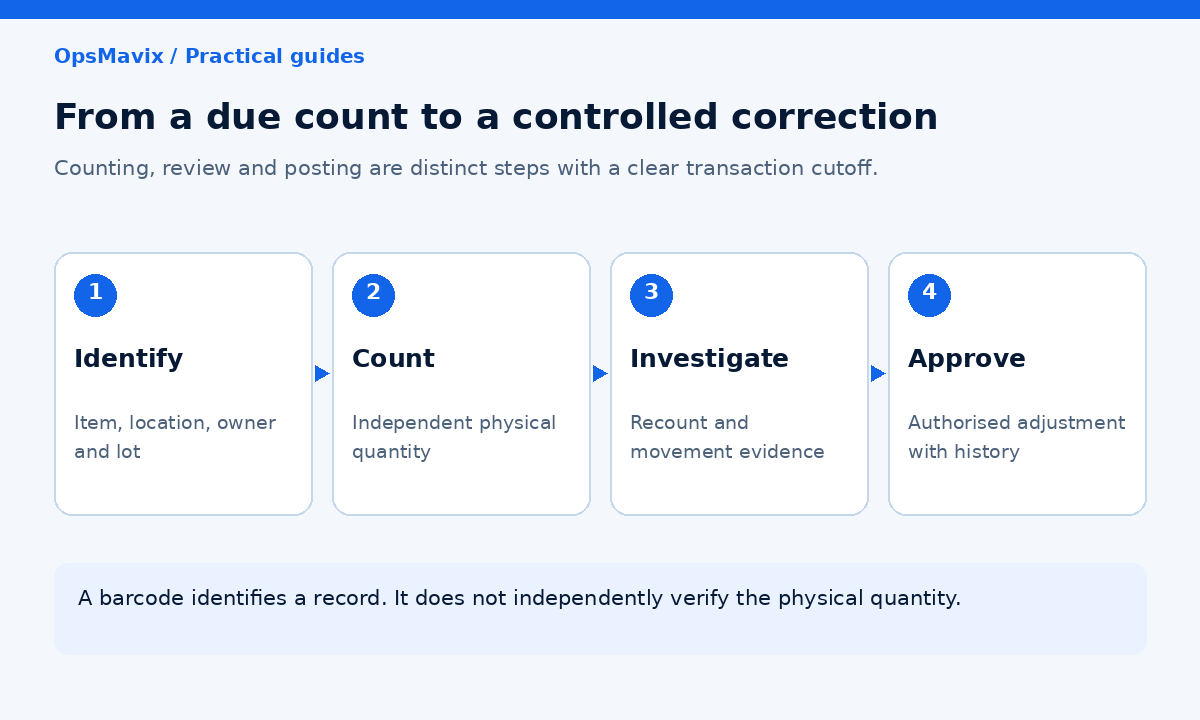
Connect the due-count list, independent result, approval and investigation into one traceable workflow.
Start with the existing capabilities
A controlled spreadsheet can establish priorities and workload. Inventory software may already support class schedules, blind counts and approvals. Configure those functions before assuming a new application is needed.
Integration or custom development may help where classification, task generation and inventory correction are disconnected. Full ERP scope may be appropriate if wider stock, production and finance requirements need redesign.
Write acceptance checks
The pilot should demonstrate that:
- Each task identifies its item, location and required stock details.
- The frequency calculation covers the agreed eligible records.
- Overdue and event tasks remain visible.
- Movement cutoffs make expected and counted quantities comparable.
- Blind counting hides the expected balance where intended.
- Recounts retain independent results and history.
- Approvals enforce the defined tolerance and authority rules.
- Adjustments post once and remain traceable.
- Failed updates cannot silently close a task.
- Exports reproduce coverage and unresolved exceptions.
Measure the full effort and outcome
Time complete tasks, not just scanning. Track discrepancies, investigation age, repeated causes and overdue coverage alongside labour.
Expand once operators and reviewers can maintain the process through a busy period. Released capacity is not automatically a cash saving, and a higher count volume is not automatically better accuracy.
Frequently Asked Questions
What is ABC cycle counting?
It uses item classes to determine repeated physical-count frequencies. The programme combines planned coverage with controlled review and correction of discrepancies.
How often should A items be counted?
Use a frequency supported by exposure, movement, errors and available capacity. Weekly or monthly policies are examples, not universal requirements.
Should counting priority use value or movement?
Review both, alongside criticality and discrepancy history. Keep the financial ABC class separate from any counting override so the reason remains clear.
What is one count unit?
It is the scope defined by the programme, such as an item-location combination or a bin. Specify it before calculating workload and coverage.
Does scanning a barcode count the stock?
No. It identifies a record. Physical units or contents still require verification under the approved counting method.
Can we count while the warehouse operates?
Often, with appropriate control of the relevant movements and a clear cutoff. Uncontrolled movement makes expected and counted quantities difficult to compare.
Should every discrepancy change stock immediately?
Follow the approved recount, tolerance and authority rules. Preserve the count result separately from the adjustment and investigate significant or recurring differences.
Does cycle counting remove the need for a full stocktake?
Not automatically. Agree its role with the people responsible for the intended reporting and assurance requirements, using evidence of coverage and control effectiveness.
Where should we start?
Define the count unit, classify a representative area and calculate the workload. Pilot the count, review and correction workflow before expanding.
How OpsMavix Can Help
OpsMavix builds inventory systems that connect stock records with practical counting and exception controls.
We assess the existing tools, define count scope and priorities, and connect schedules, independent results and approvals where the current workflow is fragmented. The scope can be focused or part of a full ERP.
OpsMavix can help you:
- Define financial classes and counting overrides.
- Calculate frequencies and a realistic task load.
- Build due-count and overdue views.
- Record cutoffs, recounts and approved corrections.
- Link discrepancies to investigation and follow-up.
- Verify exports, recovery and maintainable handover.
If counting effort is high but the same discrepancies keep returning, book an Operations Leak Audit. Bring a recent count and its movement history so we can map what is failing.
Keep reading

Getting value from OpsMavix? Add us as a preferred source on Google — you'll see more of our operations content in your AI Overviews, AI Mode and Search.