
Blind Inventory Count: How to Run One (and Why It Catches What Normal Counts Miss)
A blind inventory count hides the expected figure from the counter, so they record what's actually on the shelf instead of confirming what the system already thinks. Here's exactly how to run one, blind vs known counts, when each fits, the honest pros and cons, and why blind counts are painful on paper but trivial when the system supports them.
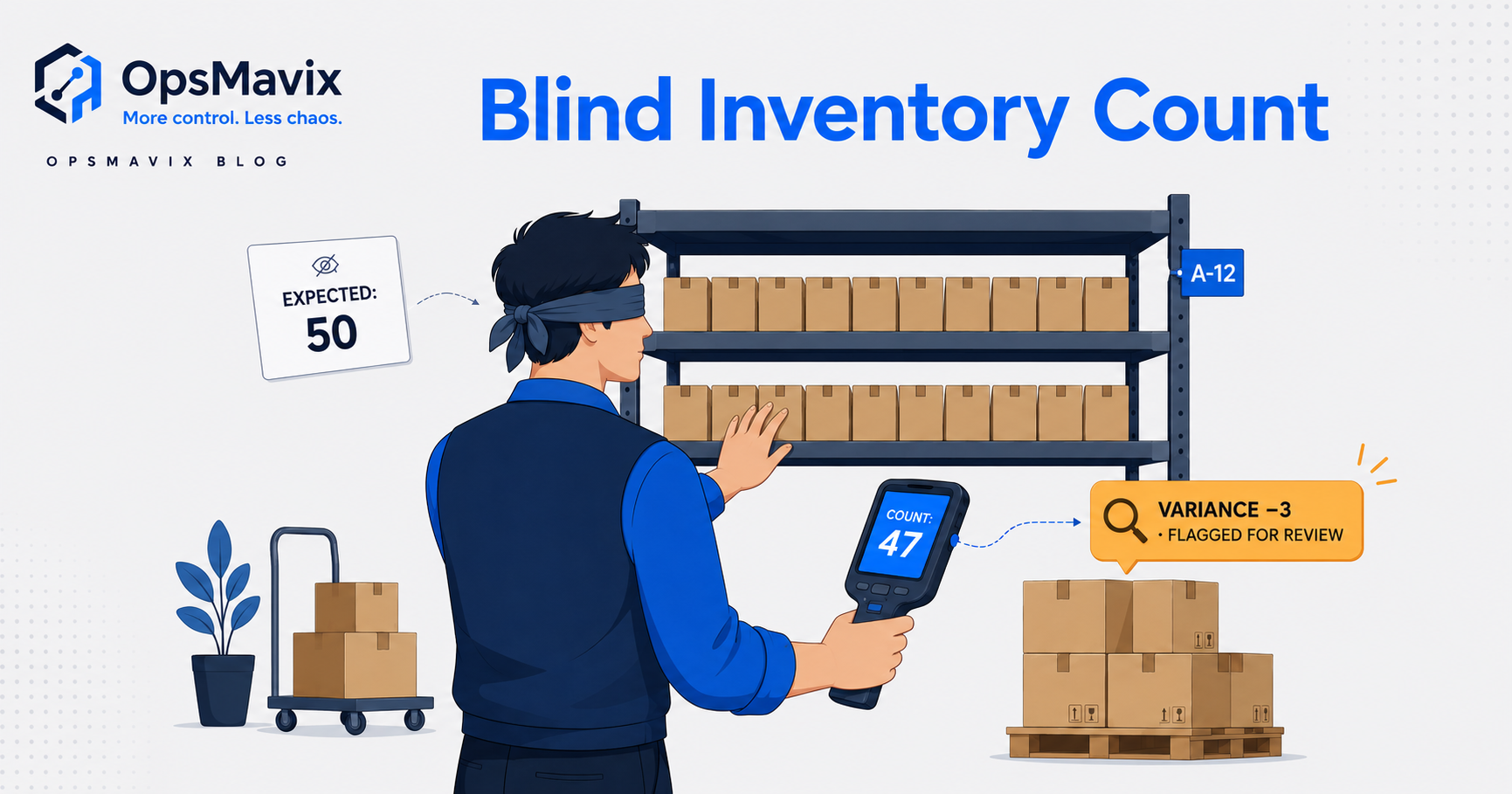
A blind inventory count records physical stock before the counter sees the expected system quantity. To run one reliably, define the scope and cut-off, issue tasks with blank quantities, preserve the observations, reconcile movements and investigate differences before approving adjustments.
The method can be used for a selected cycle count or a wider stocktake. Its success depends on the surrounding process: a hidden number cannot compensate for unclear units, unrecorded movements or stock that is counted twice. This guide is a practical runbook, with hypothetical examples rather than client results.

A count task needs clear location boundaries so goods are neither missed nor counted twice. Illustrative photograph, not an OpsMavix client.
Image credit: Nenad Stojković / Shixart1985, CC BY 2.0. Displayed at a reduced size; no additional edits.
Key Takeaways
- Assign a count owner and define the locations, items, units and statuses included.
- Capture a controlled baseline and either pause movement or reconcile a complete movement log.
- Keep expected balances off the counter’s sheet and relevant screens.
- Record zero and unexpected stock explicitly, preserving the first observation.
- Recount and investigate under a written policy before approving any adjustment.
- Close each discrepancy with a transaction or process action, not only a corrected balance.
In this guide:
- 1. Define the Count Scope and Responsibilities
- 2. Set the Baseline and Movement Cut-Off
- 3. Prepare Blind Tasks and Train Counters
- 4. Capture Observations Without Replacing Them
- 5. Reconcile the Same Stock Position
- 6. Recount and Investigate Variances
- 7. Approve Adjustments and Release the Area
- 8. Review Results and Improve the Next Count
- Frequently Asked Questions
- How OpsMavix Can Help
1. Define the Count Scope and Responsibilities
Choose a scope people can complete
Start with a manageable area for a pilot. Define the physical boundary, stock owner, tracking dimensions and statuses. For example, counting sellable stock in aisle A excludes neither reserved stock physically there nor damaged goods automatically; those distinctions must be stated in the task design.
| Responsibility | Main task |
|---|---|
| Count owner | Set scope, cut-off, instructions and escalation. |
| Counter | Identify and record the stock actually present. |
| Reviewer | Reconcile observations, timing and transactions. |
| Approver | Authorise the adjustment under the inventory policy. |
| Process owner | Correct the cause of a confirmed discrepancy. |
Small teams may combine roles. For important differences, preserve a competent independent review where practicable. Avoid using the expected balance as a target that staff are pressured to reproduce.
Include awkward areas
Receiving, staging, returns, quarantine and partly completed production can contain stock outside ordinary shelves. Assign ownership of those areas and agree whether they belong in this count. Record off-site and in-transit stock separately where relevant.
2. Set the Baseline and Movement Cut-Off
Capture the comparison position
Retain the system record by the dimensions being counted and record its time. Keep this baseline with the reviewer, not on the counter’s task. Distinguish physical on-hand stock from available-to-sell quantities and financial values.
A reservation does not necessarily remove stock from a location. A purchase order does not necessarily mean goods have arrived. The count must compare physical observations with the appropriate on-hand definition.
Choose a movement-control method
| Method | How it works | Main limitation |
|---|---|---|
| Pause the area | Stop relevant receipts, picks and transfers until release. | Requires coordination with warehouse work. |
| Controlled transaction log | Record movements and reconcile them to observation times. | Fails if movements or timing are incomplete. |
| Smaller count zones | Count and release manageable areas in sequence. | Transfers across boundaries need careful control. |
Do not assume software automatically freezes stock merely because a count task exists. Test the behaviour and brief receiving, picking and replenishment teams on the actual procedure.
3. Prepare Blind Tasks and Train Counters
Show identification, withhold expectation
Tasks should include a count identifier, location, relevant item or location instruction, unit and required batch or serial information. Quantity fields should start blank. Keep the system balance off printed sheets, exports and screens available during the task.
Oracle’s count documentation provides an example of blind events where expected quantities are not included. Your application’s workflow may differ, so verify its configuration directly.
Explain the counting method
- Confirm the item and location before recording a quantity.
- Use the stated unit, separating cartons from loose units.
- Follow the agreed policy for sealed containers and partial packs.
- Record damaged or held stock in the correct status.
- Enter a positive zero when the assigned location is empty.
- Escalate unidentified or inaccessible stock rather than guessing.
Count safely using the warehouse’s existing access procedures. A requirement to count accurately does not authorise climbing shelving or moving unsafe loads.
4. Capture Observations Without Replacing Them
Preserve the first submission
Record who counted, where, when and in which unit. Notes should explain issues such as broken packaging or an unexpected item. The initial observation is evidence and should remain available even if a later recount changes the accepted result.
An empty field means unfinished, not zero. A default that silently copies expected stock into an uncompleted line defeats the purpose of the method. Check how paper transcription, bulk imports and mobile uploads treat blanks.
Look beyond the expected item list
A sheet containing only expected items can miss unrecorded stock in the same location. Use a location-completeness instruction or an unexpected-item capture route where appropriate. Mark completed locations so another team does not repeat them unintentionally.
If an identifier is unreadable, retain the observation and resolve the item identity with the reviewer. Do not assign it to the nearest similar product merely to finish the task.
5. Reconcile the Same Stock Position
Hypothetical timed count
Suppose the retained baseline at 09:00 is 240 units in one bin. Before the counter records 228 at 09:12, a documented 12-unit pick leaves the bin at 09:05. These are illustrative inputs.
| Event | Units | Effect on comparison |
|---|---|---|
| Baseline at 09:00 | 240 | Starting on-hand position. |
| Confirmed pick at 09:05 | -12 | Legitimate movement before observation. |
| Expected position at 09:12 | 228 | 240 - 12. |
| Blind observation at 09:12 | 228 | No difference after timing reconciliation. |
Comparing 228 directly with the earlier 240 would invent a twelve-unit shortage. If no such movement occurred and the area was controlled, the difference would remain for investigation.
Keep the original and the reconciled result
Document which transactions bridge the baseline and observation. A reviewer should be able to reconstruct the calculation. If the movement log is incomplete, report the result as unresolved and re-establish a reliable count position rather than forcing an adjustment.

Bin-level evidence matters even where the warehouse-wide total appears correct. Illustrative photograph, not an OpsMavix client.
Image credit: FIONASUN, CC0 1.0. Displayed at a reduced size; no additional edits.
6. Recount and Investigate Variances
Use thresholds appropriate to value, quantity, criticality and recurring problems. A small missing component can stop production even if its financial value is low. Written thresholds help staff escalate consistently, but should not suppress unusual patterns.
Make the recount independent
Where required, give a second counter the task without the expected quantity or the first result. Preserve both observations. If they disagree, check identification, units, boundary and movements before concluding that one person counted incorrectly.
| Investigation area | Checks |
|---|---|
| Identification | Similar SKUs, wrong barcode, unreadable label. |
| Units | Case versus each, partial packs, conversion changes. |
| Movements | Unposted receipts, issues, returns or transfers. |
| Location | Nearby bins, staging or goods put back elsewhere. |
| Status | Damaged, held, reserved or third-party stock. |
| Transactions | Duplicate entries, reversals and delayed integrations. |
A discrepancy does not itself prove loss or wrongdoing. Reach a supported conclusion and retain evidence of what was checked.
7. Approve Adjustments and Release the Area
Separate the count from the correction
An accepted observation can lead to an adjustment, a missing transaction being posted or a location correction. These are different actions. If stock exists in the wrong bin, correcting the site total may solve the wrong problem.
Record the reason, quantity, affected dimensions, authoriser and resulting transaction. Confirm the adjustment has reached connected systems where required. A repeated submission must not create another adjustment for the same count.
Release only after the control point is clear
The count owner should confirm the accepted position and identify outstanding tasks before normal work resumes. If the process permits release before full investigation, document how the unresolved item is controlled.
Reconcile relevant inventory and finance records under the business’s accounting process. The stock controller’s observation and the financial treatment are related, but are not the same decision.
8. Review Results and Improve the Next Count
Measure a defined sample
Suppose 96 of 100 counted item-bin records match exactly after timing reconciliation. That is 96% exact-match record accuracy for the sample. It does not show that 96% of inventory value or all physical units is correct.
Track completion, unresolved variances, repeat locations and time to close findings. Compare similar samples and definitions. A count can reveal more discrepancies because it is more thorough, so a larger initial variance does not automatically mean the operation has deteriorated.
Pilot acceptance checklist
- Expected quantities remain hidden during observations.
- Each line has an explicit quantity or documented exception.
- Unexpected stock and empty locations can be captured.
- Movement reconciliation can be reconstructed.
- Recounts preserve independent observations.
- Adjustments require the agreed authorisation.
- Failed and duplicate submissions recover safely.
- Evidence can be retrieved and exported afterwards.
Consider existing warehouse functionality first. Microsoft’s cycle-count examples illustrate how established applications support different count workflows. A focused configuration or integration may address the gap more proportionately than replacement.
Frequently Asked Questions
How do we start a blind inventory count?
Define the scope, owner and cut-off, retain a separate system baseline and issue tasks with blank quantities. Brief counters on units, unexpected stock and movement control before work starts.
What should be on the count sheet?
Include task identity, location, relevant item details, unit and required tracking information. Withhold expected stock and leave observation fields blank until counted.
Should the whole warehouse stop?
Not always. A controlled zone pause or a reliable timed movement log may support a smaller count. Choose a method the operation can execute and verify rather than assuming movement does not matter.
How do we handle stock that is not on the sheet?
Capture its actual location and identity through an unexpected-item route. Investigate ownership and status before including it in a balance or making an adjustment.
What does a blank quantity mean?
It should mean that the task remains unfinished or needs review. Zero should be an explicit observation; a blank must not be interpreted silently as zero or expected stock.
Do all differences require a recount?
Follow a written risk-based policy. Significant, unusual or recurring differences warrant stronger review. Keep any recount independent of the expected and first-count quantities.
Should we overwrite the first count after a recount?
Preserve it and record the accepted result separately. The history explains why an adjustment was approved and helps identify training or process issues.
Can two agreeing counts still be wrong?
Yes. Both counters can share an incorrect unit, location boundary or item identification. Agreement is useful evidence, but those assumptions still need checking.
What should happen after stock is adjusted?
Confirm connected records, retain authorisation and assign an owner to the cause. Check a later sample to establish whether the process correction prevents recurrence.
How OpsMavix Can Help
OpsMavix can map the count and reconciliation process, configure existing warehouse tools, integrate stock records or build a custom workflow with blind observations, review and audit history. We can also assess a full ERP where wider operational requirements make it appropriate.
Explore our inventory automation systems. Contact OpsMavix with one count sheet and an unresolved variance so we can define a practical pilot and clear acceptance criteria.
Keep reading
Getting value from OpsMavix? Add us as a preferred source on Google — you'll see more of our operations content in your AI Overviews, AI Mode and Search.