
Production Planning and Control Tools: What You Actually Need on the Floor
Production planning and control tools turn orders into a runnable schedule and then keep score against what actually happens on the floor. This guide explains what they really do, why so many UK shops are stuck between spreadsheets and a full ERP, and how to right-size a system you own when you're outgrowing spreadsheets and disconnected tools.
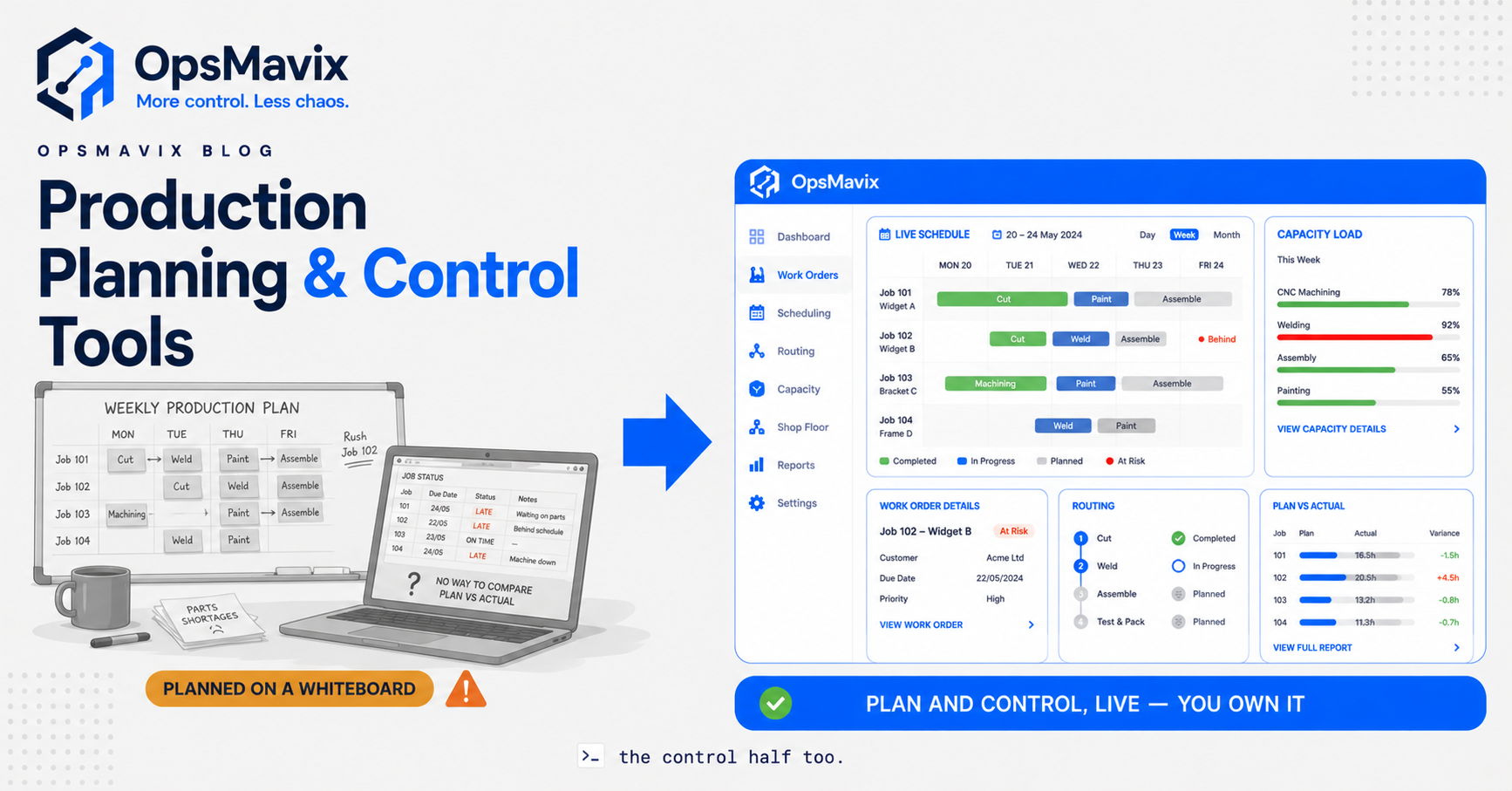
Production planning and control tools are the systems a shop uses to decide what to make and when (planning), then to steer the work through the floor and keep score against the plan (control). Planning turns customer orders, capacity, and materials into a sequenced schedule. Control is the other half most tools forget: releasing work orders, tracking where each job actually is, and comparing planned-versus-actual so the plan stays honest as the day breaks it. One without the other is either a pretty schedule nobody follows, or a busy floor with no idea whether it’s winning.
Most growing UK manufacturers already know they need this. UK manufacturing contributed £217bn in output and supported 2.6 million jobs in 2024, per Make UK’s Facts 2024 — a sector that size runs on scheduling decisions made every day, and a large share of smaller shops still make them in spreadsheets and heads. The real question is what level of tool the problem deserves — a whiteboard, a generic scheduler, a full MRP/ERP, or something built around how this particular shop routes work. Buy too small and you’re back to firefighting; buy too big and you’re implementing a platform for months and using a tenth of it.
Quick summary: In UK general engineering and job shops, typical Overall Equipment Effectiveness runs just 40–55%, versus 65%+ for world-class operations in the same category, according to TEEPTRAK’s 2026 UK OEE benchmark. A huge share of that gap isn’t broken machines — it’s planning and control: jobs waiting on materials, changeovers stacked badly, and nobody watching planned-versus-actual until the delivery is already late.
Contents
- What production planning and control tools actually do
- The spectrum: whiteboards to full ERP
- The core PP&C functions worth paying for
- The blind spot: planned-versus-actual on the floor
- Generic tool vs full ERP vs right-sized owned system
- Integrations and why ownership matters
- A worked example
- FAQ
- How OpsMavix Can Help
- Sources
What production planning and control tools actually do
Strip the vendor language away and PP&C tools do two connected jobs. Planning reconciles three things that are always in tension: demand (what’s been ordered or forecast), capacity (what your machines, cells, and people can actually produce in a period), and materials (whether you have, or can get, the parts to build it). The output is a schedule — a sequenced, dated plan of what runs where.
Control is what happens after the plan meets reality. It releases work orders to the floor, tracks each job as it moves through its routing, records how long operations actually took, and flags where the floor has drifted from the plan. Planning asks can we make what we promised? Control asks are we actually making it, and will it still ship on time? The value of the pair is a promise date you can trust and early warning when it’s at risk — not a schedule that was true only on Monday morning.
That second half is where cheap tools quietly fail. A scheduling app will draw you a beautiful Gantt chart. Whether the floor followed it, and what that means for the next three jobs, is a different question — and it’s the one that decides whether customers get their orders on time.
The spectrum: whiteboards to full ERP
There’s a natural progression most shops climb, and it helps to see the whole ladder before you decide which rung fits.
Whiteboards and spreadsheets. The starting point, and not a joke — plenty of capable shops plan on them for years. A whiteboard shows today’s plan at a glance; a spreadsheet holds the order list. What neither can do is model your capacity or your routing, so they can’t see collisions: two jobs needing the same cell on Thursday, a rush order that pushes three others past their dates. They record intentions; they don’t control anything.
Generic scheduling tools. The next step up — a dedicated planning board, production planning software, or scheduling app. These add drag-and-drop sequencing, some capacity awareness, and a shared view. For a simple, stable flow they can be enough, and they’re cheap. Where they strain is control: they schedule well but track the floor poorly, and they rarely tie the plan to materials or purchasing, so shortages still surface at the machine.
Full MRP / ERP. The heavyweight end — finite scheduling, MRP material explosions, quality modules, costing, multi-site, the lot. Genuinely powerful, and right for large, complex manufacturers. The cost is scope: months of implementation, a consultant who charges by the day, and a platform shaped for a business five times your size that you bend your process to fit. Most shops switch on a fraction of it.
Right-sized owned system. The option most people don’t know exists: a system built around your real routing — the handful of PP&C functions that carry the value, shaped to how your floor actually runs, owned by you and expandable later, up to a full ERP if you ever genuinely need one. It’s the scalpel between the generic tool that’s too small and the ERP that’s too big.
The mistake isn’t choosing any one rung. It’s jumping straight from spreadsheets to full ERP because that’s what the loudest vendors sell, when the problem needed something in between.
The core PP&C functions worth paying for
Whatever the label on the box, a handful of functions carry almost all the value for a growing product business. Everything else is usually weight.
Capacity-aware scheduling. The system must know your real capacity — machines, cells, shifts, people — and refuse to promise more than exists. A schedule that lets you commit 55 hours of work into a 40-hour week is just a prettier spreadsheet. This is the single feature that separates planning software from a to-do list.
Routing. Most jobs aren’t one operation — they flow through a sequence (laser, form, weld, assemble, inspect). A tool worth having models that routing, so it schedules each operation on the right resource in the right order and knows a job can’t weld before it’s cut. Routing is what turns a list of orders into a realistic path through your shop.
Work orders. The instruction to the floor: what to make, from which materials, in what sequence, by when. Releasing work orders from the plan — rather than shouting across the shop — is what makes control possible, because every job now has a record to track against. This is the spine of any production management system: the plan becomes an instruction, and the instruction becomes something you can measure.
Live job tracking. Where is job 4471, what stage is it at, and will it ship on time? Answered in seconds from the system, not by walking the floor. This is the backbone of manufacturing production tracking — the plan and reality kept on the same record.
Planned-versus-actual. The scoreboard. Planned start versus actual start, estimated hours versus booked hours, promised date versus projected date. This is the function that turns a plan into control, and it’s the one cheap tools skip.
Notice what’s not on the list: shop-floor IoT telemetry, genetic-algorithm finite optimisation, multi-plant global balancing, demand-sensing AI. These are real, and for the overwhelming majority of UK SME shops they’re cost and complexity with no return.
The blind spot: planned-versus-actual on the floor
Here’s the pain OpsMavix sees most. A shop invests in scheduling, gets a clean plan, and still ships late — because the plan and the floor quietly diverge and nobody sees it until it’s too late to fix.
The plan says job 4471 starts Tuesday and takes twelve hours. In reality it started Wednesday because the material slipped, the weld took sixteen hours because of a rework, and the operator never logged either. By Friday the plan on screen and the work on the floor are two different stories, and both the planner and the sales team are quoting from the fiction. The next customer gets promised a date built on a plan that was already wrong.
Planned-versus-actual control closes that gap. When actuals are captured as work happens — even lightly, a tap to start and finish an operation — the system knows the real state of the floor. It can reforecast the promised date the moment a job slips, flag the three downstream jobs that will now be late, and tell the planner where the time is actually going: setup, waiting, rework, or run. That’s the difference between a schedule and control. Without it, you’re not planning production; you’re documenting your hopes.
This is also where a broader project operations dashboard earns its keep — one live view where planned and actual sit side by side, so the drift is visible while there’s still time to act on it.
Generic tool vs full ERP vs right-sized owned system
| Generic scheduling tool | Full MRP / ERP | Right-sized owned system | |
|---|---|---|---|
| Built for | Simple, stable flows | Large, complex manufacturers | Your routing, your floor, your product mix |
| Scheduling | Basic drag-and-drop | Finite, heavyweight | Capacity-aware, shaped to your cells |
| Control (planned-vs-actual) | Weak or absent | Full, but complex to run | The functions that carry the value, nothing else |
| Materials link | Rarely connected | Full MRP explosion | Enough to stop shortages at the bench |
| Implementation | Days | Months, often a paid consultant | Weeks, built around your real workflow |
| Adoption | Fine until outgrown | Staff resist; shadow spreadsheets survive | Faster for daily tasks, so it gets used |
| Cost shape | Cheap per-seat, forever | Large licence + per-seat/module, forever | Built once, owned; no rented-complexity treadmill |
| Ownership | Rent access on vendor’s terms | Rent access on vendor’s terms | You own the system and the roadmap |
| Expandable | Limited | Already the ceiling | Grows with you, up to a full ERP if needed |
The table isn’t an argument that big platforms are bad — for a large, multi-site manufacturer a full ERP can be exactly right, and a generic scheduler is genuinely fine for a simple flow until you outgrow it. It’s an argument that fit beats feature count for a growing SME, and that most of the pain shops report with PP&C tools comes from buying for a scale and complexity they don’t have.
Integrations and why ownership matters
Planning and control that can’t see purchasing, stock, and the floor is planning in a vacuum. The value comes from connecting the four things that decide whether a job ships on time: the order, the capacity, the materials, and the actual floor state. A scheduling island that lives apart from your stock and your buying will keep finding shortages at the machine, because the plan never triggered the purchase order — it just discovered the gap.
That’s the case for integration, and it’s also the case for ownership. A generic platform is built to sell to everyone, so it fits no one exactly. You bend your process to its assumptions, or pay to bend it to yours, and either way you rent access on the vendor’s terms — the roadmap, the renewal, the per-seat maths all sit with them. A right-sized owned system inverts that. It’s shaped to how your floor already routes work, it connects to the stock and purchasing systems you already run, and because you own it there’s no renewal treadmill and no vendor deciding when your workflow gets to change. If you later genuinely need full MRP, you expand toward it deliberately, instead of buying the whole engine on day one to solve a scheduling problem.
A worked example
Consider a fictional UK maker of stainless steel catering equipment — a 30-person fabrication shop running laser cutting, forming, welding, and assembly, quoting bespoke and semi-standard jobs. (Illustrative — not a claim about a specific client.)
On a generic scheduler. Sales quotes a four-week lead time on a £42,000 order because the planning board looks roughly clear. What the board can’t show is that the welding cell is already 90% committed for those weeks, and it has no link to materials. The job is accepted and scheduled to start in week three. It stalls twice: welding is jammed, and a bracket ordered late — because nothing netted the job against stock until it was due to start — hasn’t arrived. Worse, nobody logged the delays, so the schedule still shows the job “on track” until the ship date. It goes out nine days late. The team spent hours firefighting a collision the tool couldn’t warn them about.
On a right-sized owned system. When sales enters the same enquiry, the system checks live welding-cell capacity for the window and shows it’s tight — so it proposes an achievable five-week date, or flags that overtime in week two makes four weeks safe. The job’s routing is scheduled cell by cell, and its bill of materials is netted against stock and open POs on day one, so the bracket shortage surfaces immediately and a purchase order goes out at once. As the job runs, operators tap start and finish on each operation, so when welding overruns by four hours the system reforecasts the date that afternoon and flags the two downstream jobs now at risk — while there’s still time to move them. The order ships on time. Nothing about the machines changed. The plan could finally see the collision, the shortage, and the drift before any of them became a late delivery.
The gain isn’t exotic. It’s demand, capacity, materials, and actual floor state held together instead of scattered across a scheduling board, a purchasing inbox, and one planner’s memory.
FAQ
What are production planning and control tools?
They’re systems that do two connected jobs: planning turns customer orders, capacity, and materials into a realistic, sequenced schedule; control releases work orders to the floor, tracks each job through its routing, and compares planned-versus-actual so the plan stays honest as reality changes it. Planning tells you whether you can build what you promised; control tells you whether you actually are, and whether it’ll still ship on time.
What’s the difference between production planning and production control?
Planning happens before the work starts — it decides what to make, in what order, on which resources, by when. Control happens as the work runs — it steers jobs through the floor, captures what actually took place, and flags where the floor has drifted from the plan. Cheap tools often do planning and skip control, which is why shops with a clean schedule still ship late.
Do I need a full ERP for production planning and control?
For a large, complex, multi-site manufacturer, often yes. For a growing SME, usually not. A full ERP typically means months of implementation, a paid consultant, most modules switched off, and staff quietly keeping the old spreadsheet. A right-sized owned system that does capacity-aware scheduling, routing, work orders, and planned-versus-actual — shaped to your floor and owned by you — tends to deliver the outcome with far less cost and friction, and can expand toward a full ERP later if you genuinely need it.
Can’t I just use a scheduling app or a whiteboard?
For a simple, stable flow, sometimes yes. The tells that you’ve outgrown it are consistent: promised dates become guesses, the plan and the floor diverge, shortages get found at the machine, and nobody can say where a job really is without walking the shop. A whiteboard or basic scheduler can plan; what they can’t do is control — model your routing, tie the plan to materials, and keep score against actuals. When that gap starts costing you deliveries, a proper PP&C tool earns its keep.
How does planned-versus-actual tracking help?
It’s the scoreboard that turns a plan into control. By capturing when operations actually start and finish — even a light tap to start and end each step — the system knows the real state of the floor. It can reforecast a promised date the moment a job slips, flag the downstream jobs now at risk, and show where time really goes: setup, waiting, rework, or run. Without it, you’re documenting hopes rather than controlling production.
How OpsMavix Can Help
OpsMavix builds right-sized operations systems for growing UK product businesses — manufacturing, inventory, wholesale, and ecommerce-with-stock — that are outgrowing spreadsheets but nowhere near needing a full ERP. Instead of selling you a generic scheduler that can’t control the floor, or a full ERP where you use a tenth of the features and rent the rest forever, we design a system around the PP&C problem you actually have: capacity-aware scheduling, routing, work orders, live job tracking, and planned-versus-actual — shaped to how your floor really runs, connected to your stock and purchasing, and owned by you. We sell the outcome — dates you can keep and a plan the floor trusts — not a licence and a project. If you want to see where your production planning and control leaks money today, Book a Free Operations Leak Audit.
Sources
- TEEPTRAK — OEE Benchmark: UK Manufacturing by Sector (2026) — sector-by-sector UK OEE ranges, including 40–55% typical for general engineering and job shops.
- Make UK — UK Manufacturing: The Facts 2024 — UK manufacturing contributed £217bn in output and supported 2.6m jobs.