
Shop Floor Scheduling Software: How to Decide Which Job Runs When
Shop floor scheduling software decides which job runs when, on which machine, against finite capacity and real due dates. It is not the same as tracking what is happening now. Here is what scheduling should do and where a spreadsheet quietly fails.
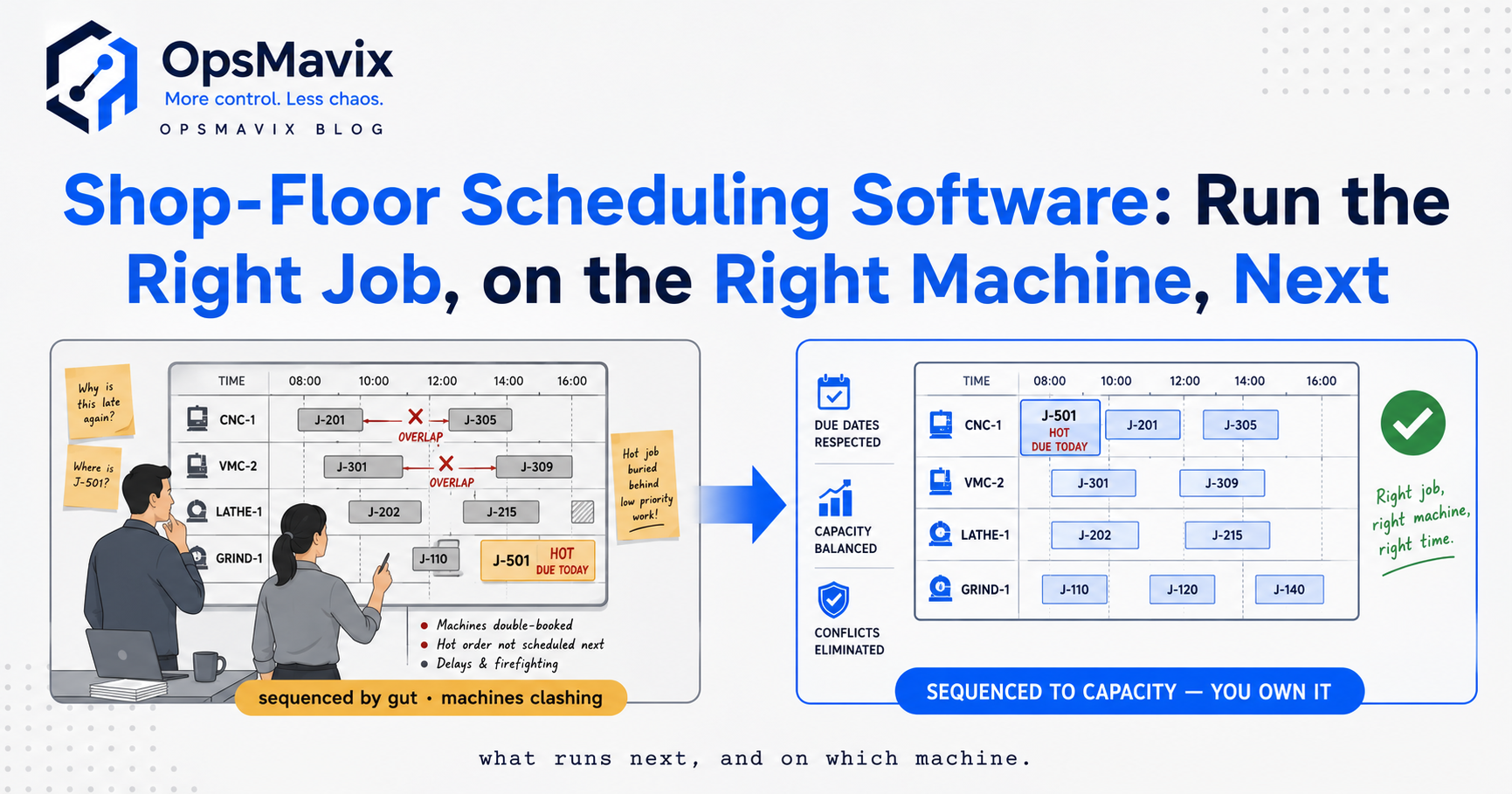
Shop floor scheduling software decides which job runs when, on which machine, against finite capacity and real due dates. That is the whole job: sequencing. Not “what is running right now” (that is tracking) and not “how much part-finished stock is sitting between stations” (that is WIP). Scheduling is the decision made before the job starts, and it is the decision most factories make in someone’s head or on a whiteboard that gets wiped every Friday.
The reason it matters is that a wrong sequence is invisible until it is expensive. You do not find out that job B should have gone before job A until the customer for B rings up asking where their order is, by which point the machine is already three days into A. Good scheduling software makes that trade-off visible before the setup, not after the shipment slips.
Key Takeaways
- Scheduling is sequencing, not status. It answers “which job, which machine, in what order” against capacity you actually have, not capacity you wish you had.
- Finite capacity is the whole point. A schedule that assumes every machine can do everything at once is just a wish list with dates on it.
- Due dates and setup time fight each other. The best sequence for changeovers is rarely the best sequence for deadlines, and the software’s job is to show you the cost of each choice.
- A spreadsheet cannot re-plan. The moment one machine goes down or a rush order lands, a static sheet is wrong and nobody trusts it by 10am.
- Scheduling only works when it is fed real data, which is why it lives next to tracking, not in a separate tool that never hears about the breakdown.
- You do not need an ERP to schedule well. You need finite-capacity logic wired to what is actually happening on the floor.
What Shop Floor Scheduling Software Actually Does
At its core the software takes a list of jobs, each with a due date, a routing (which operations in which order), and a processing time, and it assigns them to machines and time slots. The hard part is the constraint: each machine can only run one job at a time, and some jobs can only run on some machines.
That single constraint, “finite capacity”, is what separates a scheduler from a to-do list. Infinite-capacity planning (which is what most spreadsheets and a lot of MRP output actually is) tells you what should be done this week. Finite-capacity scheduling tells you it cannot all be done this week, and hands you the sequence that hurts least.
A proper scheduler also handles the awkward realities: setup and changeover time that depends on what ran before, jobs that share a tool, operations that must not start until the previous operation finishes, and shifts that are not 24 hours.
Scheduling Is Not Tracking (and Why People Confuse Them)
This is the distinction that trips up most buyers. Shop floor tracking software tells you the present tense: this job is at station 4, it started 40 minutes ago, it is running late. Scheduling is the future tense: given everything on the floor and everything in the queue, this is the order jobs should run.
They are different jobs, and they need each other. Tracking without scheduling is a very detailed record of chaos. Scheduling without tracking is a beautiful plan that goes stale the moment reality diverges from it.
If you want the detail on status and the state of part-finished work, that belongs in the production tracking system and shop floor WIP tracking posts. Here we stay on the sequencing decision.
The Trade-offs a Good Scheduler Makes Visible
Every real schedule is a fight between three things: hitting due dates, minimising setup and changeover time, and keeping expensive machines busy. Optimise hard for one and you damage the others.
Sequence purely by due date and you may flip a machine between three different tooling setups in an afternoon, losing an hour a changeover. Sequence purely to batch similar jobs and cut changeovers, and you push a deadline that mattered. A whiteboard cannot weigh those against each other; a person doing it by feel can, but only for a handful of jobs, and only while they are standing there.
Take a real scenario. A CNC job shop has a rush order due Thursday that needs the same machine as four steady jobs due the following week. The instinct is to jump the rush order to the front. The scheduler shows that doing so forces two changeovers that push a Friday job late and idles the mill for 90 minutes waiting on a tool. Same rush order still ships Thursday if it goes second, after the job already set up on that tooling. That is a decision worth 90 minutes and one angry customer, and it is invisible without finite-capacity logic.
Where the Spreadsheet Quietly Fails
Most growing manufacturers schedule in a spreadsheet or a whiteboard, and it works right up until it does not. The failure is not that the spreadsheet is wrong on day one. It is that it cannot re-plan.
A schedule is a live thing. A machine goes down, a material delivery slips, an operator calls in sick, a customer pulls a delivery forward. Every one of those events makes a static schedule wrong, and a spreadsheet has no way to absorb the change and re-sequence. So people stop trusting it, and the real schedule moves back into the supervisor’s head, where it cannot be seen, questioned, or covered when that supervisor is on holiday.
Operators tell us the same thing repeatedly: the problem is never the plan at 7am, it is the twelve small disruptions between 7am and lunch that no static plan survives. Software earns its place by re-sequencing in seconds when one of those events lands, and by keeping the decision on a screen everyone can see rather than in one person’s memory.
The £-cost framing is blunt. A missed due date is a late-delivery penalty, an expedited shipment, or a lost reorder. An hour of unnecessary changeover, three times a day, is roughly a shift a week of machine time you paid for and threw away. Neither shows up as a line on a P&L, which is exactly why they run for years.
What to Look For (and What to Ignore)
The features that matter are unglamorous. Finite-capacity sequencing that respects machine constraints. Setup and changeover time built into the calculation, not bolted on. Fast re-planning when reality changes. A view the floor and the office share, so the schedule is one thing, not two.
The features to be wary of are the ones that demo well and never get used: full-blown APS optimisation engines that need a data-science hire to tune, and “AI scheduling” that hides its logic so nobody trusts the sequence enough to run it. If your planner cannot explain why a job is where it is, they will override the software, and then you have paid for a tool that gets ignored.
For most sub-ERP manufacturers the honest need is modest: get the real constraints and real jobs into one place, apply finite-capacity logic, and re-plan fast. That is a solved problem; it just is not usually solved by the spreadsheet you are using.
Build, Buy, or Own the System
There are three honest routes, and the right one depends on how strange your floor is.
Buy an off-the-shelf scheduler if your process is standard and your constraints are common. Plenty of decent finite-capacity tools exist, and if one fits your machines and routings, use it. Do not pay us to rebuild what you can license.
An ERP with a scheduling module makes sense if you are already committed to the ERP for finance, inventory, and everything else, and the scheduling piece is good enough. The risk is the module that ships in the box but was clearly an afterthought, so you end up scheduling in a spreadsheet anyway next to a very expensive system.
The third route, and the one OpsMavix exists for, is when your constraints are real but odd, and no packaged tool models them without a fight. Shared tooling, split shifts, sub-contract steps, a machine that can only run certain jobs after certain others, a due-date logic your industry lives by. Then a right-sized operations system that models your actual floor and re-plans against it beats forcing your reality into someone else’s template. Not an ERP, not a spreadsheet, the practical layer in between that is built around how your floor genuinely works.
Start by finding out where the scheduling decision is really being made today. In most factories it is not in the software at all. It is in one person’s head, and that is the leak worth closing first.
Keep reading
Getting value from OpsMavix? Add us as a preferred source on Google — you'll see more of our operations content in your AI Overviews, AI Mode and Search.