
Open Source Inventory Management Software: The Real Cost of Free
Open source inventory management software carries no licence fee, which is exactly why the real bill hides in hosting, upgrades and developer time. This guide lists the genuine options (ERPNext, OFBiz, OpenBoxes, Odoo Community) and where the money actually goes, then shows why a right-sized owned system is often the honest middle ground for a business outgrowing spreadsheets but reluctant to pay per seat forever for a full ERP.
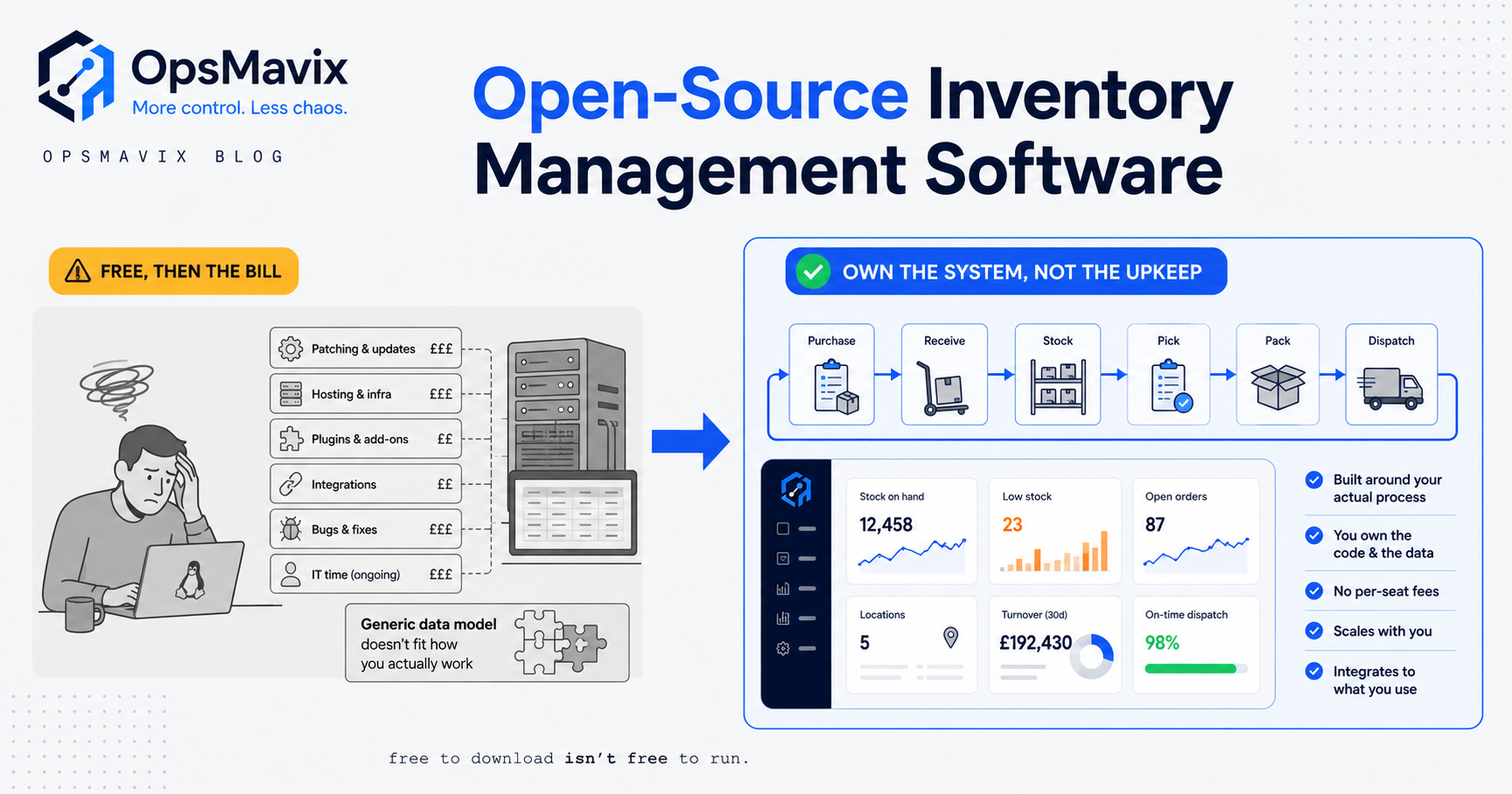
Open source inventory management software is stock-control software whose source code is published under a licence that lets anyone download, run, change and self-host it without paying for the software itself. The appeal is obvious. There is no per-seat fee, no vendor lock-in, and you can read every line of what you are running. If you are comparing options and the word “free” keeps pulling your eye, that is the pitch working as intended.
The pitch is also incomplete. “Free” describes the licence, not the total bill. The software costs nothing to download and quite a lot to actually run, because someone has to host it, secure it, back it up, upgrade it, and rebuild every workflow that the free version does not do out of the box. That someone is you, or a developer you pay by the hour. This article lists the real open source options, shows where the money genuinely goes, and lays out the honest three-way choice so you can pick the cheapest thing that closes your actual leak.
What open source inventory software actually is
Two things get bundled under the same phrase, and separating them saves confusion later.
The first is a standalone open source inventory or warehouse tool. It tracks stock levels, locations, reorder points, lot and expiry data, and movements in and out. It is narrow and does one job.
The second is a full open source ERP that includes an inventory module alongside finance, purchasing, manufacturing and sales. Here inventory is one room in a very large house, and you inherit the whole house whether you switch the other rooms on or not.
Both are “free” the same way: the code is licensed so you can run and modify it at no charge. Neither is free to operate. The difference between the licence being free and the system being free is the whole subject of this article, and it is the gap that catches buyers who read only the price tag.
The real open source options
These are the genuinely maintained open source projects worth knowing about, not a padded list of abandoned repositories.
- ERPNext. A full open source ERP built on the Python and JavaScript Frappe Framework, released under a permissive licence, with a complete inventory module inside a wider finance, purchasing and manufacturing suite. It markets itself as “100% open-source” and is the most polished of the free ERPs. You can self-host it for nothing in licence terms, or pay the maker for cloud hosting and support.
- Apache OFBiz. A top-level Apache Software Foundation project, written in Java and licensed under Apache 2.0, covering warehouse management, inventory, automated replenishment, order processing, manufacturing and accounting (Wikipedia). It is powerful and deeply customisable. It is also, in the words of one open source review, something that “requires a good deal of careful planning to set up” (Opensource.com), which is a polite way of saying it expects developers.
- OpenBoxes. A supply chain and inventory system created after the 2010 Haiti earthquake to track medical supplies, with strong multi-facility stock control, lot tracking and first-expiry-first-out picking (OpenBoxes). Excellent if your world looks like healthcare, cold chain or humanitarian logistics; more of a stretch for a general wholesaler.
- Odoo Community Edition. The free, self-hosted edition of Odoo, licensed under LGPL v3, with inventory and purchasing among its modules. The catch, covered below, is that many features you would expect are only in the paid Enterprise edition or must be coded by hand in Community.
- xTuple / other suites. Older open-core suites pairing inventory and distribution with accounting, still usable, though community energy has largely moved to the projects above.
Every one of these can run your stock. None of them runs itself.
What “free” actually costs
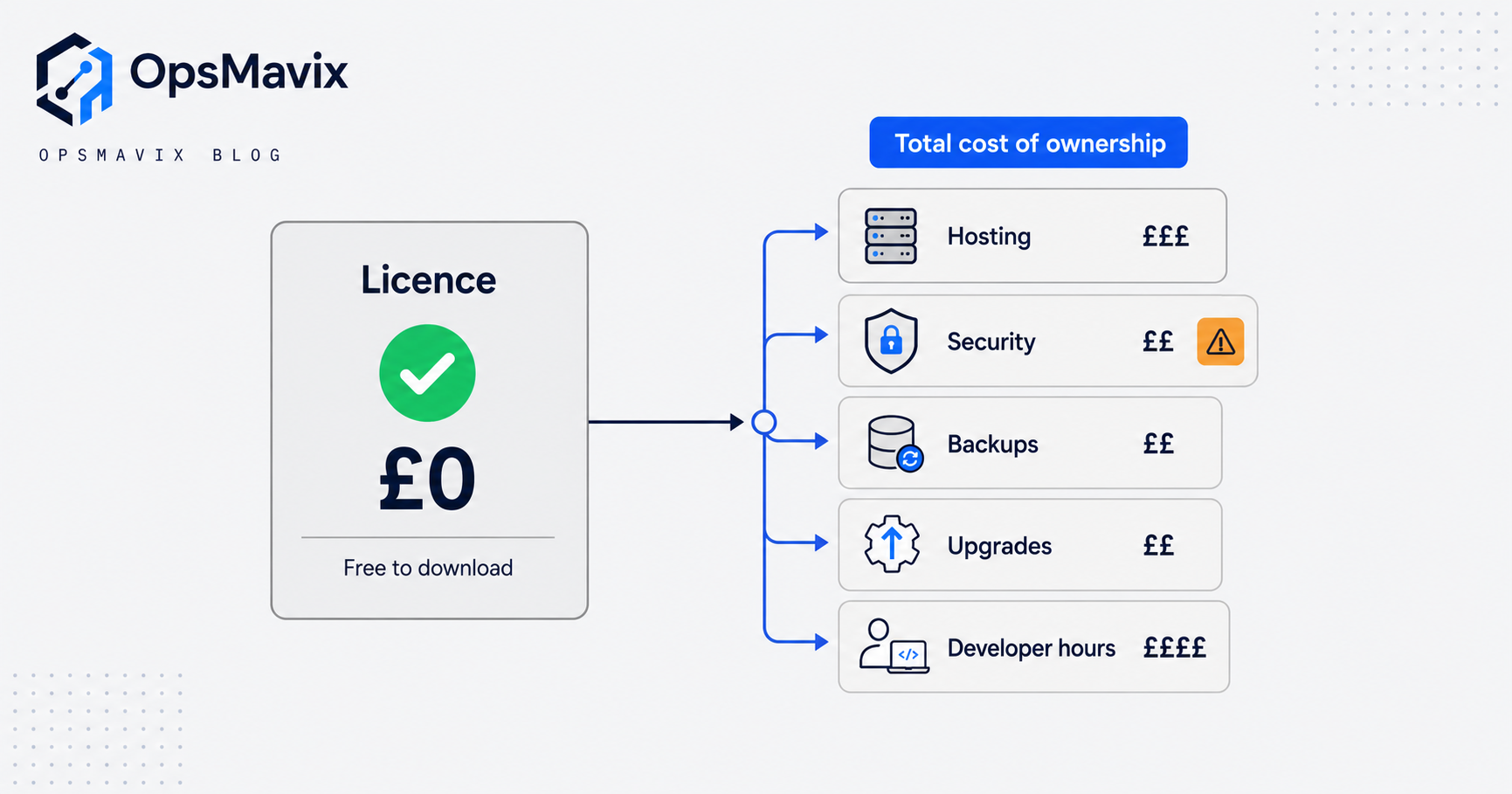
Strip away the licence and the real spending falls into four buckets. Figures here are converted from source material in US dollars and are rough guides, not quotes.
Hosting and infrastructure. Self-hosting a full ERP means a production server, backups, SSL, monitoring and uptime. A typical cloud server for a small deployment sits in the region of £40 to £160 a month (converted) before anyone touches the application. That is a modest number until you add the human who keeps it alive.
Implementation and configuration. The software installs; your business does not configure itself. A do-it-yourself setup using internal technical time is commonly costed at roughly £1,600 to £8,000 (converted) in hosting and hours, while a partner-led implementation runs from around £8,000 for a basic build to well over £80,000 (converted) for a complex, multi-company, heavily tailored one. The free software has not saved you here; it has just moved the cost from a licence line to a services line.
Customisation. This is where open source quietly bites. With Odoo Community, features that Enterprise handles with drag-and-drop configuration “must be coded in Community,” and one guide calls this “the single biggest cost surprise” (The Ledger Labs). Every workflow the free version does not do out of the box is a development ticket, and development tickets do not stop arriving once you go live.
Maintenance and upgrades. Open source moves. Core versions change, and custom modules or community add-ons can break on upgrade. The same guide notes free community modules “break during upgrades, often require patching, and aren’t all production-quality,” and that each major version upgrade “is an engineering project.” Budget for a real upgrade every couple of years, not a button you press.
Add those four together and the honest picture emerges. The licence is genuinely free. The system has a total cost of ownership that can quietly match, and in year three sometimes exceed, a paid tool, because the invoice moved from a vendor to your own payroll.
The blind spot: you become the IT department
Here is the specific pain open source creates, the one that rarely appears in the comparison blogs.
The moment you self-host, you own the operational risk. When the server falls over on a Friday afternoon, there is no support line; there is you. When a security patch lands, someone has to apply it. When the nightly backup silently fails, you find out only when you need the backup. When the developer who built your customisations moves on, their undocumented code becomes your problem. None of this is on a pricing page, because none of it is a price. It is a responsibility, and it lands on a team that wanted to fix stock control, not run a technology function.
For a business with a genuine in-house developer or a trusted technical partner on retainer, that trade can be sound: full control, no licence fees, and the skills to carry the load. For a growing wholesaler, manufacturer or distributor whose people are already stretched, “free” software often means a hidden second job. The stock problem gets solved and an IT problem gets born.
This is the real fork in the road. Not open source versus paid, but whether you have the appetite and the people to be the IT department for the system that runs your operation.
Open source vs full ERP vs a right-sized owned system
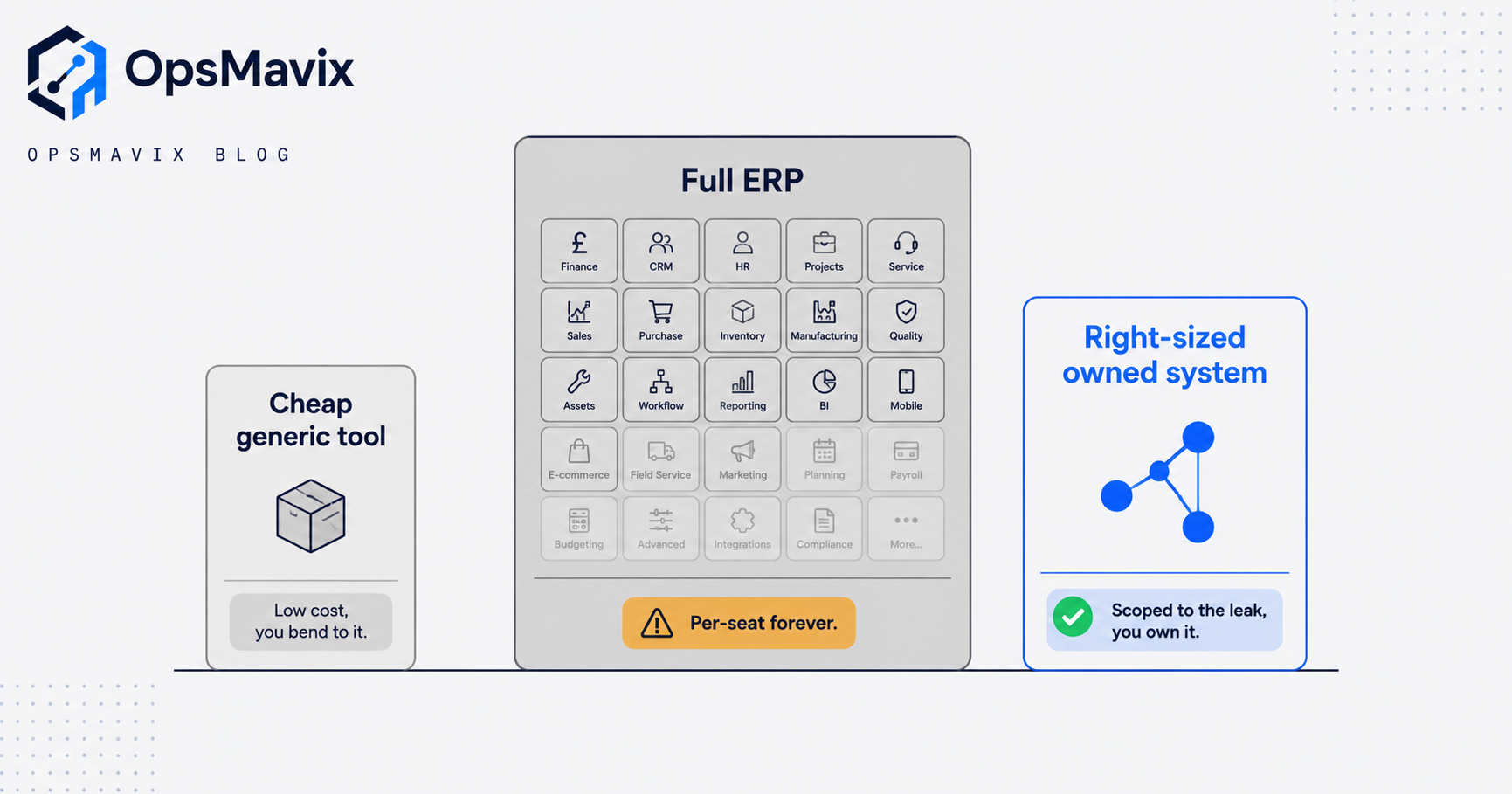
There are three honest routes, and open source can dress up as either of the first two. A cheap standalone open source tool behaves like a generic off-the-shelf tool. A self-hosted open source ERP behaves like a full ERP you happen not to pay a licence for. The table below compares the three shapes on the things that actually decide the outcome.
| What matters | Cheap / generic tool (incl. simple open source) | Full ERP (paid or self-hosted open source) | Right-sized owned system |
|---|---|---|---|
| Upfront cost | Low or zero | High, or high in services if “free” | Moderate, scoped to the leak |
| Ongoing cost | Low subscription | Per-seat forever, or your own hosting and dev time | You own it; no per-seat licence |
| Fit to how you work | You bend to the tool | You bend to the tool, heavily | Built around your real process |
| Who maintains it | Vendor | Vendor, or you if self-hosted | Your chosen partner, documented |
| Time to value | Days | Months to quarters | Weeks, focused on the painful bit |
| Covers everything | No | Yes, most of it unused | Only what you need, expandable later |
| Risk if it breaks | Vendor’s problem | Yours, if self-hosted | Owned, supported, understood |
| Scales up later | Rarely | Already heavy | Yes, add modules as you grow |
Read the table honestly and it does not always point at OpsMavix. If a cheap tool closes your leak, buy the cheap tool. If you are genuinely large and complex with the team to run it, a full ERP, open source or otherwise, may be right. The right-sized owned system earns its place in the common middle: outgrowing spreadsheets and a generic app, not wanting to pay per seat forever and reshape the business around a platform you will use a third of.
For a deeper look at that middle option, see our guides to custom inventory systems and Odoo versus custom software, and if you are smaller, inventory control software for small business.
A worked example: a £6m wholesaler
The following is illustrative, not a claim about a specific client. The numbers are realistic for the size of business, not measured results.
A £6m homeware wholesaler with fourteen staff and one warehouse decides its spreadsheet stock control has to go. It looks at self-hosting a full open source ERP. On paper the licence is zero.
The real first-year picture: a production server and backups at roughly £110 a month, so about £1,300 a year. A part-time contractor to install, configure and connect it to their accounting package and courier, costed at around £14,000 for setup because their pricing rules and sales-order flow are not standard. Two custom reports and a stock-reservation tweak that the free version does not do, another £4,000. Staff training and the disruption of a live changeover, call it a fortnight of lost productivity across the ops team.
Year one total sits near £19,000, none of it licence fees, plus an unbudgeted ongoing question: who patches, backs up and upgrades this after the contractor leaves. The following year an upgrade breaks two of their community add-ons and costs another £3,000 to sort. The software was free. The operation was not.
Now the alternative. That same business scoped a right-sized owned system around only the two workflows actually bleeding money, live stock accuracy across purchasing and sales, and automatic reorder flags, deliberately leaving finance in the accounting tool that already worked. Delivered in weeks, owned outright with no per-seat licence, documented so a maintainer can pick it up, and built to add the next module when the business is ready. The honest comparison is rarely free versus paid. It is scoped-to-the-leak versus a large system, free or not, that you only half use. Automating those two flows is exactly what an inventory automation system is for.
Integrations and why ownership matters
Stock software does not live alone. It has to talk to your accounting package, your sales channels, your couriers and, increasingly, your suppliers. This is where open source cuts both ways.
Because you hold the code, you can integrate anything, in theory. No vendor gatekeeps an API and no connector is forbidden to you. In practice that freedom is only real if you have someone able to build and maintain those connections, and to fix them when a third-party API changes underneath you. The freedom to integrate and the capacity to integrate are different things, and the gap between them is billed by the hour.
Ownership matters most at the seams. With a paid SaaS tool you get the integrations the vendor decided to offer. With self-hosted open source you get every integration you can afford to build and keep alive. With a right-sized owned system you get exactly the connections your operation depends on, built once, documented, and yours, without inheriting ninety modules you will never switch on. The question is not “can it integrate” but “who owns the seam when it breaks,” and that answer decides your Friday afternoons far more than any feature list.
FAQ
Is open source inventory management software actually free?
The licence is free; the system is not. You pay in hosting, security, backups, implementation, customisation and upgrades instead of a subscription. For a self-hosted deployment those costs are real and ongoing, and over two to three years they can match or exceed a paid tool, especially once heavy customisation is involved.
Which is the best open source inventory system?
There is no single best; it depends on your shape. ERPNext is the most polished full open source ERP. Apache OFBiz is powerful but developer-heavy. OpenBoxes shines for healthcare and multi-facility stock with expiry tracking. Odoo Community is capable but pushes many expected features into paid Enterprise or into custom code. Match the tool to your world before you match it to the price.
Do I need a developer to run open source inventory software?
For anything beyond a trivial single-warehouse setup, effectively yes. Someone has to install, configure, secure, back up, integrate and upgrade it. If you have that skill in-house or on retainer, open source can be a strong choice. If you do not, “free” software quietly becomes a technical job your team is not staffed for.
How is a right-sized owned system different from open source?
Open source hands you a general platform to configure and maintain yourself. A right-sized owned system is scoped to the specific workflows costing you money, built around how you already work, owned with no per-seat licence, documented for whoever maintains it, and expandable as you grow. You skip the modules you will never use and the burden of running a platform.
Can I start with open source and switch later?
You can, but migrations cost money and disruption. The cheaper path is to be honest at the start about whether you have the technical capacity to run open source. Buying “free” software and later paying to move off it is a more expensive route than scoping the right-sized fix first.
How OpsMavix can help
We are not here to talk you out of open source. If you have the in-house skill to run ERPNext or OFBiz and it fits your world, that can be the right call, and we will say so. Where we help is the common middle: businesses outgrowing spreadsheets and generic apps, not looking to pay per seat forever for a full ERP, and without the appetite to become their own IT department for a free platform. We start with the leak, not the software, map where your stock, orders and admin lose time and money, and recommend the cheapest thing that closes it, which is sometimes a tool you already own and sometimes a right-sized system built around how you actually work and expandable later. Book a Free Operations Leak Audit
Sources
- ERPNext, open source inventory management (Frappe): ERPNext’s own description of its 100% open source, self-hostable inventory and ERP system.
- Apache OFBiz (Wikipedia): licence (Apache 2.0), language (Java) and the inventory, warehouse and order functions OFBiz covers.
- OpenBoxes: origin, licence and multi-facility stock, lot-tracking and expiry features of the OpenBoxes project.
- Odoo Community Edition guide (The Ledger Labs): the free-licence-but-real-cost breakdown: hosting, coded customisation, module upgrade breakage.
- Open source supply chain tools (Opensource.com): overview of OFBiz, OpenBoxes and peers, including the setup-planning burden of OFBiz.
Getting value from OpsMavix? Add us as a preferred source on Google — you'll see more of our operations content in your AI Overviews, AI Mode and Search.