
ERP and WMS Integration: Connecting Stock, Orders and the Warehouse
Connecting ERP and WMS systems gives businesses a clearer, faster and more reliable way to manage stock, orders, warehouse activity and wider operations.
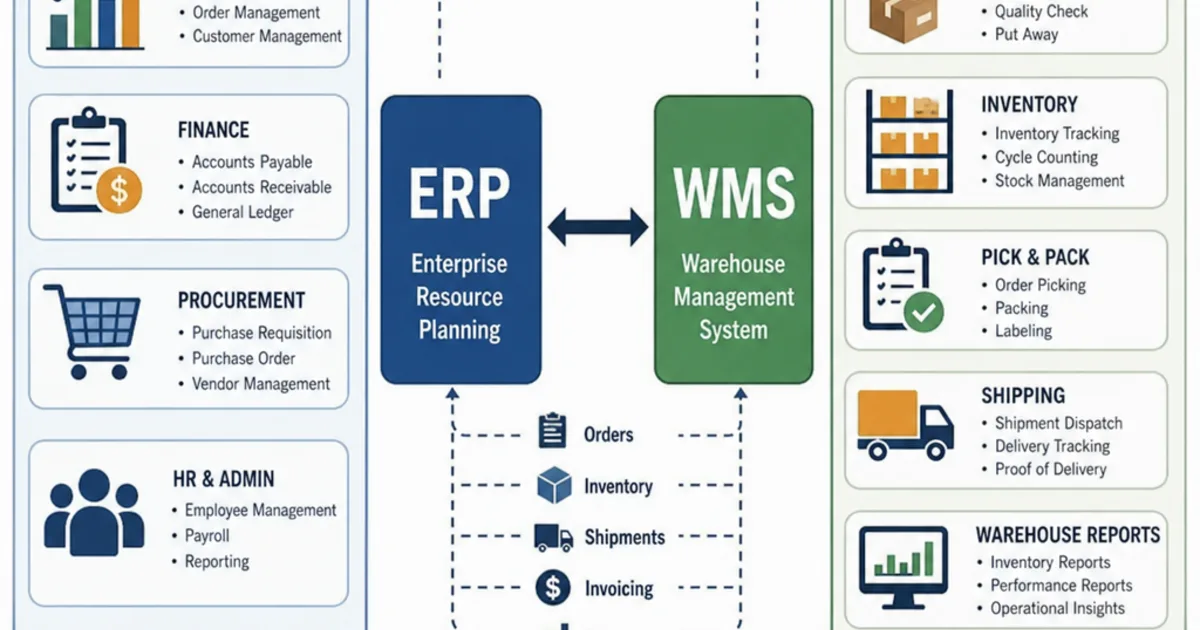
ERP WMS integration is the agreed exchange of item, stock, order, receipt and shipment records between your enterprise resource planning system and your warehouse management system, so that the commercial view and the physical view of the same stock stay aligned. The ERP usually records what the business has bought, sold and invoiced; the WMS records where goods are, what has been picked and what has left the building.
The practical problem is that most integrations are specified as “connect the two systems” and nothing more. Nobody writes down which system may create a product, which one is right when stock figures disagree, what happens to a short pick, or who fixes a message that failed at 2am. This guide works through those decisions flow by flow, so you can specify, build and test an integration that holds up on a busy day.

Every pallet movement in the warehouse eventually needs to reach the stock and finance records. Illustrative photograph, not an OpsMavix client site.
Image credit: Bernd Dittrich, Unsplash License. No edits.
Key Takeaways
- Give every record type one owning system; the other system reads it and reports back.
- Specify five core flows separately: items, stock, orders, receipts and shipments.
- Send stock movements for day-to-day updates and use scheduled snapshots to reconcile them.
- Short picks, part receipts and damaged goods must travel back as structured data, not notes.
- Every message needs a unique reference so retries do not create duplicate orders or receipts.
- Test failures, timing gaps and corrections before go-live, not just the happy path.
In this guide:
- 1. Decide What Each System Owns
- 2. Map the Five Core Data Flows
- 3. Sync Item Master Data First
- 4. Keep Stock Figures From Drifting
- 5. Release Orders and Confirm Shipments
- 6. Process Receipts and Returns Against Purchase Orders
- 7. Choose a Sync Method and Plan for Errors
- 8. Test the Integration Before Going Live
- Frequently Asked Questions
- How OpsMavix Can Help
1. Decide What Each System Owns
One owner, many readers
Integration problems usually start with two systems that can both edit the same record. If buyers can change a product’s unit of measure in the ERP while warehouse staff change it in the WMS, the next sync will overwrite one of them, and nobody will know which version was right.
The fix is a written ownership rule for each record type. The owning system is the only place the record is created or changed. The other system holds a copy, uses it, and sends back events (such as “received” or “shipped”) rather than edits.
A typical ownership split
| Record | Usual owner | What the other system does |
|---|---|---|
| Item master (code, description, units, barcodes) | ERP | WMS reads it and adds warehouse attributes |
| Bin locations, zones and putaway rules | WMS | ERP does not need them, or reads a summary |
| Customer and supplier records | ERP | WMS reads names, addresses and delivery rules |
| Sales orders and purchase orders | ERP | WMS receives them as work to execute |
| Physical stock by bin, batch and serial | WMS | ERP receives movements and totals by site |
| Stock valuation and cost | ERP | WMS does not hold cost |
| Picks, packs, receipts and shipments | WMS | ERP receives confirmations and posts them |
These are common patterns, not rules. A business that runs warehouse attributes such as case dimensions in its ERP, or a 3PL that holds its clients’ items in the WMS, will draw the lines differently. What matters is that the lines exist and are written down.
Settle the hard cases early
A few records always cause argument. Decide them before build:
- Stock adjustments. The WMS records the physical change; the ERP needs a reason code to post it correctly. Our guide to stock adjustment approval workflows covers who should approve them.
- Order changes after release. Decide whether the ERP can amend an order once the WMS has started picking, or must cancel and re-release it.
- Blocked or quarantined stock. Decide which system sets the status and whether the ERP should count it as available. See quarantine inventory workflows for the warehouse side.
For the wider question of how ERP fits with planning and supply chain tools, see our separate guide to ERP and supply chain management. This guide stays at the ERP to warehouse boundary.
2. Map the Five Core Data Flows
Direction, trigger and content
Treat each flow as its own interface with a direction, a trigger, a payload and a response. A single “sync” covering everything is hard to test and harder to repair.
| Flow | Direction | Typical trigger | Minimum content |
|---|---|---|---|
| Item master | ERP to WMS | Item created or changed | Item code, description, units, barcodes, tracking flags |
| Expected receipts | ERP to WMS | Purchase order approved, or supplier ASN received | PO number, lines, quantities, expected date, supplier |
| Receipt confirmation | WMS to ERP | Goods checked in | PO line, quantity received, batch or serial, condition |
| Order release | ERP to WMS | Order approved and stock allocated | Order number, lines, quantities, delivery address, service |
| Shipment confirmation | WMS to ERP | Order despatched | Lines and quantities shipped, carrier, tracking, parcel IDs |
| Stock movements | WMS to ERP | Adjustment, transfer, status change | Item, quantity, from and to status or site, reason code |
| Stock snapshot | WMS to ERP | Scheduled, for example nightly | Item, site, status, quantity at a stated cut-off time |
Use shared identifiers
Each flow needs keys that both systems recognise: the ERP’s order and line numbers, the item code, the site code and the unit of measure. Where trading partners are involved, GS1 standards help. GS1 UK describes the Serial Shipping Container Code as an 18-digit number that identifies a specific logistic unit such as a pallet, and explains that suppliers can send details of each unit ahead of delivery so arriving pallets can be matched when scanned. GS1 lists the Despatch Advice, also known as the Advanced Ship Notice, among its three most used EDI messages.
You do not need EDI to integrate an ERP and a WMS, but if suppliers or retail customers already use ASNs and SSCC labels, design the receipt and shipment flows around those identifiers.
3. Sync Item Master Data First
Why items come before everything else
An order line or a receipt that references an item the WMS does not know will fail. Item sync must therefore run first, and most other flows should check for a valid item before they are accepted.
The ERP normally owns the commercial definition of the item. The WMS adds what it needs to store and pick it: case and pallet quantities, dimensions, weight, storage zone and whether it needs batch, expiry or serial tracking.
Item master checklist
- Item codes match exactly, including leading zeros and letter case.
- Units of measure are mapped: if the ERP sells in each and the WMS stores in cases, the conversion is defined once.
- Every barcode used on the warehouse floor is linked to the item and its unit.
- Batch, expiry and serial tracking flags agree between the systems.
- Discontinued items are blocked rather than deleted, so history still resolves.
- Unit of measure changes on items with stock or open orders follow an agreed route, or create a new item code.
4. Keep Stock Figures From Drifting
Movements for speed, snapshots for truth
There are two ways to tell the ERP about stock. Movement messages report each change as it happens: received 240, picked 12, adjusted minus 6. Snapshot messages report the total held at a point in time. Movements keep the ERP current during the day; snapshots catch anything the movements missed.
Most robust designs use both. The WMS sends movements as they occur, and a scheduled snapshot compares the two systems’ totals at a stated cut-off.
Hypothetical worked example: a nightly reconciliation
This is a hypothetical example. One item starts the day at 1,000 units in both systems. During the day the WMS records a receipt of 240, shipments of 310 and a damage adjustment of minus 6.
| Movement | WMS records | ERP has received |
|---|---|---|
| Opening stock | 1,000 | 1,000 |
| Receipt | +240 | +240 |
| Shipments | -310 | -285 |
| Damage adjustment | -6 | 0 |
| Closing stock | 924 | 955 |
The difference is 955 minus 924 = 31 units. Two causes explain it:
| Cause | Units | What to do |
|---|---|---|
| Shipment of 25 units despatched after the cut-off, message still queued | 25 | Timing difference: should clear once the queued message posts |
| Adjustment message rejected because the reason code was missing | 6 | Real failure: fix the reason code mapping and resend |
| Total explained | 31 | Nothing left unexplained |
The reconciliation should separate timing differences from failures. A single variance figure tends to be ignored, or “fixed” with a manual adjustment that hides the real fault.
Define available stock once
A common definition of available stock is on hand, minus allocated, minus quarantined or damaged stock. If the ERP promises stock to customers, it needs WMS status changes promptly, not only at the nightly snapshot.
5. Release Orders and Confirm Shipments
Order release
The ERP releases an order to the WMS once it is approved, credit checked and allocated. The WMS should acknowledge receipt, and the ERP should show the order as “with the warehouse” so customer service knows not to edit it casually.
Decide what happens when an order changes after release. A simple rule is that the ERP sends a cancellation request; the WMS accepts it if picking has not started, or rejects it with the current status so a person can decide.
Shipment confirmation
When the order leaves, the WMS sends a shipment confirmation with the quantity shipped per line, the carrier, tracking numbers and parcel or pallet identifiers. The ERP uses it to reduce stock, close or part-close the order and trigger invoicing.
Hypothetical worked example: a short pick
This is a hypothetical example. A trade customer orders 120 units at £14.50 each. The picker finds only 112 in the pick face and the replenishment location is empty.
| Item | Quantity | Value at £14.50 |
|---|---|---|
| Ordered | 120 | £1,740.00 |
| Shipped | 112 | £1,624.00 |
| Short | 8 | £116.00 |
If the shipment confirmation sends only “order despatched”, the ERP may invoice the full £1,740.00 and the customer will dispute £116.00 of it. If it sends 112 against the line, the ERP can invoice £1,624.00 and then either backorder the 8 units or cancel them, depending on the customer’s terms. Prices exclude VAT.
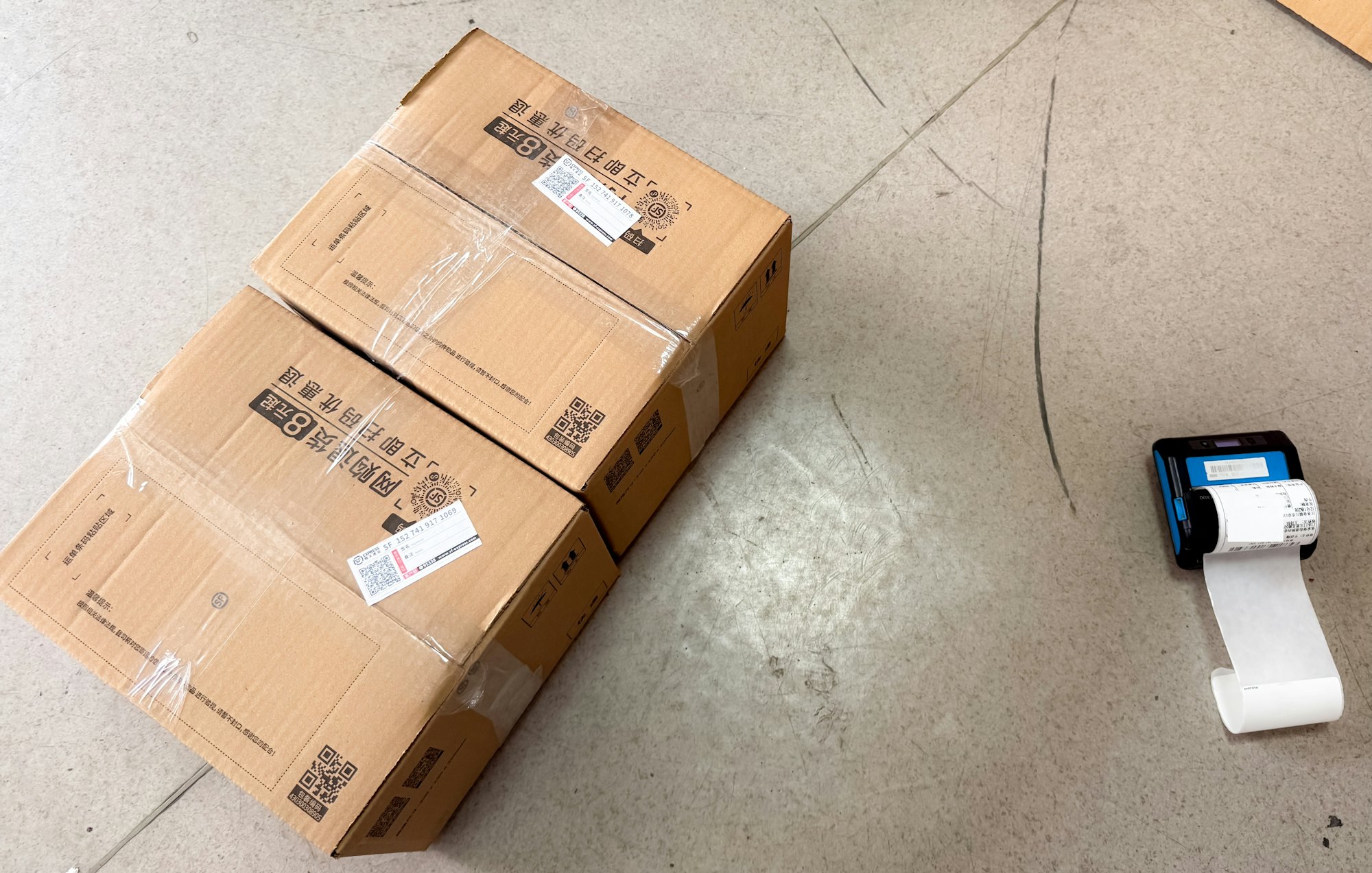
Shipment confirmations should carry the quantities, parcel identifiers and tracking the ERP needs to invoice correctly. Illustrative photograph, not an OpsMavix client site.
Image credit: Karori Production, Unsplash License. No edits.
Order and shipment checklist
- The WMS acknowledges every released order or rejects it with a reason.
- Shipment confirmations carry quantities per order line, not just a status.
- Part shipments leave the remaining quantity open or cancelled by an agreed rule.
- Batch or serial numbers shipped are reported where traceability requires them.
- Carrier and tracking details reach the ERP or customer notification process.
- Cancellations after picking has started are handled by a person, not silently.
6. Process Receipts and Returns Against Purchase Orders
Expected receipts
The ERP sends approved purchase orders to the WMS as expected receipts. If the supplier sends an ASN, that can replace or refine the expectation with the actual quantities, batches and pallet identifiers on the vehicle.
Receipt confirmation
When goods are checked in, the WMS confirms the quantity received against each PO line, with batch, expiry or serial where tracked, and the condition of the goods. The ERP uses this for its goods received record and later for matching the supplier invoice.
Hypothetical worked example: a part receipt with damage
This is a hypothetical example. A purchase order is for 500 units. The supplier’s ASN says 480 are on the vehicle. The warehouse checks in 480, of which 10 are damaged and moved to quarantine.
| Measure | Units |
|---|---|
| Ordered on the PO | 500 |
| Received (good plus damaged) | 480 |
| Of which damaged, in quarantine | 10 |
| Available to sell from this receipt | 470 |
| Still outstanding on the PO (500 minus 480) | 20 |
Whether the 10 damaged units count as received for invoice matching, or are returned to the supplier and credited, is a purchasing policy decision. The integration must send the condition as data so the ERP can apply that policy, rather than leaving it in a free-text note.
Customer returns
Returns follow the same pattern in reverse. The ERP creates or authorises the return, the WMS receives and inspects the goods, and the WMS reports the quantity and the outcome: back to stock, quarantine, refurbish or scrap. The ERP raises the credit note on the agreed basis. A returned item should not become saleable until the inspection result says so.
7. Choose a Sync Method and Plan for Errors
Compare the main methods
| Method | How it works | Good for | Watch for |
|---|---|---|---|
| Built-in connector | Vendor-supplied link between named products | Common pairings with standard flows | What it does not sync, version dependencies, extra fees |
| API calls, event driven | Each change is sent as it happens | Orders, shipments, stock status | Needs queuing, retries and monitoring |
| Scheduled API or file batch | Records sent at set intervals | Item master, snapshots, lower volumes | Decisions made on out of date data between runs |
| EDI messages | Standard business documents between partners | Supplier ASNs, retailer orders and despatch advice | Mapping effort and partner-specific rules |
| Integration platform | A middle layer that routes and transforms data | Several systems, frequent change | Another component to license, own and support |
Different flows can use different methods: item changes in a 15 minute batch, shipment confirmations immediately.
Packaged ERP and WMS products often include connectors for each other. Check exactly which flows, fields and exceptions a connector covers; gaps are common in returns, reason-coded adjustments and part receipts. A focused custom integration fits when the flows you depend on are the ones the connector leaves out.
Design for failure
Messages will fail: a network drops, an item is missing, a reason code is not mapped. The integration should handle that predictably.
- Unique message references. Give every message an ID so that a retry of the same shipment confirmation is recognised and ignored rather than posted twice.
- Retries with limits. Retry temporary failures automatically; after a set number of attempts, move the message to an error queue.
- A visible error queue. Show failed messages to a named person with the reason, the record affected and a way to correct and resend.
- Ordering rules. A shipment confirmation should not post before the order release it belongs to. Hold dependent messages until the first one succeeds.
- Alerts on silence. If no shipment confirmations arrive during a working shift, something is probably broken.
8. Test the Integration Before Going Live
Build a test pack from real cases
Use real items, customers and suppliers in a test environment. Include the awkward cases that cause trouble in practice, not just a clean order.
Integration acceptance checklist
- A new item created in the ERP appears in the WMS with the correct units and barcodes.
- A purchase order becomes an expected receipt; a part receipt leaves the right quantity open.
- Damaged goods on receipt arrive in the ERP with their condition, not as available stock.
- A released order is acknowledged; a cancellation before picking succeeds and after picking is refused with a status.
- A short pick produces a shipment confirmation with the shipped quantity per line.
- A stock adjustment with a reason code posts correctly; one without a valid code lands in the error queue.
- Sending the same shipment confirmation twice posts it once.
- The nightly reconciliation separates timing differences from failures.
- A customer return is inspected and only becomes saleable once the outcome is recorded.
- Users can find, correct and resend a failed message without developer help.
Plan the cut-over
Agree opening stock between the systems at a frozen point, with open orders and open purchase orders loaded on both sides. Run the reconciliation daily for the first weeks and review every unexplained difference. Expand to more sites, clients or flows once the first ones hold steady.
For the warehouse side, see our guides to WMS software and warehouse management system functions.
Frequently Asked Questions
What is ERP WMS integration?
It is the agreed exchange of item, stock, order, receipt and shipment data between an ERP and a WMS. Each system owns certain records, and the integration passes those records and the resulting warehouse events between them.
Which system should own stock levels?
Usually the WMS owns physical stock by bin, batch and status, while the ERP owns stock value and the total by site for financial reporting. The ERP’s figure is kept aligned through movement messages and a regular reconciliation.
Should the integration be real-time?
Not every flow needs to be. Orders, shipments and stock status changes benefit from being sent as they happen. Item master changes and full stock snapshots can usually run on a schedule.
What happens if a message fails?
It should be retried automatically for temporary faults, then moved to a visible error queue with the reason and the affected record. A named person corrects and resends it, and unique message references stop a resend creating a duplicate.
Do we need EDI to connect an ERP and a WMS?
No. Most ERP and WMS pairs connect through APIs, connectors or file transfers. EDI matters when suppliers or customers exchange standard documents such as despatch advice with you.
How do we handle short picks?
The WMS should confirm the shipped quantity per order line. The ERP then invoices what was shipped and either backorders or cancels the rest according to the customer’s terms.
How long does an ERP WMS integration take?
It depends on the number of flows, data quality, the systems involved and how much testing is needed. Ask for milestones and acceptance criteria based on your own flows rather than a generic estimate.
How OpsMavix Can Help
OpsMavix can map the flows between your ERP and warehouse, write the ownership rules and message specifications, and identify which failures and timing gaps are causing stock and invoicing errors today.
That may involve configuring an existing connector, building a focused integration with a visible error queue, introducing an inventory automation system, connecting a wholesale order management system or adding ecommerce inventory automation for online channels.
Contact OpsMavix with one recent stock discrepancy, the orders and receipts behind it and the handoff that creates the most rework. We can use that evidence to define requirements and a practical pilot.
Keep reading


Getting value from OpsMavix? Add us as a preferred source on Google — you'll see more of our operations content in your AI Overviews, AI Mode and Search.