
Manual Order Entry: Stop Re-Keying Every Order
Orders arrive by email, PDF, phone and fax — then someone re-types every one into the accounting system. Here's why that hurts, and how to enter an order once.
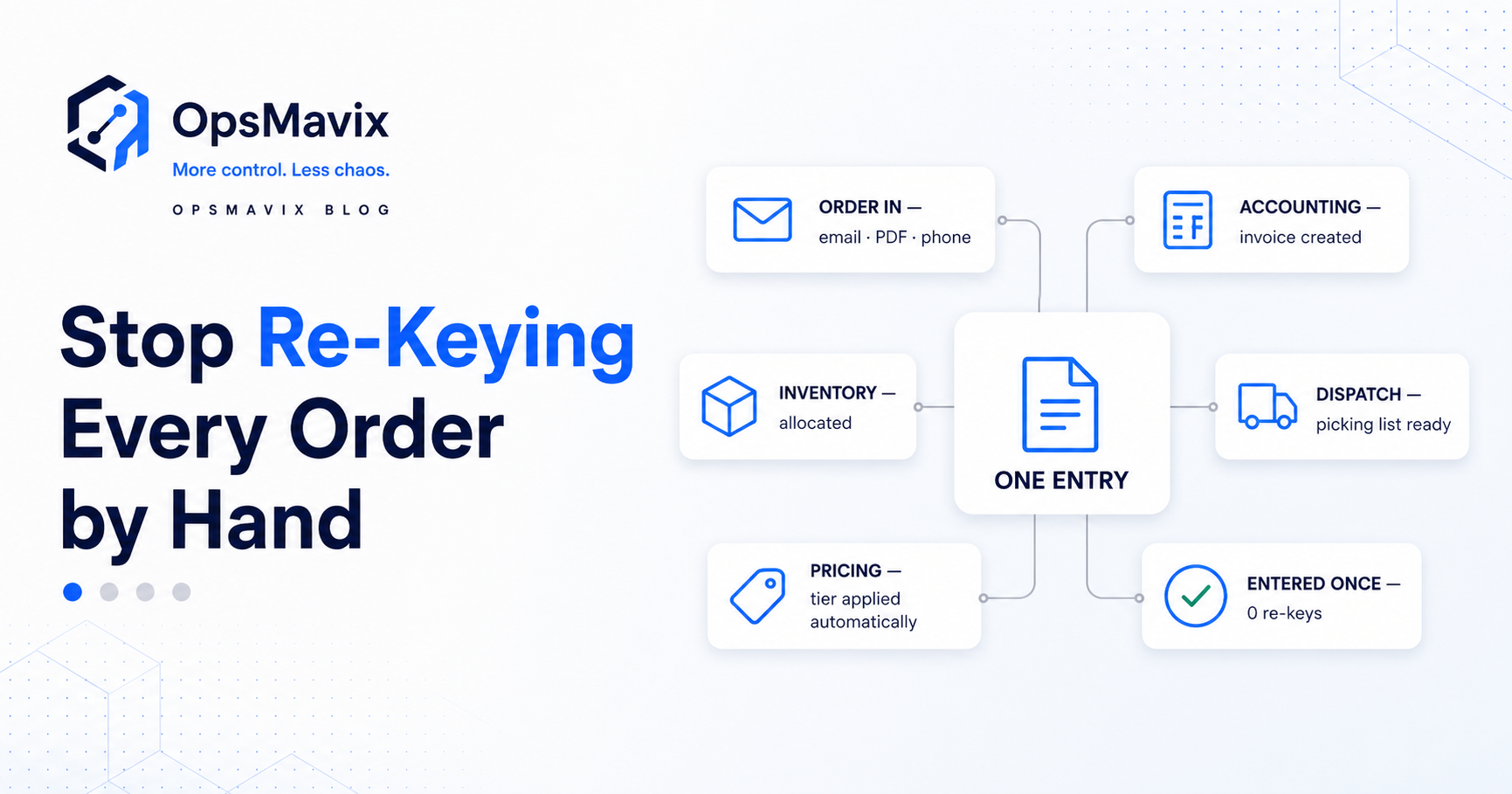
An order comes in by email. Someone reads it, opens QuickBooks or Xero, and types it in line by line. Then it gets typed again into the spreadsheet that tracks dispatch. The same numbers, keyed two or three times, every order, every day.
That’s manual order entry, and it’s one of the quietest, most expensive habits in a growing wholesale or distribution business. It feels like “just admin,” but it’s hours of skilled time spent retyping data that already exists — and every retype is a chance to get it wrong.
Here’s why manual order entry costs more than it looks, and what it takes to enter each order once and let it flow everywhere it needs to go.
Key Takeaways
- Manual order entry is data that already exists being retyped into another system by hand.
- The same order is often keyed two or three times — into accounting, inventory, and dispatch.
- Re-keying is where costly errors live: wrong item, wrong quantity, wrong price.
- It burns your team’s time on typing instead of selling or serving customers.
- Enter an order once and let it flow to accounting, stock and dispatch automatically.
1Every Order Gets Typed Two or Three Times
The order already exists — in an email, a PDF, a portal, or written down from a call. Manual entry means a person re-creates it inside your accounting tool, then often again in a stock sheet and a dispatch list. You’re paying for the same information to be entered repeatedly, in full, by hand.
2Re-Keying Is Where the Errors Live
Every manual hop is a chance to slip: a transposed quantity, the wrong item number, last year’s price, a missed line. A mistake made at entry flows straight into the invoice and the picking list, so it surfaces as a short shipment or an angry customer — long after the typo. Re-keyed numbers are also a prime reason stock never matches the system. The cost isn’t the keystroke; it’s the error it carries downstream.
3Orders Arrive in Ten Different Formats
Wholesale orders rarely come in clean. One customer emails a PO, another sends a photo of a handwritten sheet, a third reads it out over the phone, a rep submits it from the field. Each format has to be deciphered and normalised before it’s even typed — and inconsistent inputs are exactly what makes the typing slow and error-prone.
4Your Team’s Time Goes to Typing, Not Selling
The people re-keying orders are usually your most capable staff — the ones who know the products, the customers, and the prices. Every hour they spend typing is an hour not spent winning orders, fixing problems, or looking after accounts. Manual entry doesn’t just cost time; it costs your best people’s best time.
5Customer-Specific Pricing Gets Missed
Wholesale runs on tiers, contract prices, and minimums. When orders are keyed by hand, the right price depends on someone remembering — or looking up — the deal for that customer. Miss it and you either undercharge and lose margin, or overcharge and lose trust. Pricing rules belong in the system, applied automatically, not in someone’s memory.
What Entering an Order Once Looks Like
The fix isn’t typing faster — it’s capturing each order in one place and letting it flow. An order is entered (or imported) once, the correct customer pricing is applied automatically, stock is checked and allocated, and the same record drives the invoice, the picking list, and dispatch. No second or third retype, because the data only ever lives in one place. It’s the same “enter it once” principle behind a connected inventory system.
Done this way, orders stop being a bottleneck. Errors fall because nothing is retyped, your team’s time goes back to customers, and you can actually see where every order stands — captured, picked, shipped — without chasing it across tools. A custom order management system is what makes “enter once, flow everywhere” the normal way an order moves.
FAQ
What is manual order entry?
It’s re-typing order details that already exist — from an email, PDF, portal, or phone call — into your accounting, inventory, or dispatch systems by hand. The information isn’t new; it’s being recreated manually, often more than once.
Why is re-keying orders a problem?
It wastes skilled time and introduces errors. The same order gets typed into several systems, and each retype risks the wrong item, quantity, or price — mistakes that surface later as short shipments, wrong invoices, and unhappy customers.
How do I stop entering orders into QuickBooks or Xero by hand?
Capture each order once in a system that applies your pricing rules and pushes the order through to accounting, stock, and dispatch automatically. The accounting entry is created from the original order rather than retyped.
Can a system handle orders that arrive in different formats?
Yes — that’s much of the point. Orders from emails, PDFs, portals, and reps in the field can be captured into one consistent place, so your team stops deciphering and normalising every order before they can process it.
How does this protect my margins?
Customer-specific and tiered pricing is applied automatically from rules in the system, rather than relying on someone to remember the right price. That stops the quiet margin loss from undercharging and the trust damage from overcharging.
How OpsMavix Can Help
OpsMavix builds custom order management systems where each order is captured once, priced correctly on its own, and flows straight into accounting, inventory and dispatch — so nobody re-keys the same order three times. No more typing from photos of handwritten sheets, no more wrong item numbers off a fax.
If your team spends its days retyping orders, that’s a measurable operational leak — in hours, errors, and margin. Book an Operations Leak Audit and we’ll map exactly where re-keying costs you, and what it adds up to.