
Beyond Tally: Custom Operations on Top of Your Accounting
Your accounting tool is built to keep the books, not run the business around them. The fix isn't replacing it. It's a custom operations layer on top.
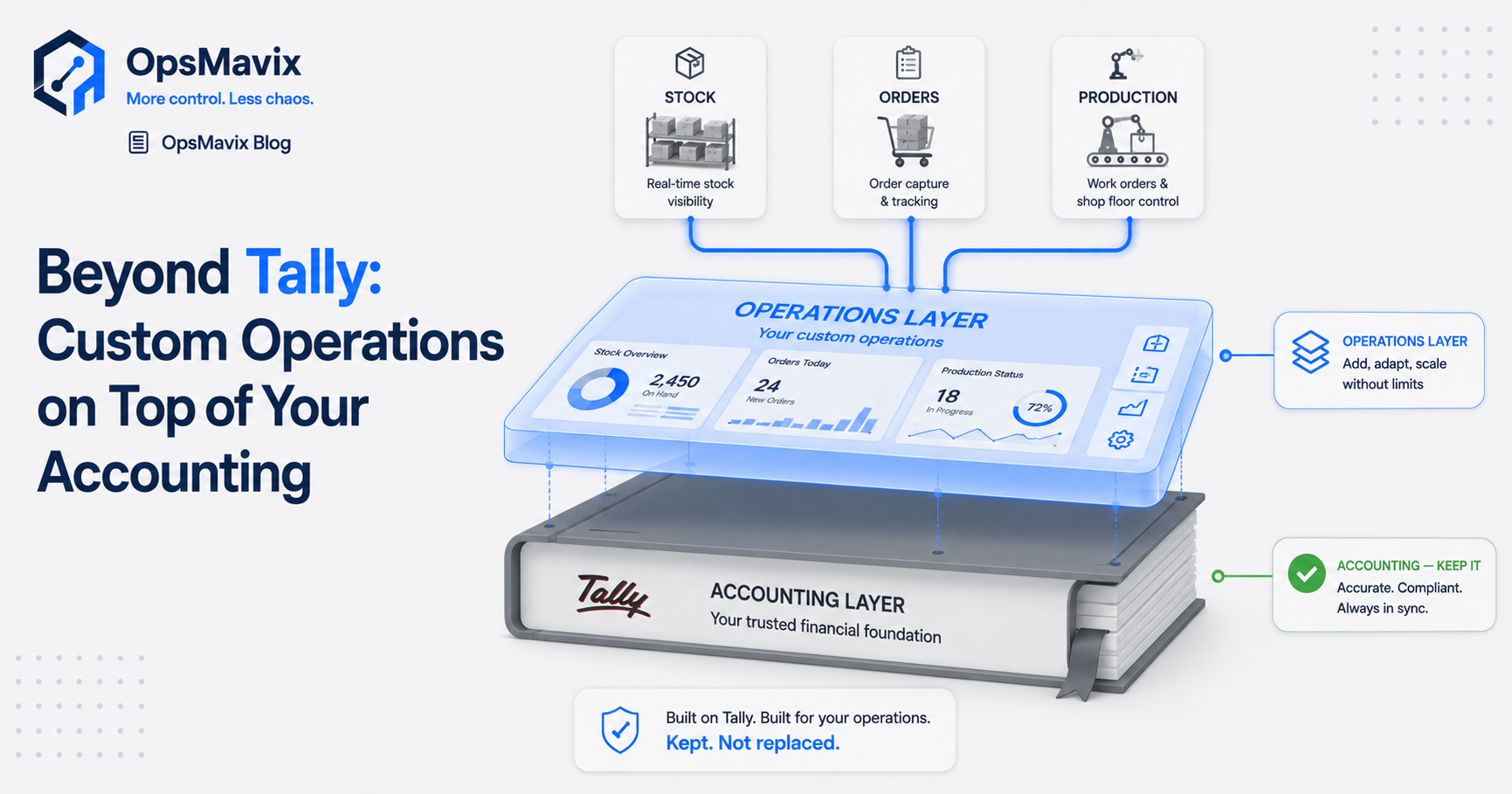
Going “beyond Tally” doesn’t mean ripping out your accounting tool. It means adding a custom operations layer on top of it. An accounting package is built to keep the books accurate. It was never built to run your day-to-day operations, your approvals, or your group-wide reporting. For most finance teams the practical answer is to keep the ledger they trust and build a thin operations system around it that does the work the accounting tool was never designed for.
This post is for the finance lead who has stretched an accounting tool as far as it will go, then propped up everything else with Excel. Here’s why that gap exists, and what belongs in it.
Key Takeaways
- An accounting tool keeps the books. It does not run operations, approvals, or consolidated reporting across entities.
- The gap usually gets filled with manual Excel, which is where the errors, delays, and key-person risk live.
- The fix is a custom operations layer on top of your existing ledger, not a rip-and-replace ERP.
- It removes the manual consolidation, the rebuilt board pack, and the fragile master workbook without touching the books you trust.
- Sized to a multi-entity SMB: built around your ledgers, live in weeks, owned by you.
1What Tally Is For — and Where “Beyond Tally” Begins
An accounting package like Tally (or TallyPrime, Xero, Sage, QuickBooks) has one job it does well: recording transactions so the books are accurate and compliant. Tally in particular is built for fast, compliant book-keeping and GST returns — but ask it to consolidate several companies, route an approval, or build a board pack and it can’t, so Tally users end up exporting to Excel to bridge the gap. That’s a ledger function and it’s the right tool for it. The trouble starts when you ask it to do the things sitting around the ledger. Route an invoice for approval. Give the whole group one live view. Assemble a board pack across several companies. It wasn’t built for any of that, so the work spills out into spreadsheets.
2The Tell-Tale Sign: Everything Important Lives in Excel
You haven’t outgrown your accounting tool because it broke. You’ve outgrown it because the real work now happens outside it. One finance lead we built the avatar for put it plainly: she’d “consolidate via excel which is what we use at the moment,” then “manoeuvre bespoke spreadsheets to tailor reporting for Board members.” The ledger is fine. The operations layer is a stack of workbooks held together by hand, and that stack is where the cost hides.
3Why “Just Buy a Bigger Accounting Tool” Misses the Point
The instinct is to reach for a more powerful accounting package. It won’t help, because the problem isn’t ledger accuracy. It’s everything operational the ledger doesn’t touch. Moving to a heavier suite to close an operations gap means paying for a giant finance engine to get a handful of workflows you could have built directly. One finance director described the mid-market ERP route as “way too overkill and outrageously expensive for us.” A bigger book-keeper is still a book-keeper.
4The Month-End Tax You’re Quietly Paying
Multi-company finance shows the cost clearest. The first week of every month disappears into “simply getting the correct entries into each company’s ledger,” then chasing intercompany that “won’t balance,” then rebuilding the board pack from scratch. None of that is accounting. It’s manual operations work the tool has offloaded onto a person. And it concentrates: the consolidation becomes “a 47-tab monster that only you understand,” with “the 3 AM panic when formulas break before a board meeting” baked in. That isn’t a finance problem. It’s an operations-layer problem wearing a finance costume.
5What an Operations Layer On Top Actually Does
A custom operations layer sits above your accounting tool and reads from it. It doesn’t replace it. It takes the jobs that don’t belong in a ledger and gives them a proper home. It routes and tracks invoice approvals instead of leaving you to chase them over email. It pulls each entity’s figures into one live operations dashboard, so the consolidated view and the board pack are ready at month-end rather than rebuilt at it. The books stay exactly where they are. The manual scaffolding around them goes away.
6Why This Isn’t an ERP (And Doesn’t Need a Migration)
The thing that stops people is migration. One FD heard it straight from a peer: the vendor’s “migration team… will screw up your books.” A layer-on-top approach is the opposite of that. No rip-and-replace. No forced move off the tool your team knows. No year-long implementation. It connects to your existing ledgers and does the operational work around them, which is exactly the middle path between fragile spreadsheets and a £250k enterprise suite. (More on operational systems vs ERP.)
7The Outcome: A Close That Runs Itself
Get the operations work out of spreadsheets and the whole shape of month-end changes. Consolidation and intercompany run automatically. The board pack refreshes itself. The close that used to eat the first week starts to fit the target finance leads dream about, dropping “from 10 days to 3.” The quieter win matters more: the fragile master workbook stops being a single point of failure, so the close no longer depends on one person sitting at one desk. You walk into the board meeting certain the numbers tie.
FAQ
Do I have to replace Tally to go “beyond” it?
No. Going beyond Tally means adding an operations layer on top of it, not removing it. Your accounting tool keeps doing what it does well, the books, while a custom system handles the approvals, consolidation, and reporting it was never built for.
Why not just move to a bigger accounting package or ERP?
Because the gap isn’t ledger accuracy, it’s operations. A heavier suite makes you pay for and migrate to a whole finance platform just to get a handful of workflows. A layer-on-top approach connects to the tool you already have and builds only the operational pieces you’re missing.
Will this interfere with my books or audit trail?
No. The operations layer reads from your accounting tool and adds workflow and reporting around it. It doesn’t rewrite your ledgers. The books stay the source of truth, and the manual spreadsheet steps that do introduce errors are what gets removed.
How does it handle multiple companies?
It pulls each entity’s figures into one connected view, so consolidation and intercompany are automated instead of stitched together in Excel each period. The board pack is built once and refreshed, not rebuilt from scratch every month.
How long does it take and what does it cost?
Because it’s focused rather than a full ERP rollout, a custom operations layer is typically built and live in weeks, sized to a multi-entity SMB rather than an enterprise. It’s scoped to a fixed price for the specific gap you’re filling, and you own what’s built.
How OpsMavix Can Help
OpsMavix builds the operations layer that sits on top of the accounting tool you already trust. We map where the manual work actually lives (the consolidation workbook, the chased approvals, the board pack rebuilt every month) then build connected invoice approval and operations reporting around your existing ledgers. Fixed scope, live in weeks, no migration, yours to own.
If your accounting tool keeps the books but everything else runs on Excel, that gap is costing you a week a month. Book an Operations Leak Audit and we’ll map exactly what to put on top, and what to leave alone.