
AS/400 Inventory Management System: Modernise It Without a Rip-and-Replace
An AS/400 inventory management system is often the most reliable thing in the building — and the biggest single-point-of-failure. Here's how to tell when the green screen has become a liability, and how to modernise stock control around it without betting the business on a rip-and-replace ERP.
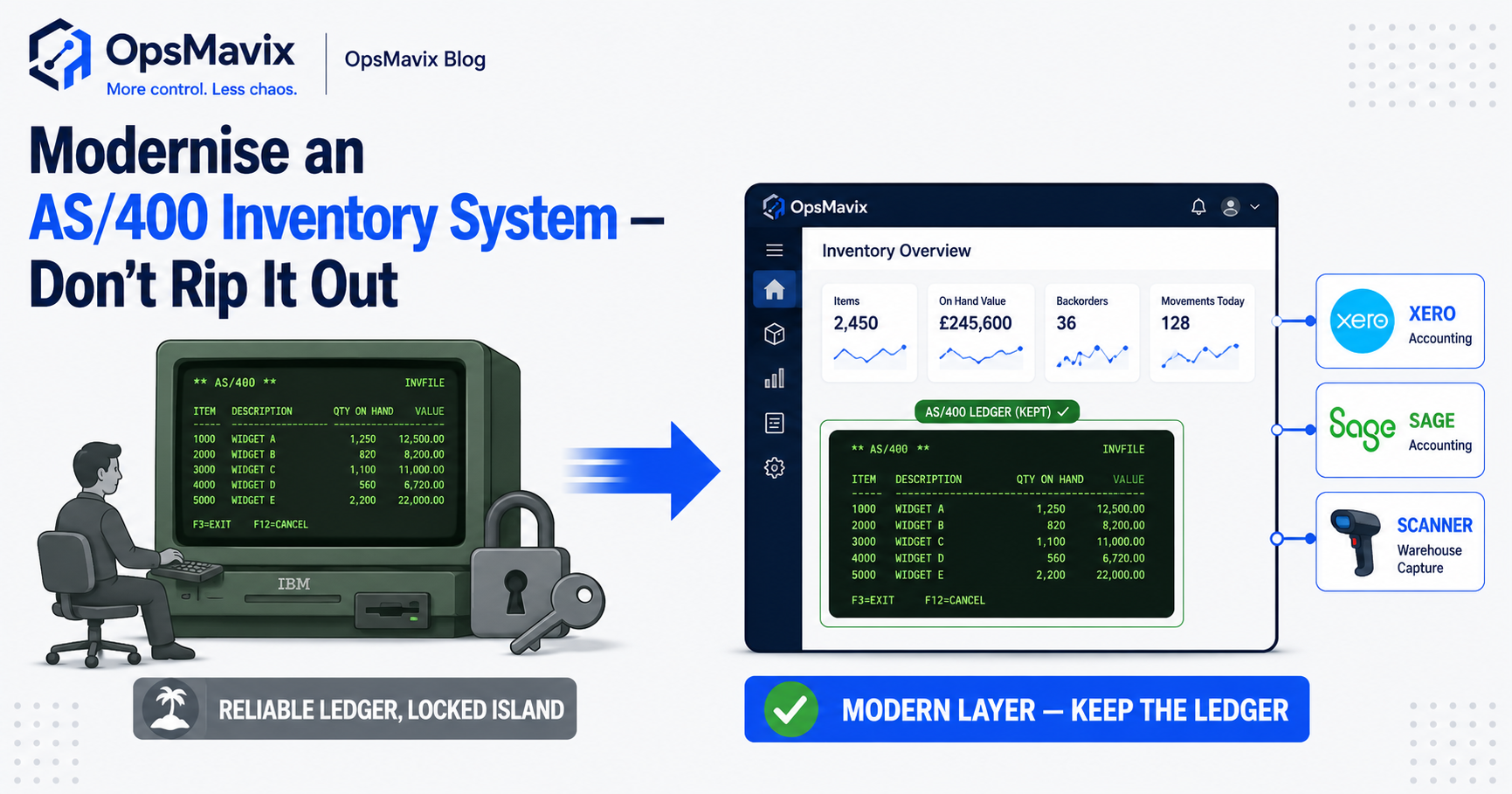
An AS400 inventory management system, often still called AS/400, can often be modernised without immediately replacing the application that records stock. The right approach depends on the actual IBM platform, installed release, application interfaces and support arrangements. Begin by separating a reliable transaction process from problems with access, reporting or integration. Where the AS/400 still holds the stock record but people work around it, a modern inventory automation system can take over daily stock tasks while the replacement decision is made on evidence.
AS/400 is a historical name that people still use for systems in the IBM midrange lineage. A museum-era machine, a later server and a current IBM i installation do not have identical capabilities or support conditions. Assess the environment you run rather than assuming it cannot connect to modern tools or that every modern interface can be added safely.
This guide compares retaining the application, adding controlled services and replacing it where requirements justify the change. The objective is a supported process with fewer undocumented dependencies, reliable records and a tested recovery route.

A historic AS/400 museum exhibit illustrates the platform lineage; assess the actual environment and release your business runs.
Image credit: Jordiferrer; Commons edit by ThisIsNotABetter, CC BY-SA 3.0. Commons version colour-corrected and cropped by ThisIsNotABetter; displayed at reduced size.
Key Takeaways
- Inventory the actual platform and application, including release, interfaces and support ownership.
- Separate access problems from missing business capability before choosing replacement.
- Preserve transaction validation and stock authority, rather than bypassing them with a new interface.
- IBM i supports modern integration options, subject to the installed environment and prerequisites.
- A modern screen does not remove key-person or recovery risk unless knowledge and support are transferred.
- Compare modernisation and ERP fairly, including maintenance, migration and future dependencies.
In this guide:
- 1. Identify the System You Actually Run
- 2. Separate Business Gaps from Access Friction
- 3. Preserve the Authoritative Stock Transactions
- 4. Add Reporting and Interfaces Deliberately
- 5. Reduce Key-Person and Recovery Dependencies
- 6. Compare Retention, Modernisation and Replacement
- 7. Compare Cost and Practical Ownership
- 8. Pilot a Controlled Modernisation Scope
- Frequently Asked Questions
- How OpsMavix Can Help
1. Identify the System You Actually Run
Record the environment and application
Document the server, operating system and release, application supplier, source availability and current maintenance arrangements. Identify the people who can support normal processing, recover failed jobs and explain data structures.
Include integrations, scheduled work, printers, scanners and exports. A report created by one remembered command can be an important dependency even if it is absent from the formal architecture diagram.
Distinguish the historical label from current capability
IBM’s integrated web services material describes exposing ILE business logic through services or APIs. Its FAQ also describes REST support. That does not establish availability on every installation; confirm release, prerequisites and application suitability.
| Area | Evidence to collect |
|---|---|
| Platform | Actual hardware, operating system and release |
| Application | Supplier, source rights and business modules |
| Interfaces | Supported services, files and existing exports |
| Operations | Scheduled jobs and exception recovery |
| Support | Owners, documentation and access arrangements |
| Recovery | Backups and demonstrated restore procedure |
2. Separate Business Gaps from Access Friction
Observe a real inventory task
Follow a receipt, stock move, pick and adjustment with an operator. Record where the user waits, retypes information or depends on another person.
A text-based screen can be unfamiliar while the transaction logic is sound. Conversely, an attractive interface can conceal incomplete business rules. Assess the recorded outcome as well as the user experience.
Classify the gap
A missing report may be solved by a supported query or reporting layer. A missing reservation policy may require a change to the application logic. A disconnected marketplace may require an interface with defined ownership and failure handling.
Do not treat every inconvenience as proof that a full replacement is needed. Equally, do not retain a system solely because it has worked for years if the required capability or support is no longer adequate.
Write a testable requirement: for example, a warehouse user can record an approved receipt without re-keying, and the existing application remains the authoritative stock record.
3. Preserve the Authoritative Stock Transactions
Keep validation in the transaction route
The existing application may enforce units, locations, permissions, costing or order status. A new interface should use a supported route that preserves the necessary controls.
Directly changing a balance outside that route can leave movement history and related records inconsistent. Define the allowed operations with the application owner before implementing writes.
Test complete business events
A receipt may affect an order, location, quantity and review status. A pick may reserve, move or dispatch goods at different stages. Treat the required event as a transaction, not just a field update.
Hypothetical example: a 20-unit receipt arrives against an order for 25. The new interface must record the 20 actually received and preserve the remaining five under the agreed order policy. Merely adding 20 to a stock table is not proof that the full receipt workflow remains correct.
Corrections should retain the original reference, reason and authority. A modern layer must make history easier to understand rather than erase it.
4. Add Reporting and Interfaces Deliberately
Start with a defined reading requirement
A read-only reporting view can be a manageable first step where the main gap is access to existing information. Define fields, filters, quantity meanings and data freshness.
A copied reporting database may lag behind the authoritative application. Show the update time and known failures so users do not mistake yesterday’s quantity for a current stock promise.
Choose a supported connection
Depending on the environment, a project may use existing services, application APIs, controlled exports or other supported access. IBM’s published options are starting points for technical assessment, not a guarantee that a particular custom application can be exposed without work.
Define who owns products, orders, reservations and completed movements. Test interrupted connections, duplicate messages and amended records before allowing the new layer to drive external actions.

A modern interface must preserve the stock movements and validation used by the operating application.
Image credit: FIONASUN, CC0 1.0. Displayed at a reduced size; no additional edits.
5. Reduce Key-Person and Recovery Dependencies
Transfer the operating knowledge
Document normal processing and the exceptions people actually handle. Include input files, scheduled jobs, mappings, report definitions and the meaning of local codes.
Train more than one appropriate person to operate the supported workflow. A web screen reduces some access friction, but it does not independently transfer the knowledge needed when a batch fails overnight.
Demonstrate recovery
Identify backup ownership, restoration steps and dependencies on the application supplier. Test the agreed restore and reconcile the recovered records to a known position.
| Dependency | Practical improvement |
|---|---|
| One person knows a report command | Documented, reviewed report route |
| Undocumented batch exception | Recovery instructions and assigned support |
| Unclear data mappings | Maintained definitions and examples |
| Unused backup process | Demonstrated restore and reconciliation |
| Developer-only deployment knowledge | Usable deployment and handover records |
Keep access appropriate to each task. A reporting user should not need unrestricted transaction authority simply to view stock. The goal is a supportable operating process, not the appearance that an old dependency has disappeared.
6. Compare Retention, Modernisation and Replacement
Put the routes against the same requirements
Use representative transactions, corrections, reporting and recovery scenarios. Include capability that works today so it is not lost unnoticed during replacement.
| Route | Where it can fit | What to prove |
|---|---|---|
| Retain and document | Application and platform meet requirements | Support, access and recovery |
| Configure or enhance current application | A specific gap can be resolved within it | Supported change and regression scope |
| Add a modern interface or reporting layer | Core transactions work but access is poor | Validation, authority and update status |
| Integrate other systems | External work needs a controlled connection | Coverage, duplicate handling and reconciliation |
| Replace with packaged or custom ERP | Capability, support or wider requirements justify migration | End-to-end fit and record continuity |
Avoid automatic risk rankings
Modernisation can reduce migration scope but introduce interface and support dependencies. Replacement can be appropriate and can be phased rather than one uncontrolled cutover.
OpsMavix can build focused layers and full ERPs. Decide from the actual requirements and support conditions, not the assumption that old means unusable or that replacement must be the highest-risk route.
7. Compare Cost and Practical Ownership
Include internal work and ongoing support
Compare discovery, development, configuration, migration, licences, infrastructure, testing, training and maintenance. A small interface can be expensive if the required application knowledge is missing.
Measure the current manual effort and operational interruptions. Released staff time is capacity unless spending actually falls. Avoid unverified six-figure replacement assumptions or generic fixed-price claims for an unseen system.
Make the handover usable
Confirm source rights for new development, existing supplier permissions, credentials, deployment instructions and the ability to appoint another maintainer. Identify any components that remain proprietary or externally licensed.
Request exports with product, unit, location and transaction relationships, not only a balance file. Historical records and documents may need a controlled archive even when the operational application remains in place.
A custom layer still requires support and still depends on the platform beneath it. Ownership should describe the rights and practical access delivered, rather than imply that no supplier or infrastructure can affect operation.
8. Pilot a Controlled Modernisation Scope
Start with a manageable workflow
A defined report or one receiving route can be a useful pilot. Include a correction and a failed update so the test covers more than the clean case.
Acceptance checks should establish that:
- The actual platform and application prerequisites are confirmed.
- Product, unit and location meanings are documented.
- Existing transaction validation remains effective.
- New users have the appropriate authority.
- Duplicate requests cannot repeat a stock movement.
- Interrupted work remains visible and recoverable.
- Reporting shows its source and update status.
- Corrections retain understandable history.
- Recovery reproduces the agreed records.
- Support and handover work without one undocumented expert.
Expand after the evidence is clear
Reconcile the pilot to the authoritative application through a normal processing cycle. Observe operator effort and review exceptions with the application owner.
If replacement is selected, map identifiers and pending transactions and define the cutover boundary. If the core stays, keep the new layer within its supported authority. Both routes need an explicit operating and support plan.
A modernisation pilot often lands on an owned inventory automation system that replicates the AS/400 stock logic the business still trusts, without the green-screen dependency.
Frequently Asked Questions
Can an AS/400 inventory application be modernised?
Often, but the route depends on the actual platform, application and support arrangements. Assess the environment and the specific gap before choosing an interface or replacement.
Does the AS/400 name describe every current installation?
No. It is a historical label still used informally. Confirm the actual server, operating system, release and application capabilities.
Can IBM i connect through modern APIs?
IBM publishes integrated web services and REST capabilities. Confirm the installed prerequisites and supported application route for the proposed connection.
Should a new web screen write directly to stock tables?
Use a supported route that preserves required validation and related records. A balance update alone may bypass the business transaction.
Is modernisation always less risky than ERP?
No. It reduces some migration work but adds its own dependencies. Compare demonstrated scope, recovery and support for each approach.
Will a new interface remove key-person risk?
Only if operating knowledge, documentation and support are transferred too. A modern login does not explain an undocumented batch failure.
Can we begin with reporting only?
Yes, where that addresses the gap. Define report meanings, access and update times, and reconcile the output to the authoritative records.
Is a custom layer cheaper than replacement?
Not inherently. Include discovery, missing application knowledge, development, testing and ongoing platform and interface support.
Where should we start?
Inventory the platform and dependencies, then trace one difficult task. Pilot a specific supported improvement and demonstrate recovery before expanding.
How OpsMavix Can Help
OpsMavix builds inventory workflows and modern operational interfaces around defined transaction and support requirements.
We assess the existing application, separate access problems from missing capability and compare supported enhancement, integration and replacement. The scope can be focused or a full ERP where requirements justify it.
We can help document mappings, preserve transaction authority, surface failed updates, build usable reporting and plan pilot checks, recovery and practical handover.
If important stock tasks depend on one person or repeated exports, book an Operations Leak Audit. Bring a representative workflow and the current support picture so we can assess the next step.
Keep reading
Getting value from OpsMavix? Add us as a preferred source on Google — you'll see more of our operations content in your AI Overviews, AI Mode and Search.