
ChatGPT 6 Astra: You’re Paying More and Getting Less—The Grand Scheme
The demos make GPT-6 Astra look ready for anything. Your subscription still has limits. Here is what the five-hour window actually means, what your plan includes, and how to judge whether the results justify the cost.
You watch the demos. You picture the website you could build, the research you could finish, the work you could finally hand over. You hand over $20 for Plus. Then you send two real prompts — and the allowance is gone.
This is not an exaggeration. It is the documented experience of paying subscribers in the weeks after launch.
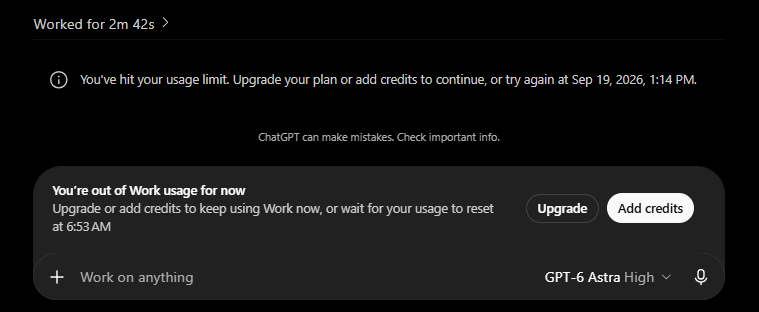
On the $20 ChatGPT Plus plan, a single heavy Astra task can exhaust your five-hour allowance. One Plus user reported hitting the five-hour limit with one task; another burned the full five-hour allowance in roughly 15 minutes on the medium setting, then drained the weekly allowance about half an hour later — and said two resets still did not finish the job. A third used Astra for a UX/UI audit with browser access and watched the credits vanish in five minutes. OpenAI’s response was telling: a one-time, global usage reset for every paid subscriber, because the complaints were that loud. (CoinPost, Sandbase, Ultimate Pocket)
The five-hour window measures an allowance. It does not promise five hours of work. OpenAI states this in its official usage guidance. What the launch videos do not tell you is how few real projects that allowance actually buys.
What the $20 plan actually gets you
OpenAI publishes these estimates for local messages per five-hour period. Compare the flagship Astra with the previous-generation model on the same subscription:
| Model (Plus, $20/month) | Estimated local messages / 5h | Relative to Astra |
|---|---|---|
| GPT-6 Astra | 5–45 | 1× |
| GPT-5.6 Sol (the previous “5.5”-class generation) | 10–100 | ~2× |
| GPT-5.6 Terra | 25–200 | ~5× |
Source: OpenAI Help Center and ChatGPT pricing docs. These are variable estimates, not guaranteed counts; weekly limits may also apply.
Read the bottom rows carefully. For the same $20, the older model line gives you roughly twice as many messages — and in practice, because Astra’s agentic tasks consume far more per prompt, the gap in finished work is wider than the table shows. After launch, reporting indicated heavy users saw their Astra limits cut by as much as 4× compared with launch week. (ExplainX)
Five messages and forty-five messages are very different working sessions. A plan label alone cannot tell you whether the project in your head will fit. On the low end, a real coding or browser-use task can eat the whole window in one go.
Two prompts, then the wall: what users actually experienced
The reports are consistent enough to treat as a pattern, not isolated bad luck:
- One task, full stop. A Plus subscriber reported reaching the five-hour Astra limit after a single task. (CoinPost)
- Fifteen minutes, then weekly gone too. A Reddit user (RufflesOriginal) switched an existing Codex project from GPT-5.6 Sol to Astra on medium, exhausted the five-hour allowance in ~15 minutes, and the weekly allowance roughly 30 minutes after that. Two resets did not complete the task. (Sandbase)
- Five minutes of browser use. A user ran a UX/UI audit with Astra’s browser access — clicking, screenshotting, documenting — and “in 5 minutes it used up all its credits.” (Ultimate Pocket)
- OpenAI reset everyone. Facing these complaints, OpenAI issued a one-time global usage reset to all paid subscribers. A reset is an admission that the shipped allowance did not match the shipped expectations. (CoinPost)
Why does one prompt cost so much? OpenAI says larger inputs and outputs, higher reasoning, Fast mode and multistep tasks increase consumption. (OpenAI Help Center) Consider “Build my website and make sure everything works.” That short sentence can mean writing pages, creating assets, checking layouts, testing forms and fixing mistakes — dozens of internal steps, all billed against your allowance. The sentence is short; the workload is extensive.
Fast mode makes it faster — and 2.5× more expensive
OpenAI documents GPT-6 Astra Fast mode at 2.5× the Standard credit rate, where available. This applies to the ChatGPT credit feature; API-key billing follows separate token pricing. (ChatGPT speed docs)
So a Plus user who flips on Fast mode to meet a deadline can turn an already thin 5–45 message allowance into an effective 2–18 messages. At the low end, that is two prompts. This is the arithmetic behind the user reports, not an anomaly.
The grand scheme: how the pricing ladder is built
Look at the structure as a whole and a pattern emerges — call it the grand scheme. It is not one price increase. It is an architecture that gently pushes every tier upward:
- Plus ($20) gets Astra, but only in Work and Codex — not in ordinary Chat. GPT-6 Pro in Chat is reserved for Pro $100 and above. So your $20 buys you the flagship model in two specific surfaces, with the thinnest allowance, and you cannot use it in the main chat window at all. (OpenAI Help Center)
- The flagship model gets roughly half the messages of the previous generation on the same plan. You are paying the same $20 for less usage of the model you actually want.
- Heavy tasks burn the allowance in minutes, which makes the “5–45” headline feel fictional the moment you attempt a real project.
- The upgrade path is always visible. Pro 5× ($100) gives 25–225 Astra messages; Pro 20× ($200) gives 100–900. When your two prompts run out, the product knows exactly which page to show you.
- Extras sit on top. Credits, banked resets and API billing are separate revenue lines. A banked reset refreshes the windows but does not permanently increase your allowance. (Banked reset guide)
None of this is illegal. It is a standard upsell funnel. What makes it feel like a scheme is the gap between the launch spectacle — “general intelligence,” “build anything” — and the fine print: two heavy prompts on the entry plan.
Launch confusion had a separate cause too. The Verge reported that paying customers were frustrated by delayed access during the staggered rollout, and Sam Altman apologized for the messy launch. That explains the early backlash, but the usage problem outlasted the rollout: even after access arrived, the allowance did not. (The Verge)
The benchmarks are real. They do not price your project.
OpenAI presents Astra as a major advance in computer use, software engineering and professional tasks. (GPT-6 Astra launch) Independent evaluation backs some of it: MathArena’s September 15 update reports approximately 81% on BrokenArXiv August and 88% on ArXivMath August, with Astra leading those updated tests. (The researchers changed the questions and evaluation setup, so the benchmark version matters.) (MathArena)
A strong benchmark result is evidence about performance on that evaluation. It cannot tell you how much of your $20 a customer dashboard, research brief or debugging session will consume. The practical buying question remains: what does it take to get a result you can actually use — and how many tries do you get?
API pricing is a separate bill (and a separate shock)
OpenAI lists standard Astra API pricing at $10 per million input tokens and $50 per million output tokens. These are API rates, not a cash conversion for your included ChatGPT allowance. (OpenAI API models)
For a simplified illustration, 100,000 uncached input tokens and 20,000 output tokens at those rates total $2 ($1 input + $1 output). That covers only those specified tokens and excludes additional requests, tool charges and other billable activity. Reporting on heavy agentic prompts has put the cost of a single complex Astra task far higher — into the tens of dollars on API-equivalent terms. (Ultimate Pocket)
It is an arithmetic example, not a measured project cost. But it explains why a subscription allowance designed around older, cheaper models evaporates so fast on Astra.
Can you reset your Astra allowance?
Eligible accounts may have a saved, or banked, reset. A full banked reset refreshes the applicable five-hour and weekly windows and changes the weekly reset date. It does not permanently increase the plan’s allowance. Check the account’s expiry and eligibility details before using it. (Banked reset guide)
For other options, inspect the current offers in your account. Before paying anything extra, establish what the purchase changes, which usage it covers and when it takes effect. A missing model and an exhausted allowance require different decisions — and both are designed to make you reach for the upgrade button.
Make the next task easier to finish

Image: OpenAI Developers. Original prompting guide.
OpenAI’s developer guidance recommends revisiting instructions accumulated for older models. Requiring unnecessary document reads or repeated checks can consume context and slow work — and on Astra, every wasted step is money. (Rethinking skills and prompts for Astra)
Our suggested way to assess value, given how thin the Plus allowance is:
- Choose a real, repeatable task. Use something you already need to finish.
- Define success before starting. Specify the output and the checks it must pass.
- Record the starting conditions. Note your plan, model, reasoning, speed setting and remaining usage. Leave Fast mode off unless the deadline justifies 2.5×.
- Review the deliverable. Record what worked and what still needed correction.
- Count the prompts. If one task consumed most of a window, that is your real per-project cost — not the 5–45 headline.
- Compare with the 5.x model. Run the same task on GPT-5.6 Sol. For many routine jobs, you may finish more, for the same $20, on the older model.
These are editorial recommendations, not results from an OpsMavix usage experiment. One run will not establish a universal cost, but it can tell you whether Astra’s extra capability is worth its extra consumption for your work.
Is GPT-6 Astra worth paying for?
It may be worth it when the completed work saves enough time or solves a sufficiently difficult problem — and when you are on a plan whose allowance actually survives the task. On Plus at $20, for heavy agentic work, the honest answer is often: you are paying for a demo, not a workflow.
At OpsMavix, we would judge that decision by the finished output, the review it needs and the total cost of getting there. A leaderboard position is useful context. Your own recurring workload — and how many prompts it survives — is the test that affects your budget.
Before upgrading, write down one job you need Astra to finish. Check the allowance, run a clearly defined version of that job and inspect the result. If it takes two prompts to hit the wall, you have your answer about what the subscription actually buys.
Related reading: Fly vs Chess: the experiment behind the search surge. Explore more technology and practical systems coverage on the OpsMavix blog.
About this article: Researched on 17 September 2026 using the sources linked beside the relevant claims. The “two prompts / single-task exhaustion” claims are drawn from named and documented user reports (linked inline), while the 5–45 figure remains OpenAI’s official estimate. Availability and limits can change; your account’s current usage screen and OpenAI’s documentation take precedence. The images are linked from their original OpenAI hosts and credited beneath each image.