
What Is Quoting Software? What It Does and Who Needs It
What is quoting software? It's the tool that turns your real costs and catalogue into consistent, priced quotes, controls versions, expiry and discount approvals, and hands the won quote straight to the job without re-keying. Here's what it does, how it differs from estimating, and who actually needs it over a spreadsheet.
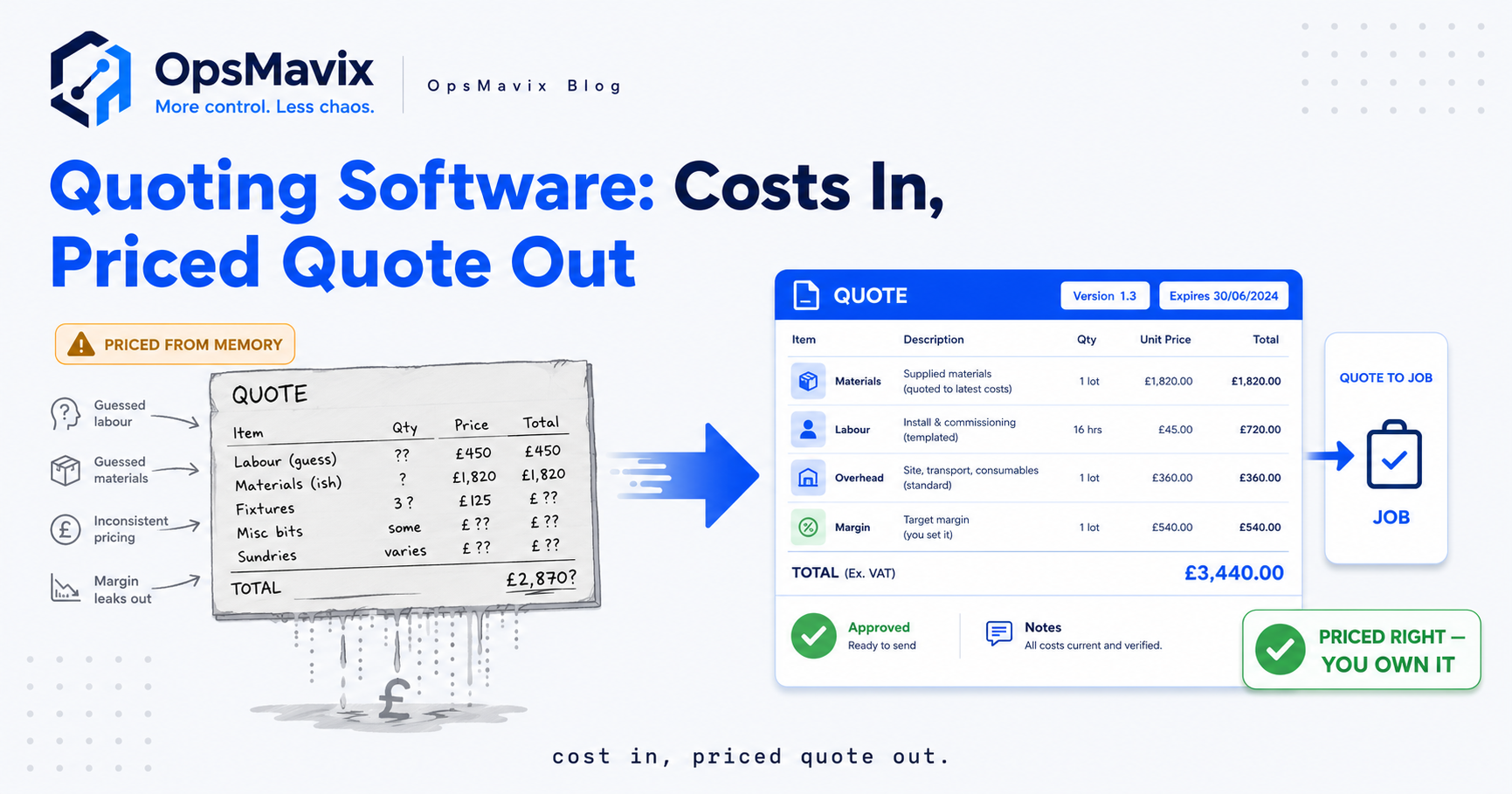
What is quoting software? It’s the tool that turns your costs and your catalogue into consistent, priced quotes — then controls the versions, the expiry and the discounts around each one, and hands the quote you win straight to the job without anyone re-keying it. Not a prettier document template, and not a calculator you paste a figure into. A system that holds your prices in one place, builds the quote from them, and keeps every version and approval attached so the number you sent is the number you can defend.
Strip it back and it does two jobs at once. It makes the front of the sale consistent — the same line items, margins and terms every time, whoever builds the quote. And it makes the back honest — the won price carries its breakdown into the work, so the job starts from what you actually quoted rather than a number someone half-remembers. Everything below unpacks what that means, where it differs from estimating, and when a spreadsheet quietly stops being enough.
Key Takeaways
- Quoting software turns costs and catalogue into priced quotes — it holds your prices in one place and builds the document from them, so the same job gets the same price whoever quotes it.
- Its core jobs are consistency and control — templated line items, versioning, expiry dates, and discount approval that stop margin leaking one quote at a time.
- Quoting and estimating aren’t the same thing. Estimating works out what the job will cost; quoting wraps that cost in a price, terms and a document the customer accepts.
- The quote-to-job handoff is the underrated half. Software carries the won quote’s breakdown into the work, so nobody re-keys it and the job starts from the real numbers.
- A handful of standard jobs doesn’t need it. A clean template prices those fine; software earns its place when volume, variation, or several people quoting make consistency impossible by hand.
- The choice isn’t spreadsheet or full ERP. A right-sized system sits in the gap — shaped to how you quote, without the weight of a module you configure for six months.
What Quoting Software Is — and Isn’t
Quoting software is a system that produces priced quotes from a single, maintained source of your costs and prices. You keep your materials, labour rates, standard line items and margin rules in one place; the software assembles a quote from them; and it keeps every quote — version, expiry, approvals — as a record you can find again. The price stops being something one person works out in a corner and becomes something the business produces the same way every time.
What it isn’t: a document template. A branded Word file with your logo makes a quote look consistent while the numbers behind it stay wherever the person typing them keeps them — a head, an old email, a spreadsheet only they open. It also isn’t a raw calculator. Working out the figure is estimating’s job; quoting software takes that figure, wraps it in line items, terms and an expiry, controls what happens after it’s sent, and connects it to the work if you win. The document is the least of it — the system around the document is the point.
What Quoting Software Actually Does
The label covers a handful of distinct jobs. Worth taking them one at a time, because a tool can do some and not others — and which you need is the buying question.
It builds the price from real costs. Instead of typing a total, you assemble the quote from priced components — materials at landed cost, labour at a rate, a margin rule on top — so the number has a breakdown behind it rather than being a guess dressed as a figure. Change a material’s cost once and every future quote reflects it. It templates the line items. The standard things you sell live as reusable blocks, so a quote is built by choosing and adjusting rather than from a blank page — faster, and identical whoever does it.
It versions and expires. Every quote carries a version, so when the customer asks for “the one with the extra unit” you know which is live and which is superseded — no two conflicting PDFs both claiming to be current. And each gets an expiry date, so a price built on last quarter’s material costs doesn’t get accepted six months later at a margin that’s since evaporated. It controls discounts. Give a rep 5% to play with and force anything past it through approval, and you stop the slow bleed of margin given away one “just to close it” at a time — the leak nobody notices because each concession looks small.
It hands the won quote to the job. The half that gets forgotten. When a quote is accepted, its breakdown — materials, hours, price — becomes the starting point for the work, without anyone re-typing it into a job sheet or stock system. The job begins from what you actually quoted — also the reference line you’ll need later when you check what it truly cost. Break that link and every job starts with a transcription error waiting to happen.
Quoting vs Estimating — the Distinction That Trips People Up
The two get used interchangeably, and the difference matters for what you’re buying. Estimating is working out what a job will cost you — materials, hours, the overhead that lands on it. Quoting is turning that cost into a price the customer accepts — cost plus margin, wrapped in line items, terms, an expiry and a document. Estimating faces inward at your costs; quoting faces outward at the customer.
A clean example: estimating tells you a bespoke fit-out will cost £7,800 to deliver. Quoting decides you’ll sell it for £9,500, presents it as four line items with a 30-day expiry, and records that you offered it. Same job, two different jobs of work — a tool can be strong at one, weak at the other. Some “quoting software” is really estimating software with a document bolted on; some is a document builder with no costing underneath. Knowing which you’re weak at tells you what to shop for.
For the disciplined side of getting the cost right before the price goes on — especially where lots of small components add up — micro-estimating covers building an estimate from the parts rather than a gut round number. Quoting software wraps that estimate in a price and sends it; the two are a chain, not rivals.
Who Actually Needs Quoting Software
Not everyone does. The businesses that feel the need aren’t defined by industry so much as by shape — how varied their quotes are, and how many people build them.
You feel it when quotes are bespoke, not off a fixed price list. A shop selling fifty catalogue products at set prices doesn’t need it; a customer picks, the price is the price. But a fabrication shop, a joinery, an installer, a print or signage firm — anyone pricing each job from its own mix of materials and hours — rebuilds a bespoke number every time, and that’s where consistency breaks down by hand. You feel it harder when more than one person quotes. One owner pricing everything keeps it in their head; the moment a second and third person quote, “the way we price” has to live outside anyone’s head or three people invent three margins.
You feel it most when the same job gets quoted at different prices depending on who caught it and what the costs were doing that week — inconsistency that stays invisible until you line up won quotes and see the spread. A firm quoting a handful of near-identical standard jobs a month genuinely doesn’t need this; a clean template holds those fine, and anyone insisting otherwise is selling a licence you won’t use. The dividing line is variation times the number of hands on the pricing.
Signs a Spreadsheet Has Stopped Coping
Most businesses arrive from a spreadsheet, and it rarely fails loudly — it just quietly stops being trustworthy. A few recognisable symptoms.
Quotes get priced from memory. A material’s cost changed months ago, but the quote still carries the old figure because nobody updated the sheet, or someone typed the number they think it is. The price looks fine and is quietly wrong. There’s no version control. Three PDFs exist for one customer, all called “quote-final,” and no one’s certain which you’re bound to — so when the customer accepts, you accept a version you can’t reconstruct. Margin leaks unseen. Discounts get given informally to close deals, each small and reasonable, and the aggregate never surfaces because there’s no approval step and no report — you find out only when the year’s numbers come in thin.
A joinery owner put it well: “Every quote was right the day it went out. Six weeks later half of them were priced on costs that had moved, and we’d honour them anyway.” That’s the failure mode — not a spreadsheet that breaks, but one that holds stale numbers with total confidence, because it only ever shows what someone last remembered to type. When your quotes are only as current as your least-recent update, the tool has stopped coping even though nothing looks broken.
Quoting Software vs a Full ERP Quoting Module
Once a spreadsheet stops coping, the reflex is to reach for a big all-in-one system — an ERP with a quoting module included. Sometimes that’s right. Often it’s the wrong shape of solution, and it’s worth seeing why first.
A full ERP quoting module is powerful and generic: built to serve every business that might buy the ERP, so it does far more than you need and assumes your quoting fits its model. The cost isn’t just the licence — it’s the months of configuration to bend a generic module toward how you quote. If quoting is the one process you need to fix, buying a twenty-module platform to get one module is paying for a warehouse to store a bicycle.
The genuine alternative isn’t “spreadsheet or ERP.” It’s a system sized to the job — one that handles your costs, catalogue, versions, approvals and the handoff to the work, shaped to how you quote, without the weight of everything you don’t. Not a cut-price ERP clone — a system that fits your quoting exactly, instead of a generic one you spend half a year forcing into shape.
Build vs Buy — Which Way to Go
So do you buy an off-the-shelf quoting tool or have one built? It depends on how standard your quoting is. If the way you price maps cleanly onto how a packaged tool expects you to work, buy it — a product you adopt as-is beats a custom build on cost and speed. The friction starts when your quoting has structure a generic tool can’t hold: a costing model specific to your trade, a catalogue with rules of its own, a handoff into systems you already run. That’s the pattern that pushes businesses toward a build — not wanting bespoke for its own sake, but having a process a packaged tool keeps fighting.
For the full commercial comparison — features to demand, packaged options, how to weigh build against buy — the buyer’s guide on quoting and estimating software goes deeper. And once you’ve chosen, running it well is its own skill; quoting software best practices covers how to hold margin with whatever you land on. Answer how varied your quotes are, how many people build them, and where the won quote goes next, and build-versus-buy usually answers itself.
FAQ
What is quoting software in simple terms?
It’s a tool that builds priced quotes from your costs and catalogue, keeps every version and approval attached, and passes the quote you win to the job. Rather than typing a total into a document and hoping it’s right, you assemble the quote from priced components — so the same work gets the same price whoever builds it, with a breakdown behind it you can defend.
What does quoting software actually do?
Several distinct things: builds the price from real material and labour costs; templates your standard line items; versions quotes and gives them expiry dates so stale prices don’t get accepted; controls discounts through approval so margin doesn’t leak; and hands the accepted quote to the job without re-keying. A given tool may do some and not others.
Is quoting software the same as estimating software?
No, though they’re often bundled. Estimating works out what a job will cost you — materials, hours, overhead. Quoting turns that cost into a price the customer accepts, with margin, terms, an expiry and a document. Some tools are strong at one and weak at the other, so it’s worth knowing which half you need before you buy.
Do I need quoting software or is a spreadsheet fine?
A spreadsheet is genuinely fine for a handful of standard, near-identical jobs priced by one person. It stops coping when quotes are bespoke, when several people build them, when prices drift out of date unnoticed, or when you can’t say which version a customer accepted. Cross a few of those and the spreadsheet isn’t pricing your work any more — it’s a stale record everyone quietly distrusts.
How OpsMavix Can Help
Knowing what quoting software is comes first; getting a system that fits how you quote — rather than one you spend six months bending into shape — is the harder part. OpsMavix builds quoting into the systems businesses already run the day on: prices in one maintained place, quotes built from real costs, versions and expiry tracked, discounts approved by rules that match your margins, and the won quote handed straight to the job it becomes. Shaped to how your pricing works, so people use it instead of routing around it — feeding a live project operations dashboard where quotes sit beside the jobs and costs they turn into.
If your quotes go out right and drift wrong, live in three conflicting versions, or leak margin a discount at a time, the price isn’t your real problem — the system around it is. Book a Free Operations Leak Audit.
Keep reading
Getting value from OpsMavix? Add us as a preferred source on Google — you'll see more of our operations content in your AI Overviews, AI Mode and Search.