
Shop Floor WIP Tracking: See the Value Stuck Between Operations
Shop floor WIP tracking is how you see the units and value sitting half-finished between operations, before it turns into missed ship dates and mystery stock. This guide explains what to track, why WIP hides money, and how a live view beats a whiteboard.
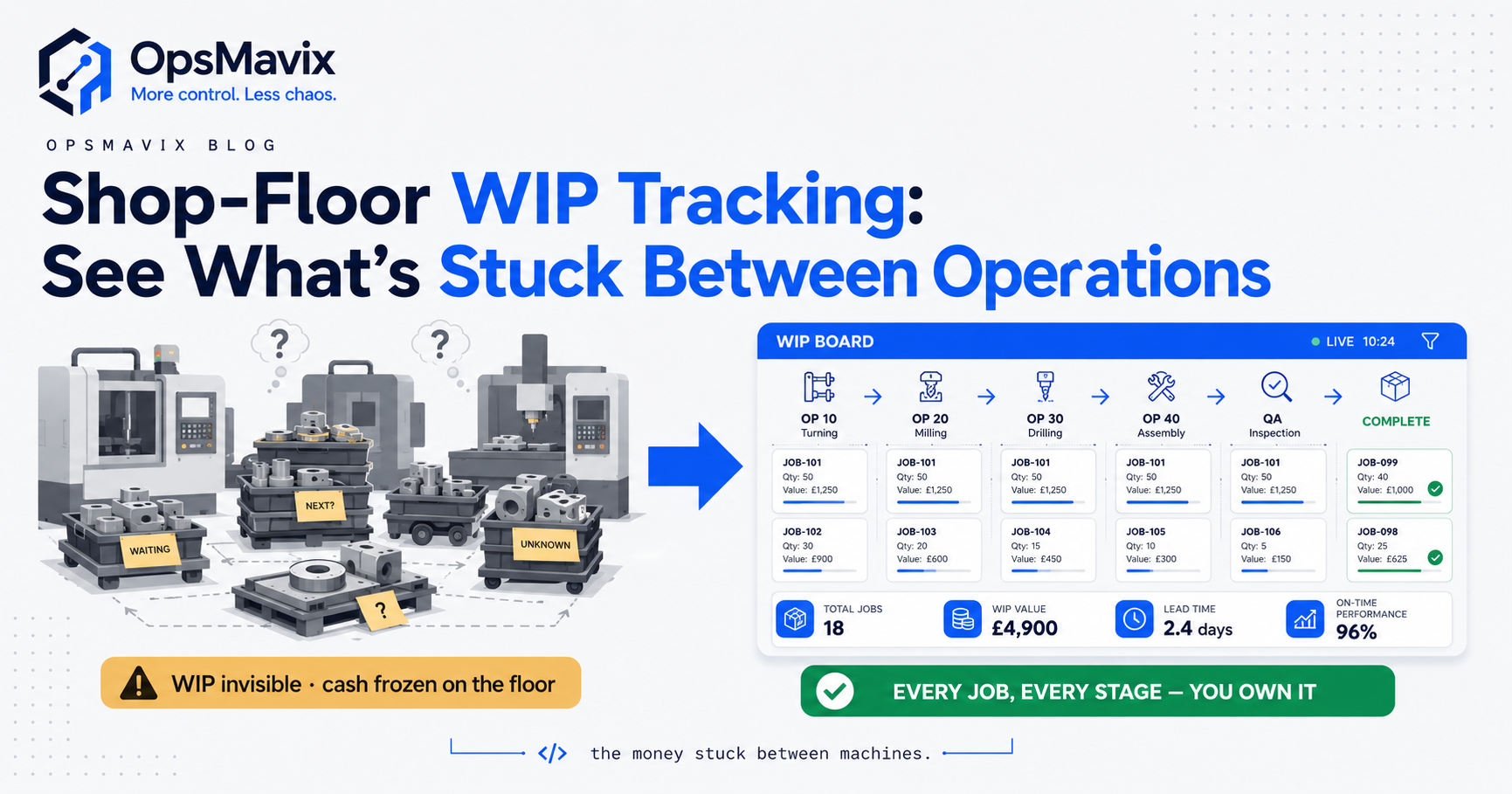
Shop floor WIP tracking is the practice of knowing, at any moment, how many units and how much value are sitting half-finished between operations on your shop floor. Not what you started this morning, and not what shipped last night, but the stuff stuck in the middle: parts waiting at the weld station, a batch parked before QC, an order that’s cut but not yet assembled. That middle is where money quietly piles up, and it’s the part most manufacturers can see least clearly.
Most shops track the two ends well. You know what raw material you bought, and you know what finished goods left the door. The gap is everything between the first operation and the last, and on a busy floor that gap can hold weeks of labour and materials. WIP tracking closes that blind spot so you can answer a simple question your customers keep asking: where is my order right now?
Key Takeaways
- WIP is value in motion, not just parts. Work-in-progress is the labour and material already sunk into jobs that aren’t finished yet. Tracking units alone misses the point; you’re tracking money that can’t ship.
- The leak lives between operations, not at them. Bottlenecks show up as queues of stuck work sitting idle between stations, which is exactly what a whiteboard hides and a live view reveals.
- Untracked WIP becomes mystery stock. When parts move without a record, your counts drift, job costs go fuzzy, and you find batches nobody remembers starting.
- Real-time beats the morning stand-up. Knowing where a job is when the customer calls is worth more than a report that was accurate at 7am.
- You don’t need a full MES to start. A right-sized system that logs operation completions gives you most of the visibility without a drawn-out rollout.
- WIP visibility feeds job costing. Once every operation is logged, the true cost of a job stops being a guess.
What WIP Actually Is (and Why It Hides Money)
Work-in-progress is any job that has started but not finished. The moment you release material to the floor, it stops being raw stock and it isn’t yet a finished good. It’s in limbo, and it stays there through every operation until the last one signs off.
The reason WIP hides money is that value accumulates silently. A steel bracket might be worth £4 as raw stock. After cutting, forming, welding and painting, the same bracket carries £30 of labour and overhead before it’s ever sold. If it’s sitting in a tote between welding and paint, that £30 is real, it’s on your floor, and most spreadsheets record it as either “started” or nothing at all.
Multiply that across a floor running fifty jobs and the number stops being trivial. One operations manager told us they found “about six weeks of half-built orders” sitting in a corner that their stock system counted as zero, because nothing was finished and nothing had been booked out. That’s not a rounding error. That’s a cash-flow problem wearing a hi-vis vest.
The Difference Between Shop Floor Tracking and WIP Tracking
This is worth being precise about, because the two get lumped together. General shop floor tracking software covers the whole picture: labour, machine status, attendance, output, scheduling. WIP tracking is the slice of that focused specifically on units and value stuck between operations.
You can have shop floor tracking that tells you a machine is running and an operator is clocked on, and still have no idea that 200 units are queued behind the next station. The floor looks busy. The WIP is invisible. Tracking WIP means logging the transition — when a batch leaves one operation and joins the queue for the next — so the queue itself becomes a number you can watch.
Think of it this way: shop floor tracking answers “is the floor working?” WIP tracking answers “what is the floor working on, and what’s it stuck behind?”
What to Track: The Fields That Matter
You don’t need to instrument every screw. WIP tracking gets useful fast with a small set of signals per job:
- Current operation — which step the job is at right now.
- Status at that operation — queued, in progress, or complete.
- Quantity — how many units, and how many have passed vs. scrapped.
- Timestamp of the last transition — so you can see how long it’s been sitting.
- Value accrued — material plus labour booked to that point.
The transition timestamp is the quiet hero. The gap between “arrived at operation” and “started operation” is your queue time, and queue time is where lead time goes to die. A job that spends four hours being worked and three days waiting is a job with a three-day problem, not a four-hour one.
A wholesale-manufacturing hybrid we spoke with described their old routine: every morning the production lead walked the floor with a clipboard, counted stacks, and translated it into a guess for the sales team. By the time the guess reached a customer it was already a few hours stale. Live operation logging replaced the walk with a screen, and the “where’s my order” calls dropped because the answer was on a shared dashboard.
How WIP Tracking Exposes Your Real Bottleneck
Ask a shop where the bottleneck is and you’ll usually get a confident answer. Ask them to prove it and the confidence wobbles. Bottlenecks feel like the loud, busy station. They’re actually the station with the longest queue in front of it.
WIP tracking makes the queue visible. When you can see that welding is fed faster than it can clear, and work piles up in front of it every afternoon, you’ve found the real constraint — not by opinion, but by the stack of half-built jobs waiting there. Move a person, re-sequence a batch, or add a shift at that one station, and the whole floor’s throughput lifts. Guess wrong and you optimise a station that was never the problem.
This is the operator point of view we keep landing on: you can’t fix a queue you can’t see. Most improvement money on a shop floor gets spent on the wrong operation because the WIP data to aim it properly was never captured.
WIP Tracking and Job Costing Are the Same Data
Here’s a connection most shops miss. The exact events you log for WIP tracking — this operation, this many units, this much labour, this timestamp — are the same events you need for accurate job costing. One capture, two payoffs.
When WIP is tracked properly, the cost of a job isn’t a post-mortem estimate someone reverse-engineers from timesheets. It’s a running total that’s correct while the job is still live. You can see a job going over budget at operation three, not at invoice time when it’s too late to do anything about it.
The same feed also cleans up your works order processing. A works order that knows which operations are done, which are queued, and what’s been consumed stops being a piece of paper and becomes a live record. The order and the floor agree, because they’re reading from the same events.
Why Whiteboards and Spreadsheets Break at WIP
Whiteboards work until the floor gets fast. They’re a photograph of a moment, updated when someone remembers, and they live in one place while your questions come from everywhere — sales, purchasing, the customer on the phone.
Spreadsheets last a bit longer but break in a specific way: they can’t handle transitions. A spreadsheet is good at “here is the state of things.” It’s bad at “log every time a batch moves from one operation to the next, across three shifts, without anyone forgetting.” Miss a few transitions and the whole sheet drifts out of sync with the floor, and once people stop trusting it, they stop updating it, and it dies.
The before/after is stark. Before: a production meeting where three people argue about where a job actually is, and someone walks off to physically look. After: one screen everyone reads, updated the second an operator taps “complete” at a station. The argument disappears because the data isn’t anyone’s opinion.
Build, Buy, or Own the System
Straight take. You have three roads for shop floor WIP tracking, and the honest answer depends on your floor.
Buy a full MES. If you’re a large plant with heavy compliance and deep pockets, a mature manufacturing execution system is the right tool and it does far more than WIP. For most growing manufacturers it’s overkill — long implementation, features you’ll never touch, and a per-seat bill that assumes you’re bigger than you are.
Build it yourself in spreadsheets. Cheap to start, and it’s how nearly every shop begins. It breaks exactly where WIP lives: transitions, shifts, and trust. Fine as a stopgap, dangerous as a destination.
Own a right-sized system shaped around how you actually run. This is the middle we believe in. One system that logs operation completions the way your floor already thinks about them, gives you the live WIP view and the job-costing feed off the same data, and doesn’t make you rebuild your process to fit someone’s software. You own it, it fits, and it grows with you instead of billing you for the privilege.
There’s no prize for tracking everything. There’s a real prize for seeing the value stuck between your operations before it turns into a late order or a stock count that doesn’t add up. Start with the transitions. The rest follows.
Keep reading
Getting value from OpsMavix? Add us as a preferred source on Google — you'll see more of our operations content in your AI Overviews, AI Mode and Search.