
Spreadsheets vs OpsMavix vs ERP: What Does Your Business Actually Need?
Outgrown spreadsheets but not convinced you need ERP? This guide where spreadsheets stop working, when an operational middle layer, and when full ERP really is the right move.
 A growing product business does not usually wake up one morning and suddenly need an ERP.
It happens gradually.
The spreadsheet that once managed twenty orders is now managing hundreds. Stock sits in more than one location. Shopify has one number, the warehouse has another, purchasing has its own sheet, and somebody in the office has become the only person who knows how all of it fits together.
The business has clearly outgrown spreadsheets.
But that does not automatically mean it needs a full ERP.
There is a large operational gap between those two stages, and many growing UK businesses sit directly inside it.
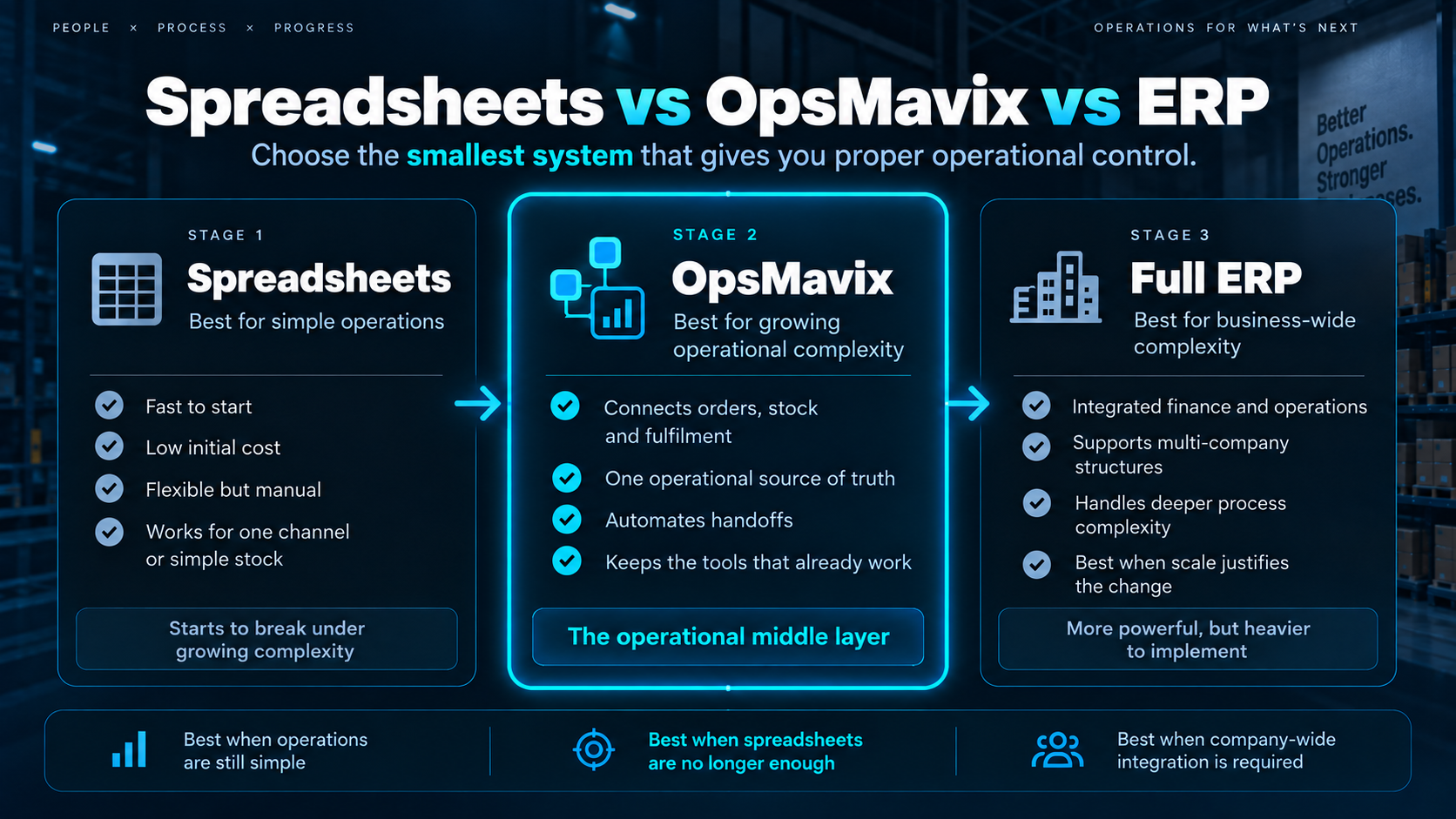
The Three Stages of Operational Growth
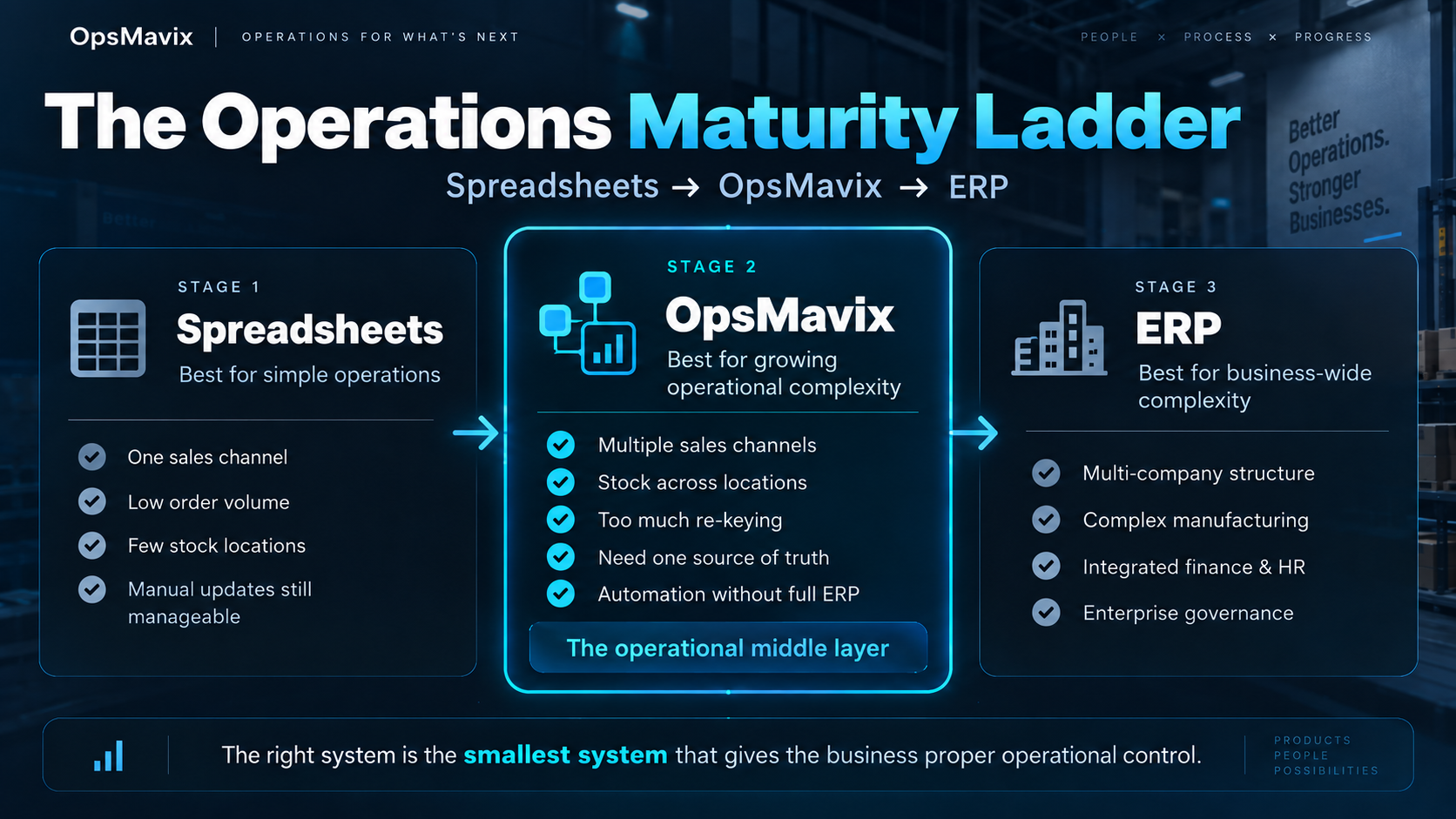
Most businesses move through three broad stages as their operations become more complicated:
Spreadsheets → Connected Operations System → ERP
There is nothing wrong with any of them.
The problem starts when the system running the business no longer matches the complexity of the business itself.
Stay with spreadsheets too long and people begin doing the work the system should be doing.
Move into ERP too early and you may spend a large amount of money and management time implementing functionality you did not actually need.
The goal is not to own the most sophisticated software.
It is to have the smallest system that gives the business proper operational control.
Stage 1: When Spreadsheets Still Work
Excel and Google Sheets are exceptionally good business tools.
They are flexible, inexpensive, familiar and quick to change.
For a small operation, spreadsheets may be exactly the right system.
A product business can comfortably use them for things such as:
-
Stock levels
-
Purchase orders
-
Supplier information
-
Order tracking
-
Production planning
-
Delivery schedules
-
Customer information
-
Forecasting
-
Basic reporting
If five people understand the process, order volumes are manageable and everybody trusts the numbers, there may be no business case for replacing them.
Spreadsheets are usually still enough when:
-
A small number of people manage operations
-
Most orders come through one channel
-
Inventory is relatively simple
-
There are only one or two stock locations
-
Manual updates do not create meaningful delays
-
Reporting remains straightforward
-
Processes do not depend heavily on automation
-
Staff know where the correct information lives
-
Mistakes caused by duplicate data are rare
At this stage, installing a larger system simply because the company is growing can create more complexity than it removes.
The spreadsheet is not the enemy.
The question is whether it is still doing its job.
The Warning Signs You Have Outgrown Spreadsheets
The number of spreadsheets you have is not necessarily the problem.
What matters is how much human effort is required to keep them working.
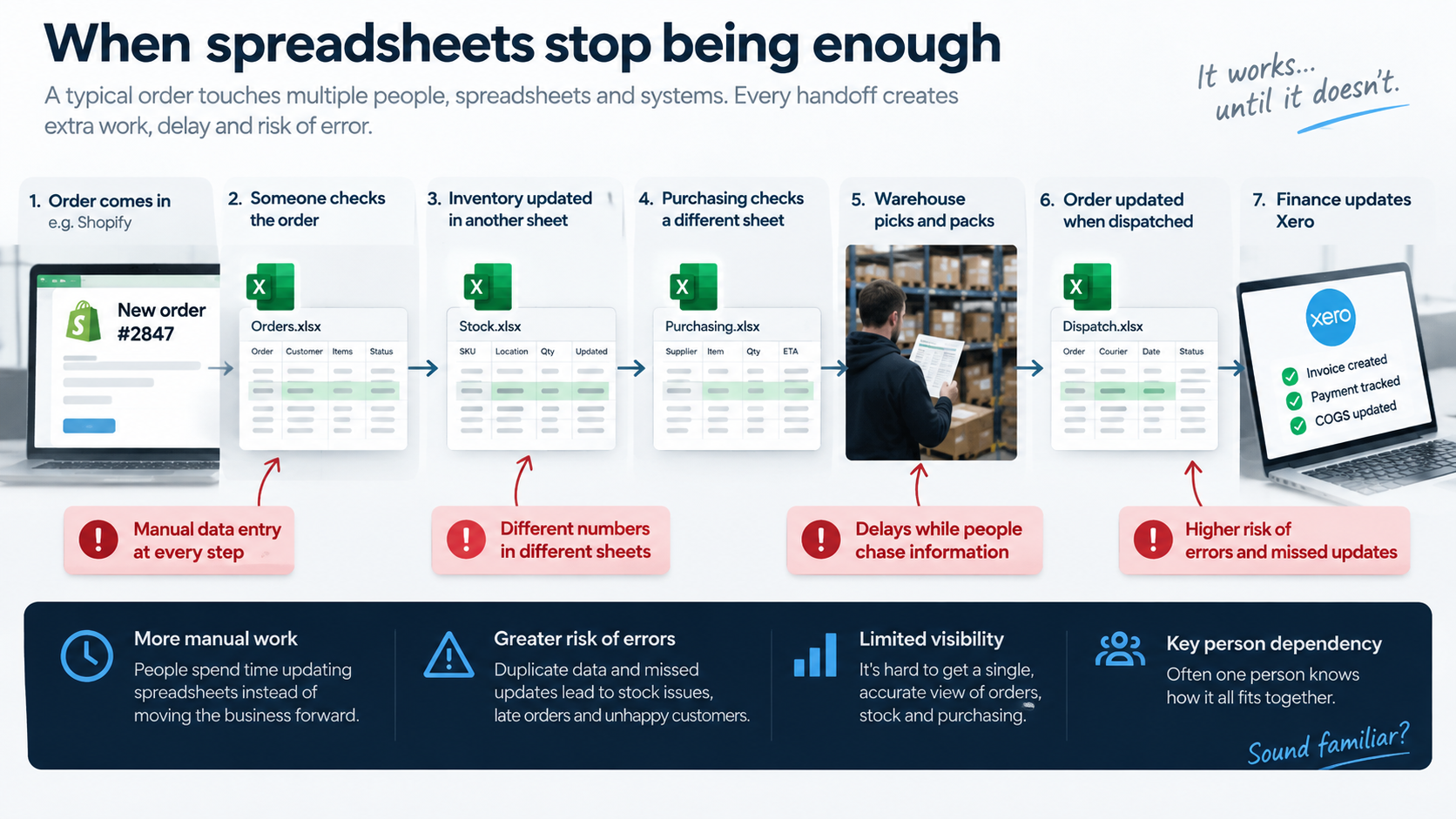
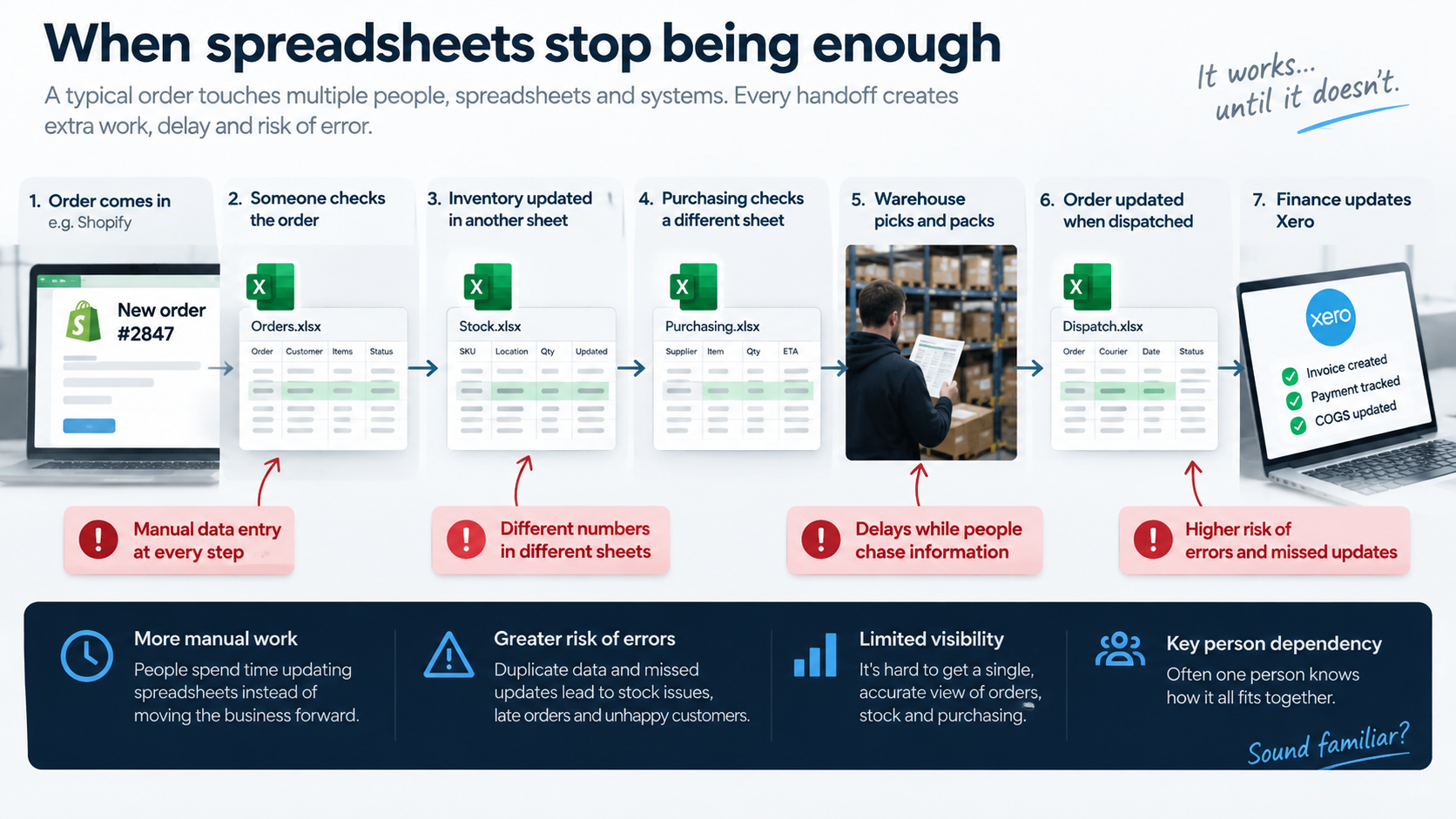
Imagine a fairly normal order.
It arrives through Shopify.
Someone checks it.
Someone updates an inventory spreadsheet.
Purchasing checks another sheet.
Information is sent to the warehouse.
The warehouse updates the order when it is packed.
Someone updates another system when it is dispatched.
Finance eventually receives the information in Xero.
Nothing in that workflow is particularly complicated.
But the same information has travelled through several people and systems before the order reaches the customer.
Multiply that across hundreds or thousands of orders and the hidden administration becomes significant.
The warning signs usually sound familiar:
-
“Which stock number is actually correct?”
-
“Has purchasing ordered this yet?”
-
“Where is that order?”
-
“Can we promise this to the customer?”
-
“Who changed this spreadsheet?”
-
“Why does Shopify say one thing and the warehouse another?”
-
“Can someone update the report before the meeting?”
-
“Ask Sarah — she knows how that process works.”
Other signs include:
-
The same information is entered more than once
-
Different departments have different versions of the truth
-
Stock cannot always be trusted
-
Orders occasionally get missed
-
Purchasing becomes reactive
-
Reporting takes hours to prepare
-
Teams rely on email or WhatsApp to move operational work forward
-
One employee holds critical process knowledge
-
Adding another sales channel creates a disproportionate amount of work
-
Management cannot see problems until they have already affected customers
At that point, the problem is no longer the spreadsheet itself.
The business has developed workflows that require a proper operational system.
Stage 2: The Operational Middle Layer
This is where many growing companies get stuck.
They know their current setup is becoming fragile.
They start researching alternatives and usually find two options.
The first is to buy more specialised software.
Inventory software.
A CRM.
Warehouse software.
An order management tool.
A reporting platform.
An automation tool.
A purchasing application.
Each solves a problem.
Before long, however, the business may have replaced ten spreadsheets with ten subscriptions — and the workflows between those applications are still being managed manually.
The second option is ERP.
One large platform designed to bring a significant part of the organisation into one integrated system.
ERP can be exactly the right answer.
But not every company experiencing spreadsheet pain needs to replace its entire operational technology stack.
There is a middle stage.
Connect the operations that have become difficult without replacing the systems that already work.
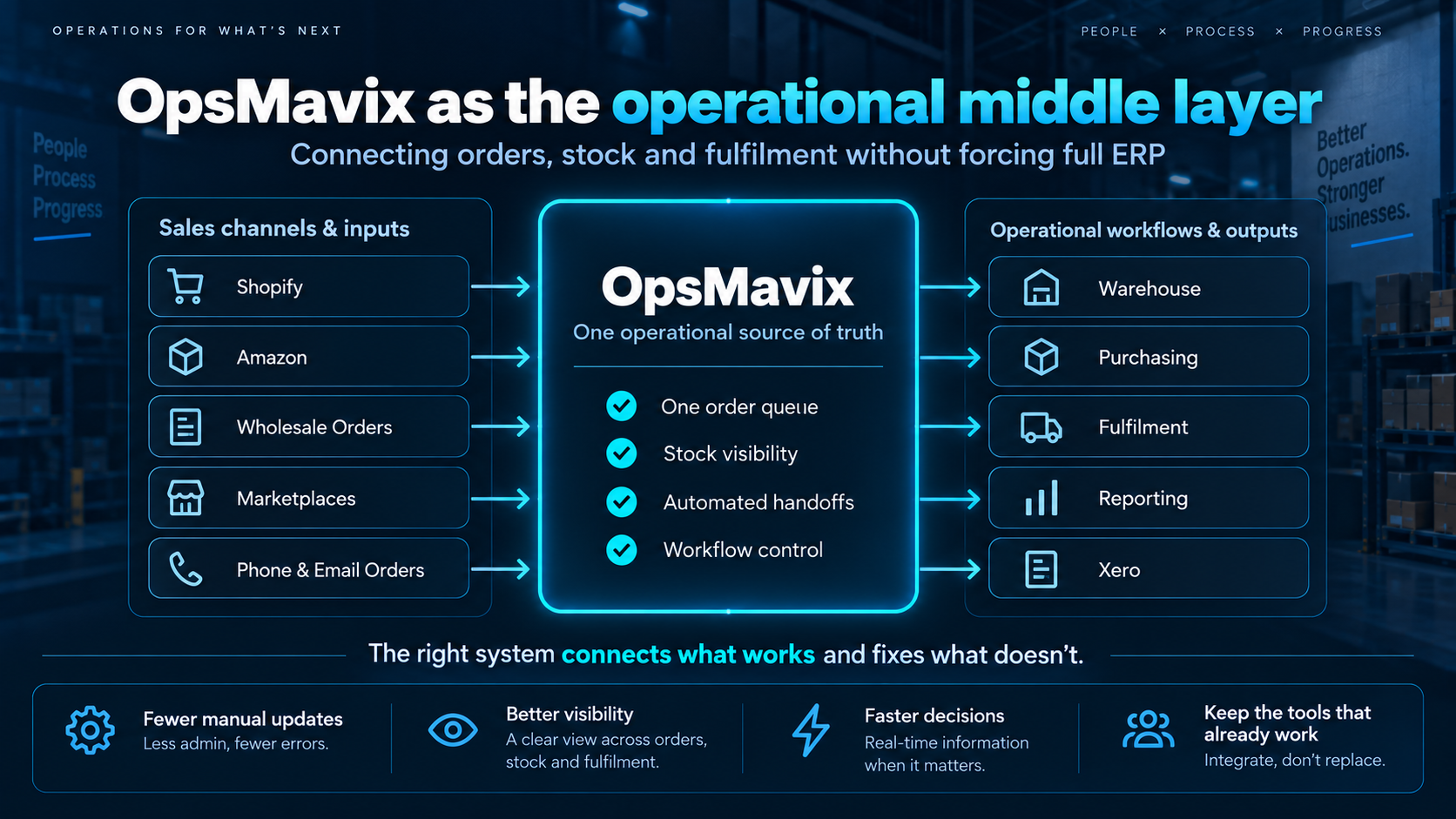
That is where OpsMavix sits.
OpsMavix is an owned operations system for growing product businesses that have outgrown spreadsheets and disconnected applications but do not yet need, or want, a full ERP implementation.
Instead of asking:
“How much of your company can we move into one platform?”
we start with:
“Where is operational friction costing you time, money or visibility?”
Then we build around that.
A typical structure might look like:
Shopify → OpsMavix → Warehouse
Amazon → OpsMavix → Fulfilment
Wholesale Orders → OpsMavix → Purchasing
OpsMavix → Xero
Shopify remains the storefront.
Xero remains the accounting system.
Your courier remains your courier.
OpsMavix becomes the operational layer connecting what happens between them.
When OpsMavix Makes Sense
The exact point varies between businesses, but there are several situations where the middle layer becomes particularly useful.
1. Orders are arriving from several places
A growing product business may receive orders through:
-
Shopify
-
Amazon
-
eBay
-
B2B customers
-
Wholesale
-
Telephone
-
Email
-
Sales representatives
-
Marketplaces
The problem is rarely receiving those orders.
The problem is what happens afterwards.
Operations still needs one reliable answer to:
What needs to happen next?
A connected operations system can turn several order sources into one operational workflow.
2. Stock has become difficult to trust
Inventory becomes harder as the business expands.
You might now have:
-
Multiple warehouses
-
Retail locations
-
3PL stock
-
Field stock
-
Reserved stock
-
Incoming stock
-
Components
-
Finished products
-
Batch or lot-controlled products
When different systems hold different parts of that picture, a simple question becomes surprisingly difficult:
“Can we actually fulfil this order?”
OpsMavix can create one operational view across those movements instead of requiring somebody to reconstruct the answer manually.
3. Your team keeps re-entering information
Re-keying is one of the clearest signals that the system is falling behind the business.
If the information already exists digitally in one place, another employee should not normally need to type it into a second or third system.
Every repeated entry consumes time.
Every repeated entry also creates another opportunity for error.
Connecting those transitions is often one of the fastest operational improvements a growing business can make.
4. Problems are visible only after customers feel them
Most owners do not need another dashboard showing what happened last month.
They need to know what is about to go wrong.
For example:
-
An order cannot be fulfilled
-
A supplier delivery is late
-
Stock has dropped below the required level
-
A warehouse task has stalled
-
An order has missed its expected stage
-
A delivery is at risk
-
A workflow has developed a backlog
Good operational visibility allows the team to intervene while the problem is still internal.
5. Your software is good individually but poor collectively
This is one of the most common situations we see.
The company likes Shopify.
Finance likes Xero.
The warehouse has tools that work.
Management does not necessarily want to replace any of them.
The problem is the gaps between them.
That is exactly where an operational middle layer can make sense.
Why Adding More SaaS Does Not Always Solve It
Buying another application is often the easiest response to an operational problem.
Need inventory management?
Buy inventory software.
Need CRM?
Buy CRM.
Need warehouse management?
Buy another system.
Need the systems to communicate?
Add an automation platform.
This can work extremely well.
But eventually one important question appears:
Who owns the complete workflow?
A company may end up operating:
-
Ecommerce software
-
Inventory software
-
CRM
-
Warehouse management
-
Purchasing
-
Helpdesk
-
Reporting tools
-
Automation tools
-
Accounting software
-
Spreadsheets connecting whatever is left
Each application may be good.
The architecture as a whole may still be poor.
OpsMavix is not designed to become just another application in that list.
Its role is to become the operational backbone connecting the applications the business wants to keep.
Stage 3: When ERP Is the Right Answer
Sometimes the honest answer is that the business has moved beyond the middle layer.
A full ERP may be the better option when complexity has expanded across much more of the organisation.
For example:
-
Complex multi-company accounting
-
International entities
-
Large-scale manufacturing
-
Sophisticated material planning
-
Extensive financial controls
-
Complex procurement
-
Large numbers of users
-
Formal enterprise governance
-
Integrated HR requirements
-
Significant regulatory requirements
-
A strategic decision to operate most departments through one platform
Platforms such as Odoo, Microsoft Dynamics, NetSuite and SAP exist because large and complex organisations genuinely benefit from deeply integrated systems.
We do not believe businesses should avoid ERP.
We believe they should implement it when the problem actually requires ERP.
The question is not:
“Is ERP better than spreadsheets?”
Of course it is more capable.
The better question is:
“Does the complexity of our business justify the cost and organisational change of implementing ERP today?”
If the answer is yes, ERP may be exactly what you need.
If the real problem is connecting sales, inventory, purchasing and fulfilment, there may be a much more focused route.
Spreadsheets vs OpsMavix vs ERP
Here is the simplest way to compare the three options.
Spreadsheets
-
Best suited to: Simple operations
-
Implementation: Immediate
-
Flexibility: Very high
-
Multiple teams: Becomes harder as the business scales
-
Integrations: Usually manual
-
Operational visibility: Manually assembled
-
Automation: Limited
-
Custom workflows: Easy to create but fragile
-
Accounting and HR: Usually separate
-
Initial complexity: Low
-
Best stage: Early or simple operations
OpsMavix
-
Best suited to: Growing operational complexity
-
Implementation: Focused and phased
-
Flexibility: Built around the required workflow
-
Multiple teams: Designed for connected operations
-
Integrations: A central part of the system
-
Operational visibility: Centralised
-
Automation: High
-
Custom workflows: A core strength
-
Accounting and HR: Existing specialist systems can remain
-
Initial complexity: Controlled
-
Best stage: Growing product businesses
Full ERP
-
Best suited to: Business-wide complexity
-
Implementation: Typically a larger programme
-
Flexibility: Usually operates within an ERP framework
-
Multiple teams: Designed for large organisations
-
Integrations: Available through configuration or integration
-
Operational visibility: Centralised
-
Automation: High
-
Custom workflows: Possible, depending on the platform
-
Accounting and HR: Often integrated into the ERP
-
Initial complexity: Higher
-
Best stage: Complex organisations
There is no universal winner.
The correct answer depends on the stage your company has reached.
The Cost of Moving Too Late
One reason businesses stay with spreadsheets for too long is simple:
They still work.
The company is still shipping orders.
Customers are still buying.
Nobody wants to disrupt a busy operation.
The inefficiency creeps in slowly.
Five minutes copying an order does not seem serious.
One person spending half an hour preparing a report does not seem serious.
One stock discrepancy does not seem serious.
One lost order does not seem serious.
But operational friction compounds.
If ten employees each lose thirty minutes a working day to unnecessary administration, that can exceed 1,000 hours of staff time over a year.
And that calculation still ignores:
-
Correcting mistakes
-
Searching for information
-
Resolving stock discrepancies
-
Handling avoidable customer enquiries
-
Producing reports manually
-
Training staff on undocumented processes
-
Recovering knowledge when key employees leave
-
Delays caused by missing information
Eventually the “cheap” system becomes expensive.
You are simply paying for it through people’s time instead of a software invoice.
The Cost of Moving Too Early
The opposite mistake is equally real.
The company hits operational problems and somebody says:
“We need ERP.”
But installing ERP because orders and inventory are becoming difficult can be like rebuilding the kitchen because you need a larger fridge.
ERP implementation can involve:
-
Process redesign
-
Data cleansing
-
Data migration
-
Configuration
-
Integrations
-
Testing
-
Staff training
-
Change management
-
Ongoing system administration
When the company genuinely requires those capabilities, the investment can be worthwhile.
When the underlying problem is much narrower, the business may spend a great deal of money solving complexity it does not yet have.
That is why operational technology should grow alongside operational maturity.
What Happens If You Eventually Need ERP?
Then OpsMavix should have helped you get there.
A well-designed operational system should not create another dead end.
It should leave the business in better shape for its next stage.
By the time a company has been running through a structured operational layer:
-
Processes are better defined
-
Operational data is cleaner
-
Roles are clearer
-
Workflows are documented
-
Integrations are understood
-
Management knows which reports actually matter
-
Operational exceptions are better understood
Those are exactly the things that make a future ERP implementation easier.
OpsMavix can therefore be a stepping stone toward ERP rather than an alternative you become trapped inside.
And if we assess your operation and believe you have already reached the point where ERP is the better answer, we would rather tell you that than build something you are going to replace.
FAQ
How do I know if my business has outgrown spreadsheets?
The strongest signs are repeated data entry, unreliable stock information, different teams working from different numbers, manual reporting, missed handovers and too much operational knowledge sitting in individual employees’ heads. If maintaining the spreadsheets is becoming a significant job in itself, the business has probably outgrown them.
Do I need an ERP when spreadsheets stop working?
Not necessarily. There is a significant stage between spreadsheets and full ERP where a business needs structured workflows, integrations, automation and operational visibility without moving finance, HR and every other function into one enterprise platform.
What is OpsMavix?
OpsMavix builds owned operational systems for growing product businesses. It connects workflows such as orders, inventory, purchasing, warehouse operations, fulfilment and reporting while allowing businesses to keep existing tools that still work.
Is OpsMavix an ERP?
No. OpsMavix is designed to sit between disconnected spreadsheets or SaaS tools and a full ERP. It focuses on the operational workflows a business actually needs rather than requiring the whole organisation to move onto one enterprise platform.
Can OpsMavix work with Shopify and Xero?
Yes, where those systems form part of the required solution, they can remain in place while OpsMavix manages and connects the operational workflows between them.
What happens if we need ERP later?
The aim is not to prevent that move. Better processes, cleaner data, documented workflows and clearer integrations can make a future ERP implementation easier rather than harder.
Is ERP ever a better choice than OpsMavix?
Absolutely. If your business requires deep company-wide integration across areas such as finance, manufacturing, procurement, multiple legal entities, HR and enterprise governance, full ERP may be the better investment.
Should we replace every spreadsheet?
No. A spreadsheet performing a simple job well does not need replacing. The priority should be processes where spreadsheets are causing errors, delays, duplicate work or poor visibility.
How OpsMavix Can Help
If your business has reached the awkward stage where spreadsheets are no longer enough but ERP feels like far more than you need, that is exactly the gap OpsMavix is designed to fill.
We look at how orders, stock, purchasing, fulfilment and reporting currently move through your business.
Then we identify where information is being duplicated, where visibility disappears and where people are doing work that the system should be doing.
The goal is not to sell you the biggest possible system.
It is to build the right-sized operational backbone your business needs now, without blocking where it needs to go next.
Outgrown spreadsheets? Not ready for ERP?
Getting value from OpsMavix? Add us as a preferred source on Google — you'll see more of our operations content in your AI Overviews, AI Mode and Search.